22 - IE
INSTALLERUSER
MAINTENANCE TECHNICIAN
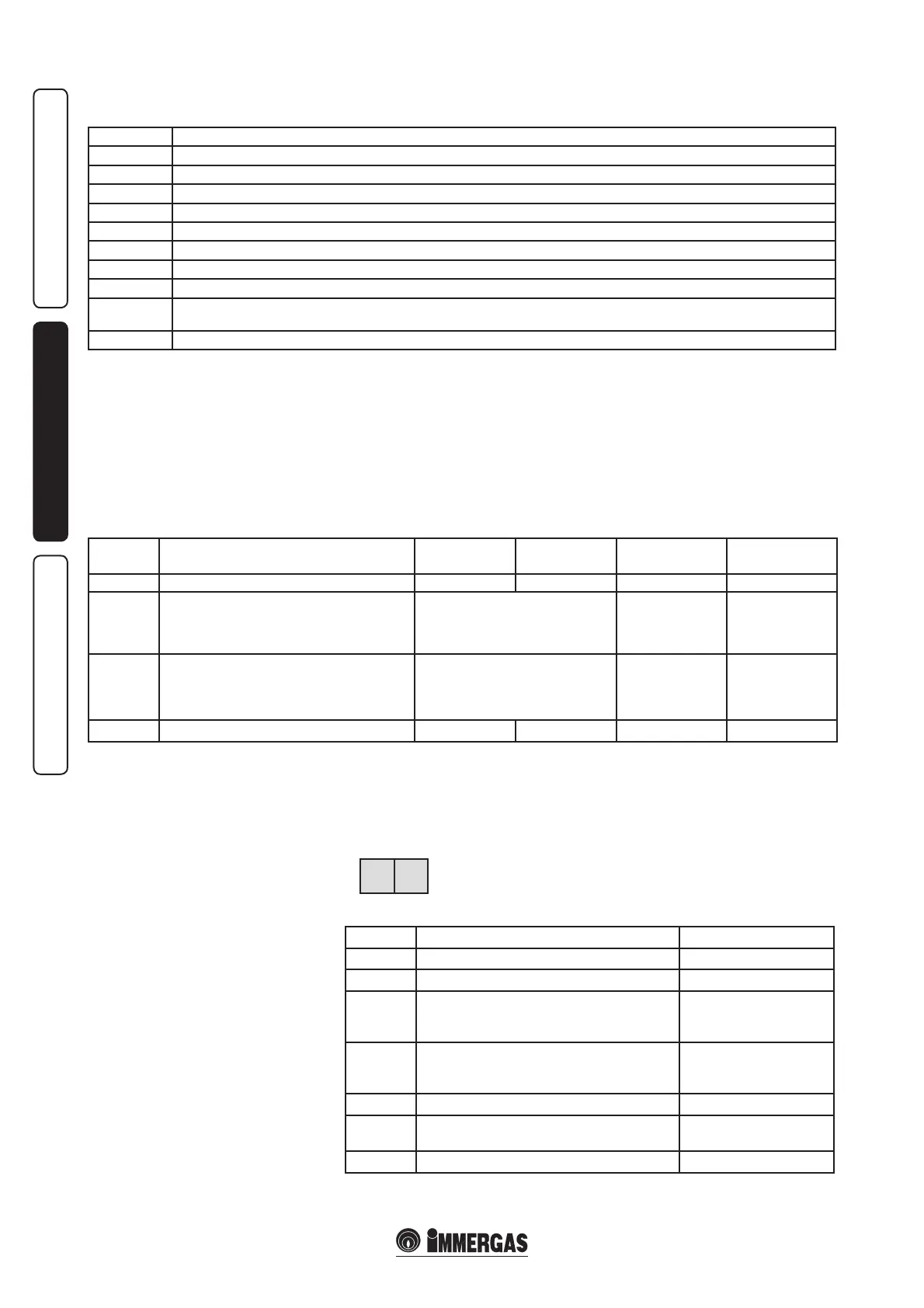
PARAMETERS mode. Press the MODE key
once to access the PARAMETERS MODE. In
this situation the pre-set functioning values
can be varied. e rst two gures indicate the
number of the parameter, the last two give the
setting value. Proceed as follows to modify the
boiler settings:
0
Stand-by, no functioning request
1
Pre-ventilation
2
Burner ignition
3
Burner on (system CH operation)
4
Burner on (DHW operation)
5
Fan control
6
Burner o due to requested temperature reached
7
Pump post-circulation in central heating mode
8
Pump post-circulation in domestic hot water mode
9/b alternating
ash
Burner o due to one of the blocks listed in the table in par. 3.5 (e.g.: bxx)
A
Check 3-way valve
The boiler functioning modes are indicated
successively:
- press the MODE key once to access the
parameters mode;
- select the parameter to be modied using the
STEP key;
- change the value by acting on the + or - keys;
- press the STORE key to memorise the new
value;
- press MODE to make the new value eective.
Parameters that can be modied by the user.
Parameter Description
Upper
limit value
Upper
limit value
Factory
value
Value set by the
User
1 DHW set value 20°C 70°C 20°C
2 DHW operating mode
0 = excluded
1 = active
2 = excluded + continuous pump
3 = active + continuous pump
0
3 CH operating mode
0 = excluded
1 = active
2 = excluded + continuous pump
3 = active + continuous pump
1
4 Maximum CH ow temperature 20°C 85°C 85°C
Parameter 1: allows to set the temperature of the
DHW if controlled with the NTC probe.
Parameter 2: allows to activate or exclude the
production of DHW. From factory setting the
production of DHW is excluded.
Parameter 3: allows to exclude functioning
in system CH mode (Summer)or to enable
it (Winter). From factory settings the system
central heating is active.
Parameter 4: allows to set the CH flow
temperature. If the external temperature probe
is connected to the boiler, the electronics
automatically determines the ideal temperature
value of the system water. This parameter
represents the maximum temperature that the
CH system ow water can reach.
info MODE. Press the MODE key twice to access
the INFO mode. In this situation it is possible to
display and control the instant functioning values
without, however, making variations. e rst
two gures indicate the step number, the last two
give the setting value.
For example, if these values
are read on the display it
me a n s that the retu r n
temperature is 40°C.
Pitch Display Value
1 Flow temperature Value in°C
2 Return temperature Value in°C
3
DHW temperature, when the DHW probe is
present (optional); without probe, the value is non
inuential.
Value in°C
4
External temperature, when the external probe is
present (optional); without probe, the value is non
inuential
Value in°C
6 Flow temperature set point Value in°C
7, 8, 9
Temperature gradients
(cannot be modied)
°C / S
E Flame current value µA
02 40








 To Next Page