58
INSTALLER
USERMAINTENANCE TECHNICIAN
TECHNICAL DATA
Ignition intermediate heat output
Once the nominal heat output calibration is conrmed, the boiler
is calibrated with the intermediate heat output (or ignition heat
output).
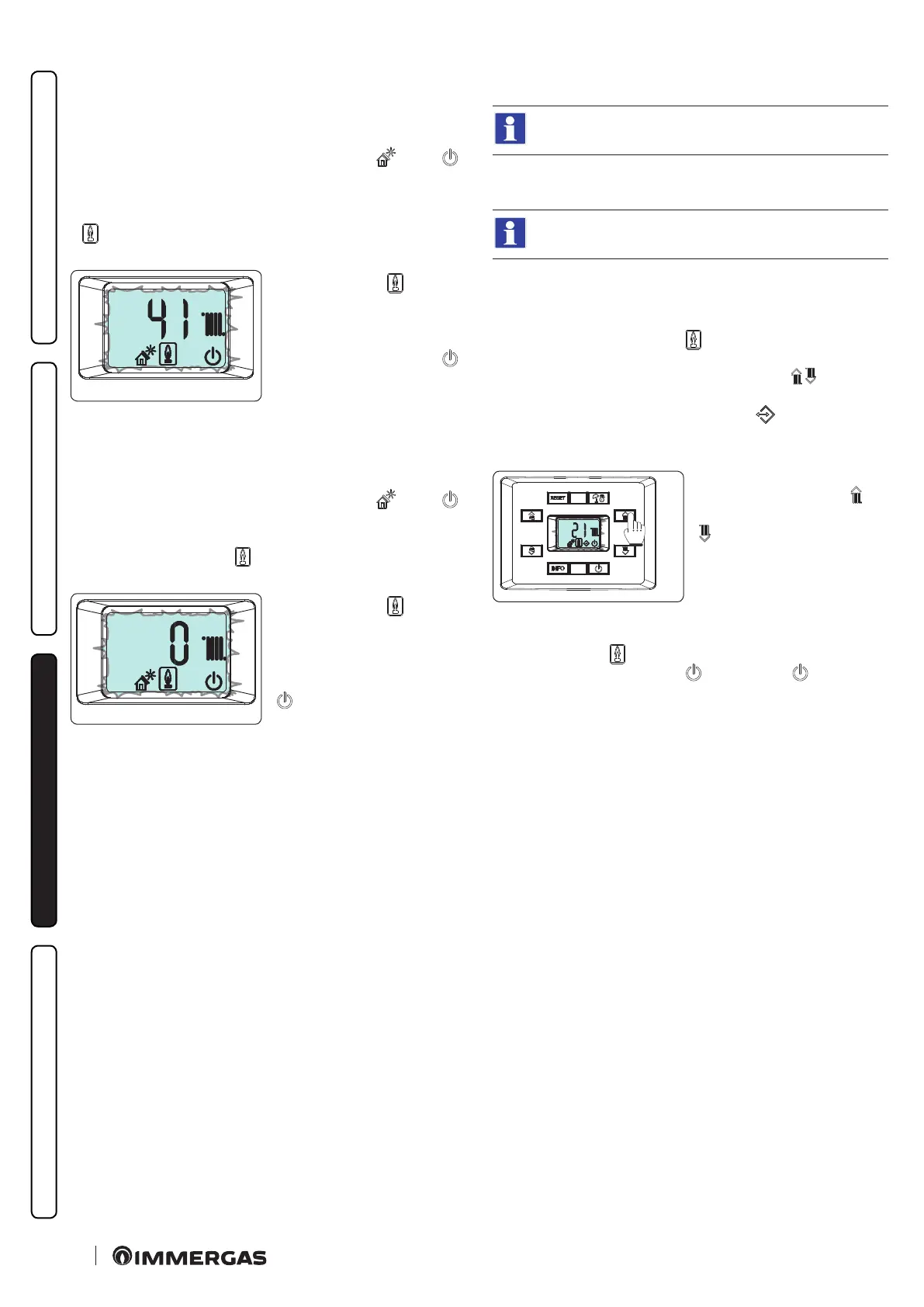
At this stage the display features ashing icons: “ ” and “ ”
and the operating temperature alternated with the current oper-
ating heat output (e.g.: 41%) is displayed; once the parameters are
detected and stabilised, the
“ ” symbol will start ashing, meaning that the nominal heat
output settings have been set.
46
Only aer the “ ” symbol
ashes is it possible to change
the CO
2
value (Par. 3.10) or
switch to the next heat output
parameter by pressing the “ ”
button.
Minimum heat output
Aer having calibrated the boiler with the intermediate heat out-
put, it is calibrated with the minimum heat output.
At this stage the display features ashing icons: “ ” and “ ”
and the operating temperature alternated with the current oper-
ating heat output (0%) is displayed; once the parameters are de-
tected and stabilised, the “ ” symbol will start ashing, mean-
ing that the minimal heat output settings have been set.
47
Only aer the “ ” symbol
ashes is it possible to change
the CO
2
value (Par. 3.10) or
switch to the calibration self-
check phase by pressing the “
” button.
Calibration self-check
Once calibration operations are complete, the boiler runs a self-
check for about one minute. During this check, the boiler can run
at dierent powers and it is not possible to apply modications to
the operating parameters or to delete the operation in progress.
Moreover, it is important not to cut the boiler's power.
3.10 CO2 REGULATION
During the complete calibration (Par. 3.9) it is possible
to modify the CO
2
values.
In order to have an exact value of
CO
2 in the ue gas, the technician
must insert the sampling probe into the well to the bottom
In case of calibration for propane air, select the analyser
in LPG gas mode.
Check that theCO
2
value is the one indicated in the table (Par. 4.2),
(considering a maximum tolerance of ± 0.2%), otherwise change
the value as described below:
During calibration, when the “ ” symbol starts ashing (indi-
cating the correct acquisition of the parameters) it is possible to
alter the CO
2
value by pressing the buttons 5 or 6 ( ).
In this phase, the previously activated icons together with the “ex-
ternal connected devices presence icon” ( ) will ash on the
display and the operating temperature alternated with combus-
tion setting is displayed.
48
To increase the combustion set-
ting, press the button 5 ( ), to
decrease it, press the button 6 (
). As the combustion setting
increases, the CO
2
value de-
creases and vice-versa.
Once the parameter has been altered wait for the value to be saved
(displayed via the “ ” symbol ashing).
To conrm the value set, press “ ” followed by “ ” again in or-
der to go to the next calibration.






 To Next Page