User’s Manual
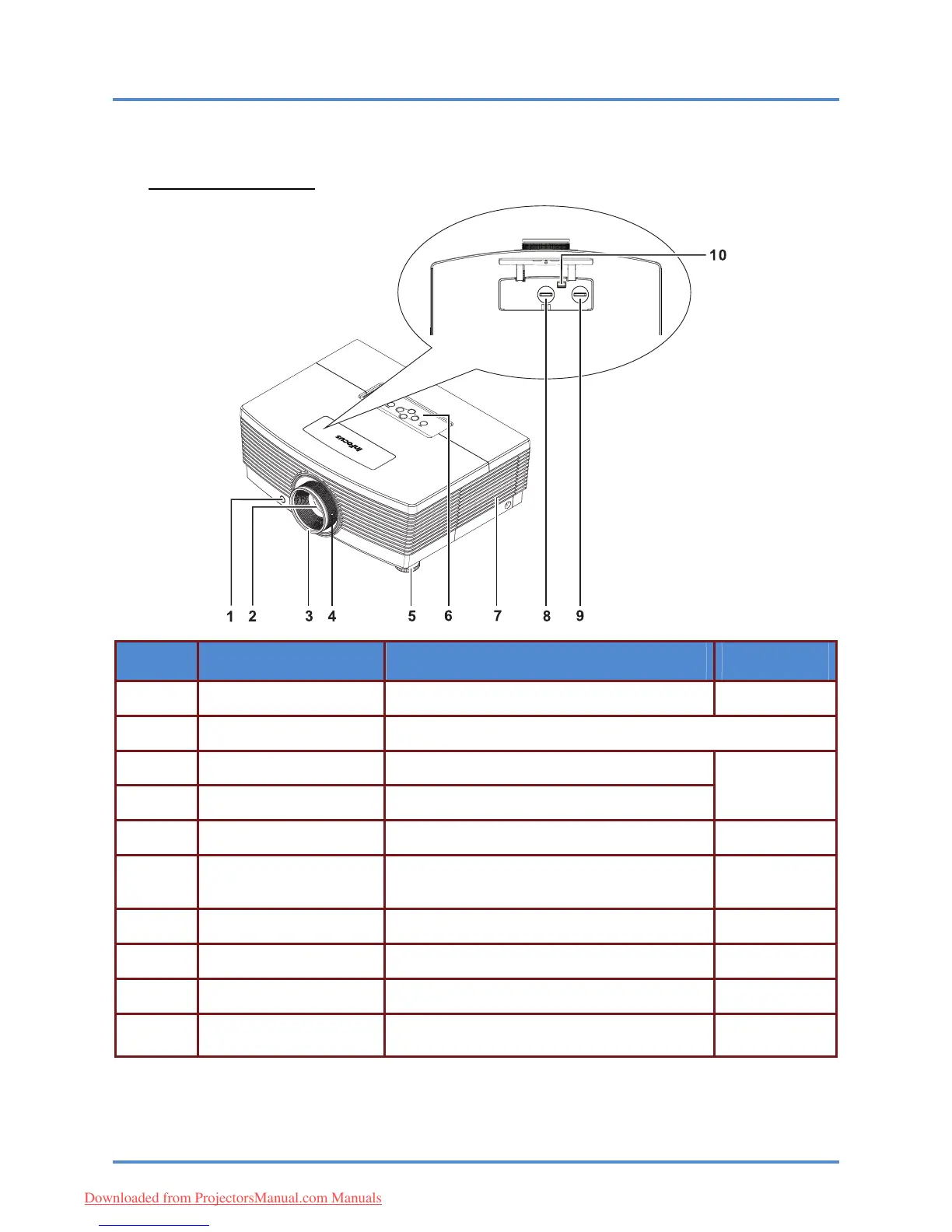
Views of Projector Parts
Front-angled View
ITEM LABEL DESCRIPTION SEE PAGE:
1. 7
IR receiver Receives the IR signals from the remote control
2.
Lens Projection Lens
3.
Focus ring Focuses the projected image
17
4.
Zoom ring Enlarges the projected image
5. 14
Elevator foot Adjusts level of projector
See Top view—On-screen Display (OSD) but-
tons.
6. 3
Function keys
7. 39
Lamp cover Remove cover to replace lamp
8. 15
Vertical lens shift Adjusts the image position vertically
9. 16
Horizontal lens shift Adjusts the image position horizontally
Press the release button before attempting to
replace the lens
10.
10
Lens release button
– 2 –
Downloaded from ProjectorsManual.com Manuals



 To Next Page