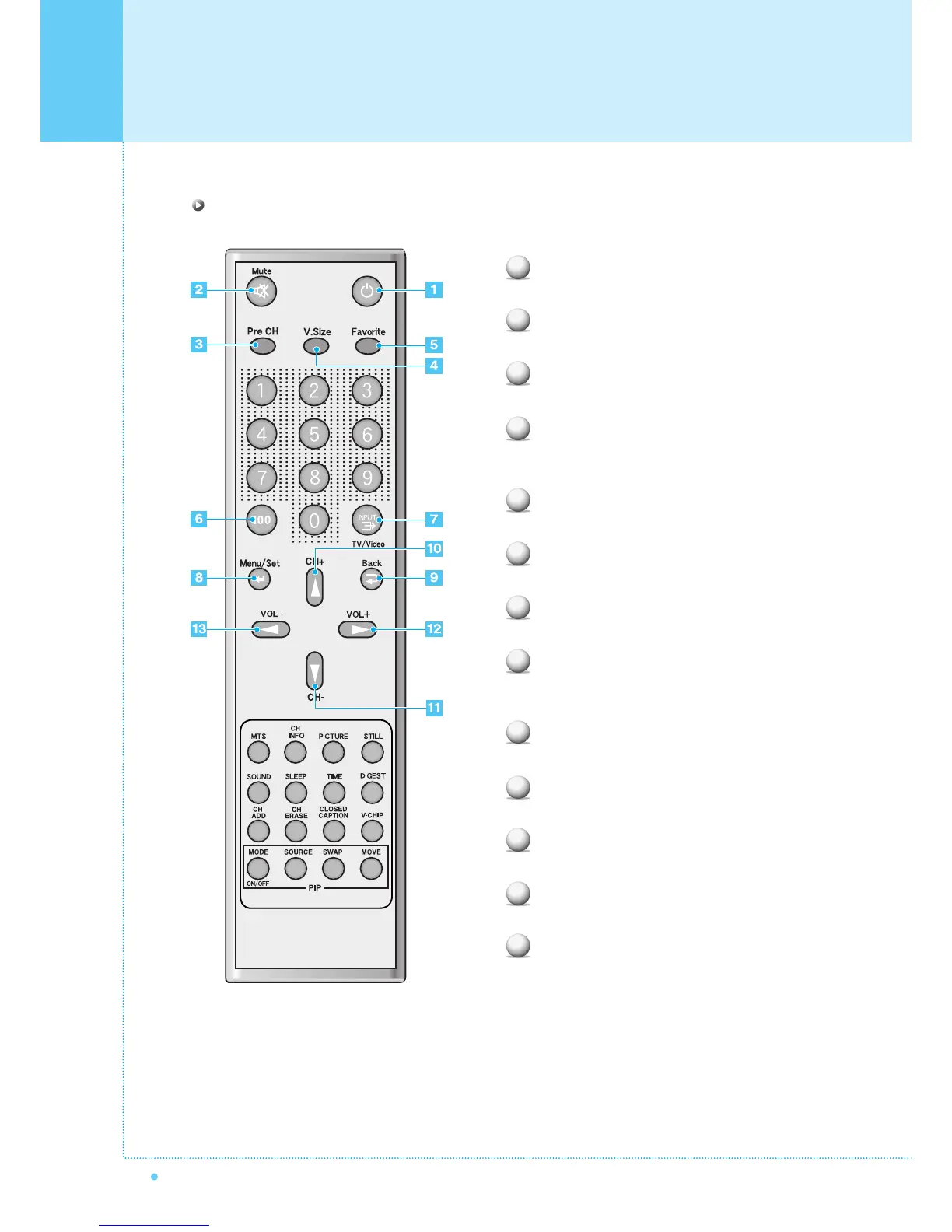
Viewing the Remote Control
12
OWNER'S MANUAL
Power
Turn the Monitor on and off.
Mute
Temporarily cut the sound and restore it.
Pre.CH
Turn to the previous channel or exit OSD.
V.Size
Choose the Screen Form.
Wide ➔ Panorama ➔ Zoom1 ➔ Zoom2 ➔ 4:3
FAVORITE (FAVOURITE)
Tune to your next favorite channel.
100
Press to tune the channels over 100.
INPUT
Display the input source list.
Menu / Set
Display the main OSD menu.
Activate your choice in the OSD menu.
Back
Return to the previous OSD menu.
CH+
Move to the upper channel.
CH-
Move to the lower channel.
VOL+
Increase the volume level.
VOL-
Decrease the volume level.
1
2
3
4
5
6
7
8
9
10
11
12
13
Key Description



 To Next Page