73
72
4-5. Wi-Fi Specications
- Frequency 2.4 ~ 2.4835 GHz (US/Canada/Europe), 2.4 ~ 2.497 GHz (Japan)
- Communication Rate : 802.11b = 11, 5.5, 2, 1 Mbps
802.11g = 54, 48, 36, 24, 18, 12, 9, 6 Mbps
802.11n(20Mhz) = MCS0-7, up to 72.2 Mbps maximal
802.11n(40Mhz) = MCS0-7, up to 150 Mbps maximal
- Channels : USA/Canada: 11 channels
Europe: 13 channels
France: 7 channels
Japan: 14 channels (13 channels for 802.11g)
- Mode : Ad-Hoc or infrastructure
- Receive Sensitivity :
- Network Protocal : TCP/IP, ARP, ICMP, DHCP, UDP, PING
- Security Protocols :
150Mb/s(40MHz)=-67dBm
72.2Mb/s(20MHz)=-68dBm
54Mb/s = -75dBm
36Mb/s = -82dBm
18Mb/s = -88dBm
6Mb/s = -93dBm
11Mb/s = -88dBm
1Mb/s = -98dBm
Personal
Disabled, WEP 64 & 128bit, WPA (TKIP), WPA (AES),
WPA2(AES), 802.1x (EAP) Supplicant 802.11i
WPA & WPA2 Enterprise supplicants
EAP-TLS, EAP-TTLS(MSCHAPv2),
EAP-PEAPv0(MSCHAPv2), EAP-FAST, LEAP
Supports Certicates and Private Key Upload and Storage (Multiple)
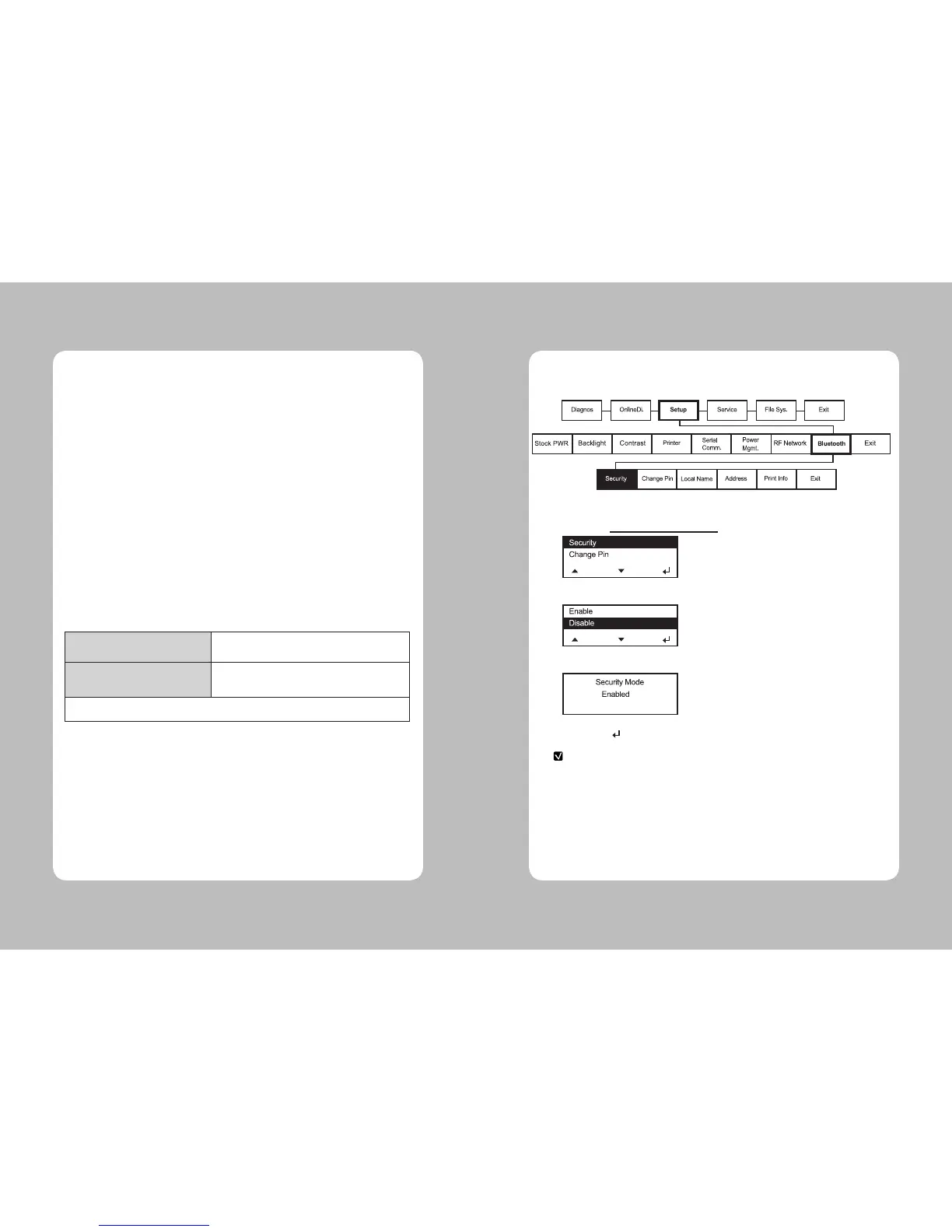
5-1. Using the Bluetooth Settings Dialog
5. Bluetooth
This Menu sets Bluetooth communication.
1. Select Setup Menu – Bluetooth – Security.
2. Select one of Enable and Disable.
3. Selected option is displayed as shown below
4. Press Enter( ) button to exit.
5-1-1. Enabling the Security
NOTE
Refer to “3-1-14. Bluetooth Interface” for the Bluetooth conguration.


 To Next Page