41
40
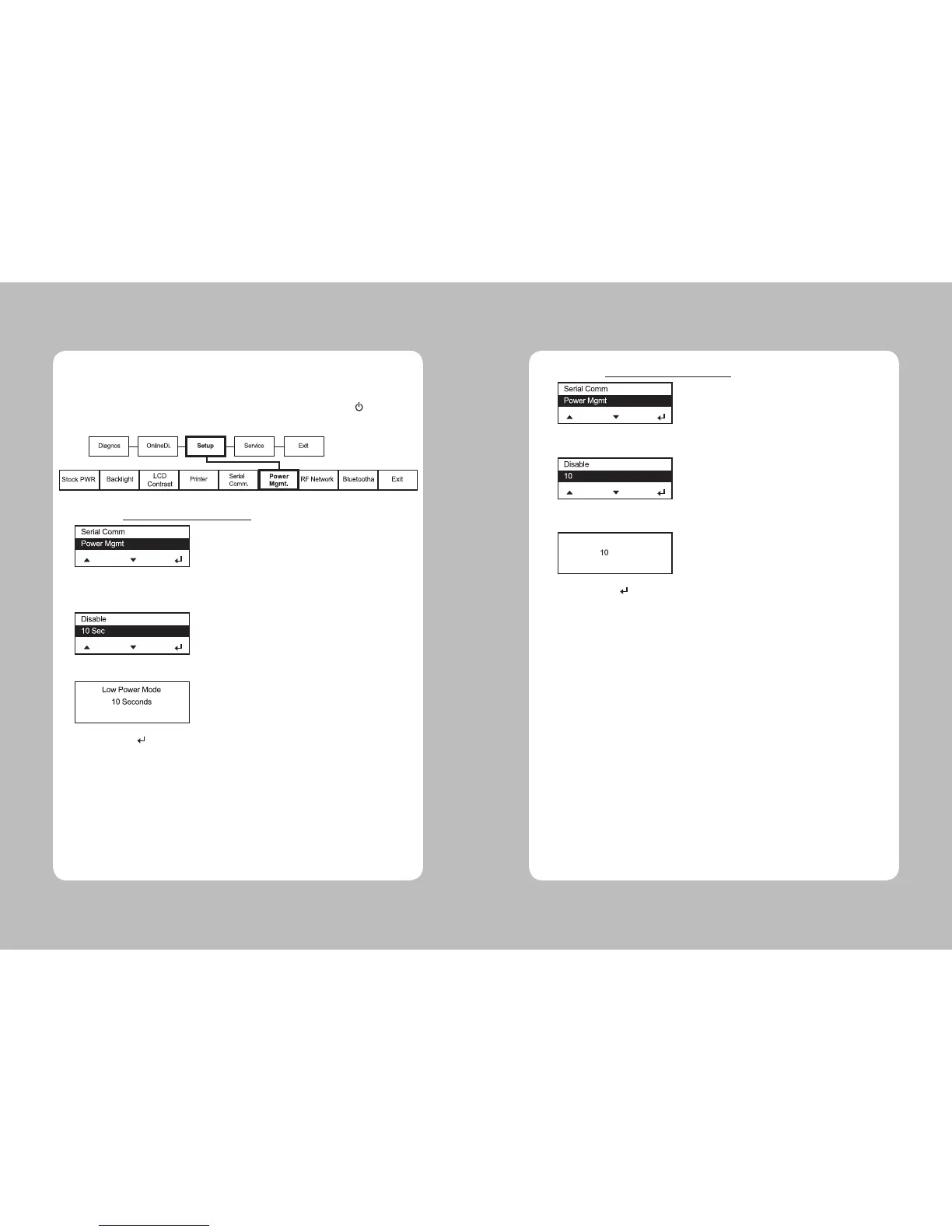
1. Select Setup Menu – Power MGMT - Low Power
2. Select the Power Save Time among disable, 10 sec, 20 sec, 30 sec, 1 min, 2 min, 5 min,
10 min, 30 min, 1 hour.
3. Selected time is displayed and buzzer sounds short two times.
4. Pressing Enter( ) button.
5. Select Exit to return to the Setup menu.
3-1-6. Power Management
This Menu sets Power Save Timeout.
(If USB cable is connected the printer does not go into Power Save). If the printer goes into Power
Save Mode, wake-up the printer by connecting the USB cable, or pressing Power( ) button, or
send data to the serial port.
1. Select Setup Menu – Power MGMT -Shut Down
2. Select the Power Save Time among disable, 10min, 20min, 30 min
3. Selected time is displayed and buzzer sounds short two times.
4. Pressing Enter( ) button.
5. Select Exit to return to the Setup menu.
min
min
Shut Down Mode


 To Next Page