iWL2xxWirelessSeries• 19/28
Copyright©2011Ingenico
900003061R1100004/1050Allrightsreserved
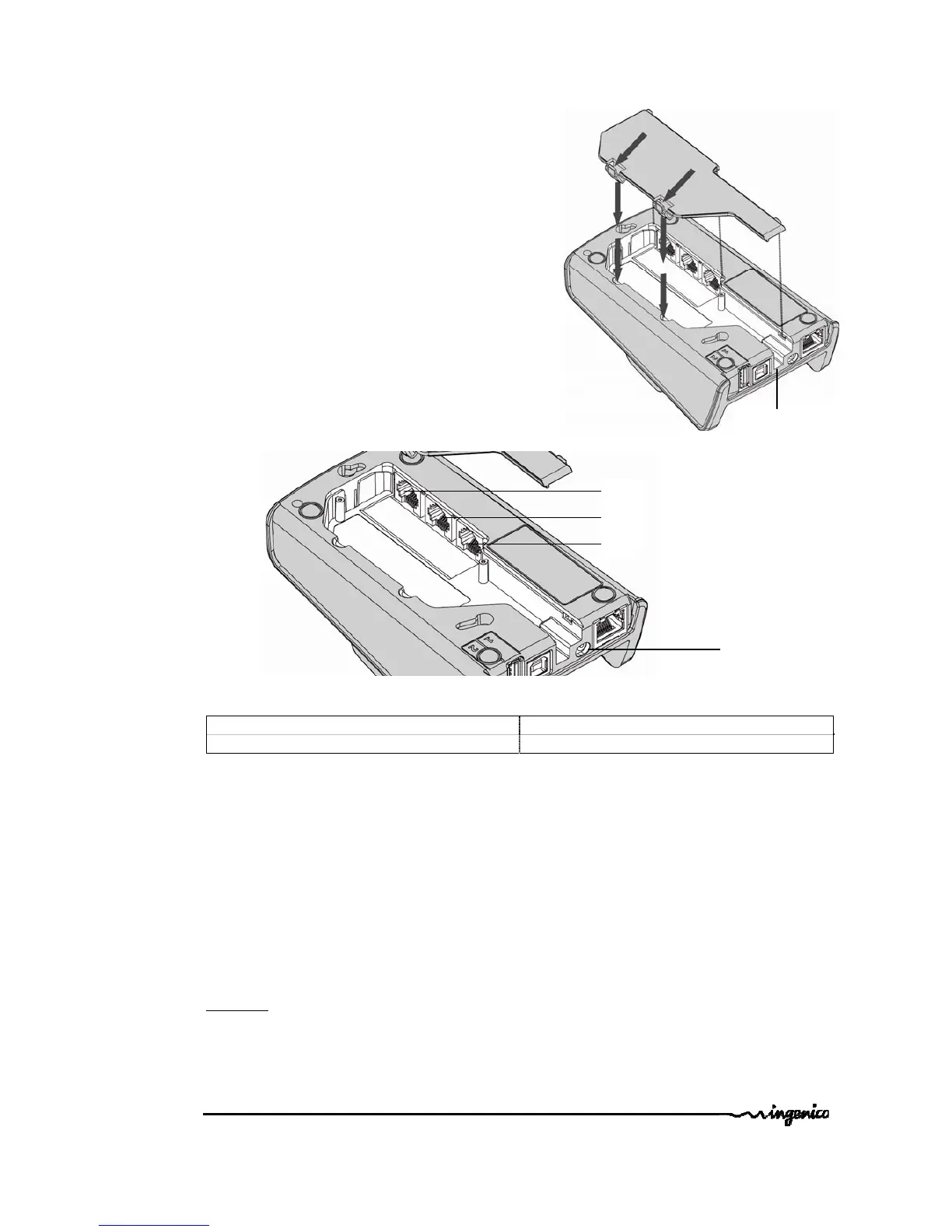
5.1.2. Basedownsideconnections
• Removebasetrapdoorpushingonclips
(seeclipslocationatredarrows)
• Connectalldownsideconnections
• Use“pathforwires”to
managecableexit
• Closetrapdoor
G=SeriallinkCOMØ–RS232(optional) H=SeriallinkCOM1–RS232(optional)
Path
B
I=Modemsocket(optional)
Followthebelowinstructionstoconnectthebasetothetelephonenetwork:
• Disconnectpowersupplyunit(socketB)inordertoswitchoffthebasepriorto
connectingittotheappropriatenetwork.
• Connecttelephonecableequippedifnecessarywithusercountryspecific
telephoneplug,tothetelephonenetwork.
• Connecttheotherendofthewiretothebase(socketI).
• Connectthemainspowersupplywiretothebase(socketB).
• Connectbasepowersupplyblocktothemains.
SocketI
:TNV‐3circuit:TelecommunicationNetworkVoltage,aspersafetystandardEN
60950‐1.



 To Next Page
 Loading...











