EasyManua.ls Logo

Innco CO3000 - Page 26

Default Icon
79 pages
Print Icon
To Next Page IconTo Next Page
To Previous Page IconTo Previous Page
Loading...
Controller CO3000
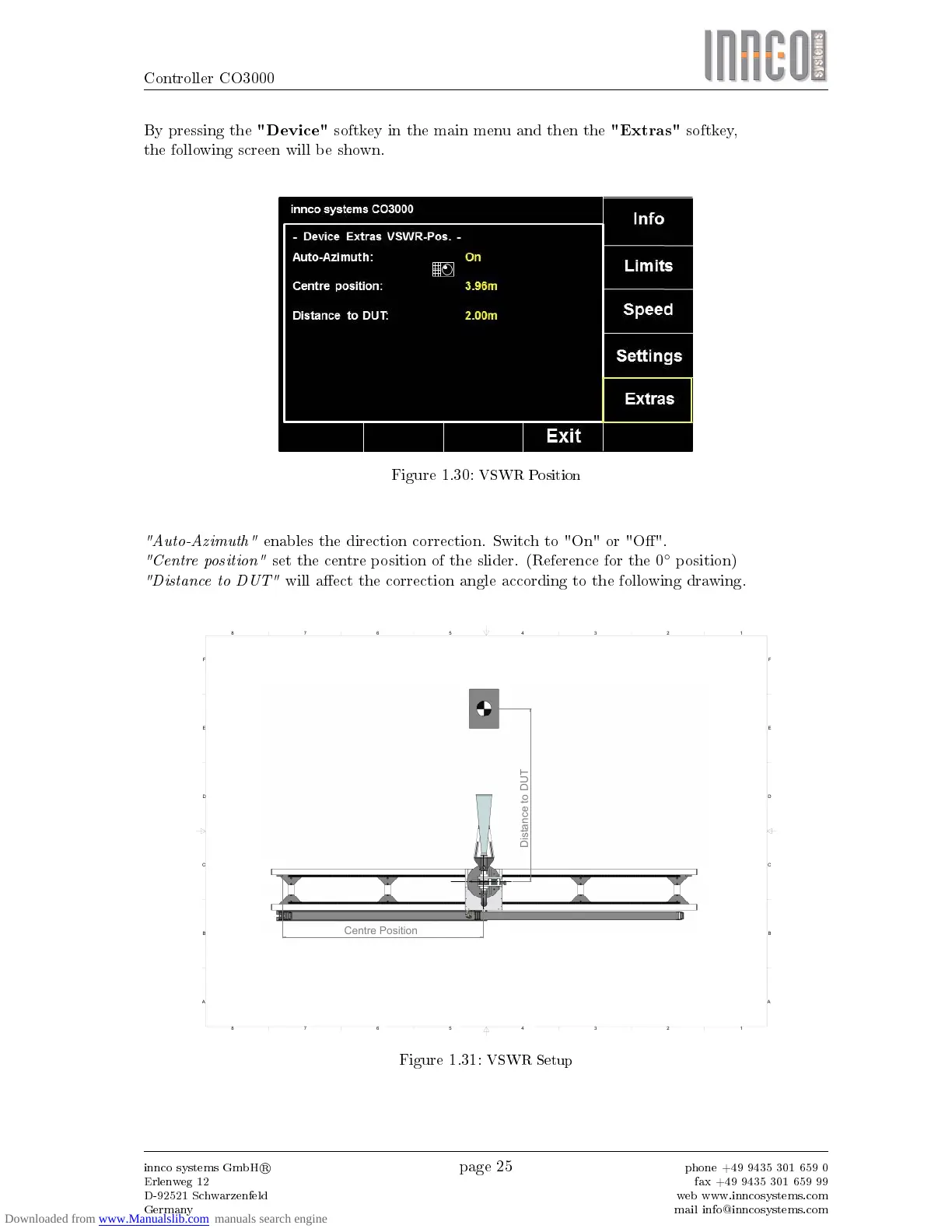
By pressing the
"Device"
softkey in the main menu and then the
"Extras"
softkey,
the following screen will be shown.
Figure 1.30:
VSWR Position
"Auto-Azimuth"
enables the direction correction. Switch to "On" or "O".
"Centre position"
set the centre position of the slider. (Reference for the 0
position)
"Distance to DUT"
will aect the correction angle according to the following drawing.
Distance to DUT
Centre Position
1
1
2
2
3
3
4
4
5
5
6
6
7
7
8
8
A A
B B
C C
D D
E E
F F
Figure 1.31:
VSWR Setup
innco systems GmbH
R
Erlenweg 12
D-92521 Schwarzenfeld
Germany
page 25
phone +49 9435 301 659 0
fax +49 9435 301 659 99
web www.inncosystems.com
mail info@inncosystems.com