36
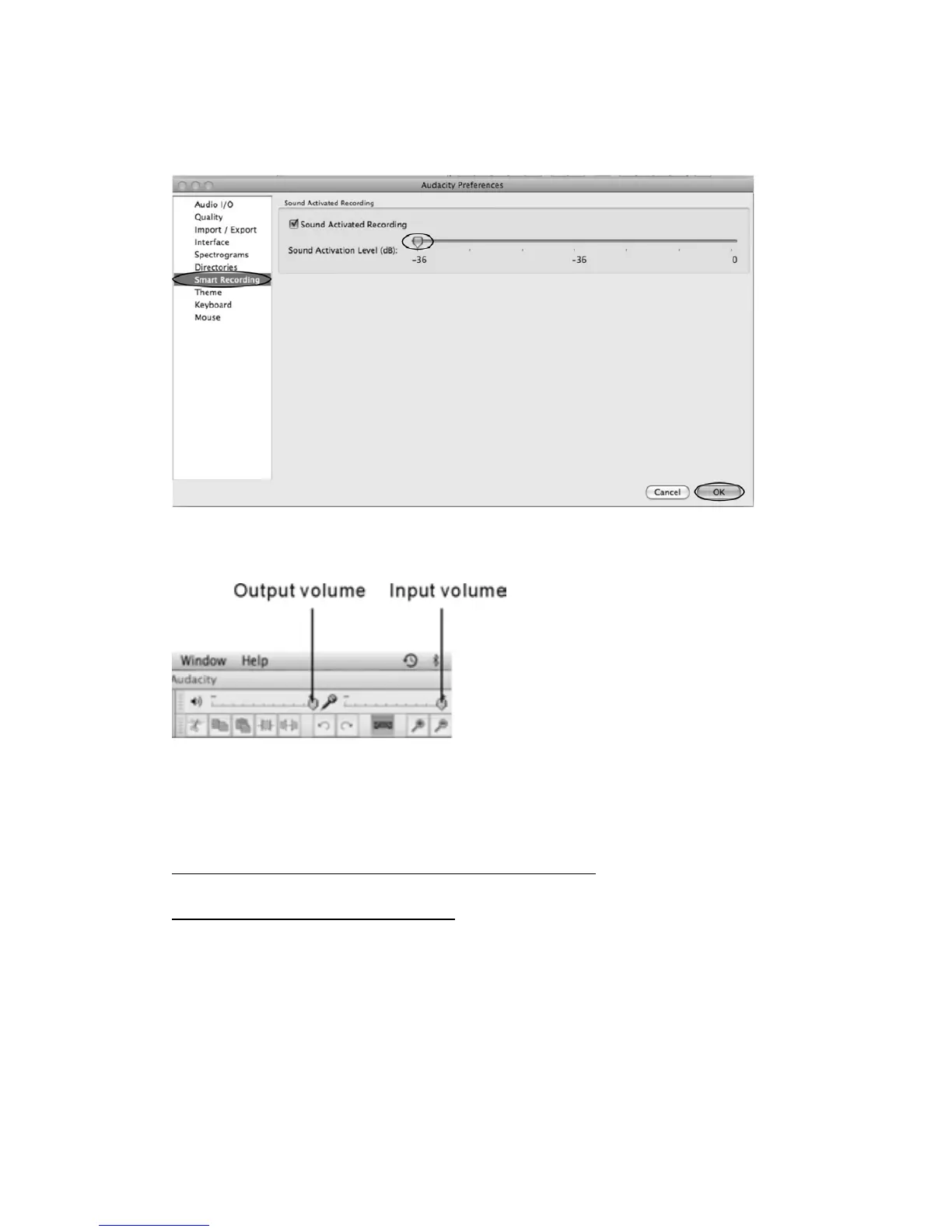
TosettheSmartRecording
1. To select the Smart Recording in the Audacity Preferences interface, and set the Sound
ActivationLevel(dB)to‐36,andthenclickOK.
2. On the top of the main Audacity window, to the right of the input and output level meters
(labeledL and R), youwill seetheinputand outputvolume.Theleft of the inputand output
volume,thereisavolumeicon.Adjusttheoutputandinputvolume
toma
ximum.
NOTE:Becauseofthevariationofdifferentoperationsystems,theinputvolumecontrolmaynot
workonsomeindividualWindowsversions.WindowsVistaisrecommendedtoensuretheinput
volumecontrolworkingproperly.
FormoreinformationonMixerToolbar,pleasesee‘OSX‐specificissues’onthewebsitebelow:
http://wiki.audacityteam.org/index.php?title=Mixer_Toolbar_Issues
ForfurtherinformationofAudacityonMACOSX,pleasesee
http://wiki.audacityteam.org/wiki/Mac_Bugs



 To Next Page