20
Shift Button
• The Shift Button is used for secondary features, modes, and controls
(See the Erase & Undo, Layer Record Destination Lock, Onset
Control Modes, Scan Mode & Follow Mode, Save & Load, and
Import & Export sections for more information).
• If the Shift Button is held down, the colour of the Granular Stream
display illuminates red with white illumination on either side.
Erase & Undo
Erase: If a new recording has been captured into an empty layer, press
and hold the Shift Button and then press the Strike Button to perform the
Erase function.
Undo: If audio replacement or a sound-on-sound overdub has been
recorded into an existing layer, one Undo function is accessible. In this
case, press and hold the Shift Button and then press the Strike Button to
perform the Undo function. The Undo function will always return back to
the last manually captured or loaded layer.
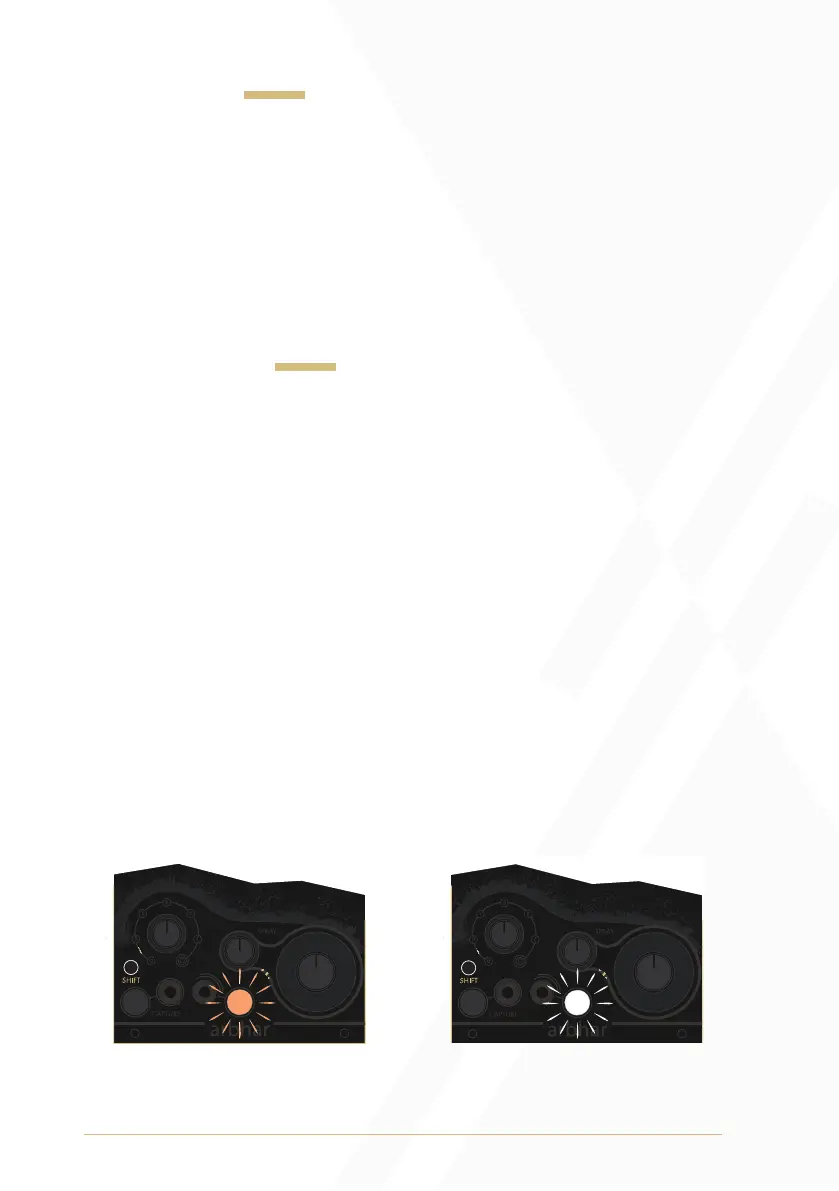
If audio has been captured into the currently selected layer, the Strike
Button will pulse amber when the Shift Button is held down, indicating
that there is audio to Erase and/or Undo. Once the Undo function has
been performed, the Strike Button will pulse white, indicating that there
is still audio captured into the currently selected layer that can
be Erased.
1
2
1
2
To undo an overdub hold 1, press 2.
When pulsing orange the action
will undo.
Doing this a second time will erase the
buffer completely. When pulsing white
the action will erase.


 To Next Page