45
Looping Granular:
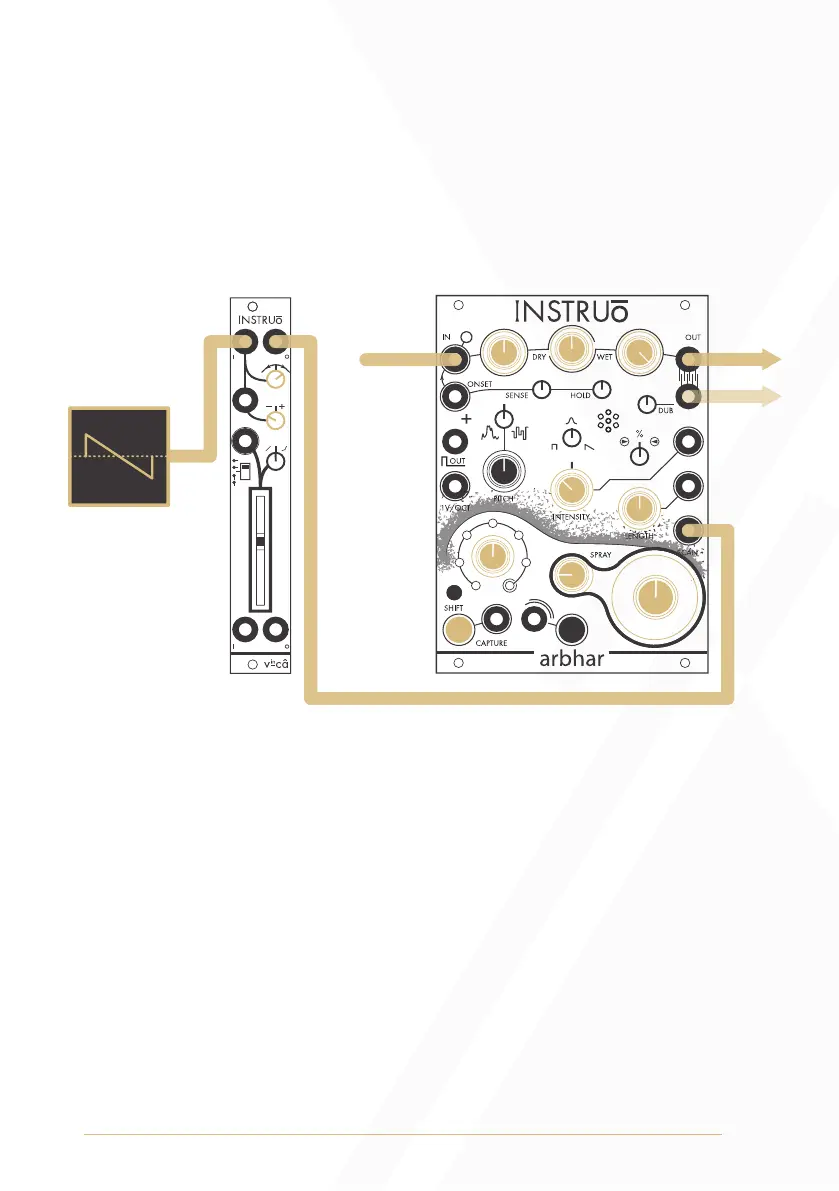
Summary: A scaled and offset sawtooth waveform is used to modulate
the Scan position of arbhar for looping granular playback. Scaling sets
the length, inversion sets the direction and the LFO frequency sets
playback speed.
Audio Path:
• Connect any audio signal to the Input.
• Set the Input Level to a desired position and set the Output Level
fully clockwise.
• Set the Dry/Wet Mix knob to a desired position. If the Dry/Wet
Mix knob is fully clockwise (fully wet), then audio will not be heard
until audio has been captured.
• Monitor Output 1 for mono playback. Monitor Output 1 and
Output 2 panned hard left and hard right for stereo playback.
• Set the Layer knob to the desired target layer.
• Press the Capture Button or connect a gate signal to the Capture
Gate Input to start capturing audio.
Output 1
Output 2*
Audio Signal
LFO
(sawtooth)


 To Next Page