25
Scan Mode & Follow Mode
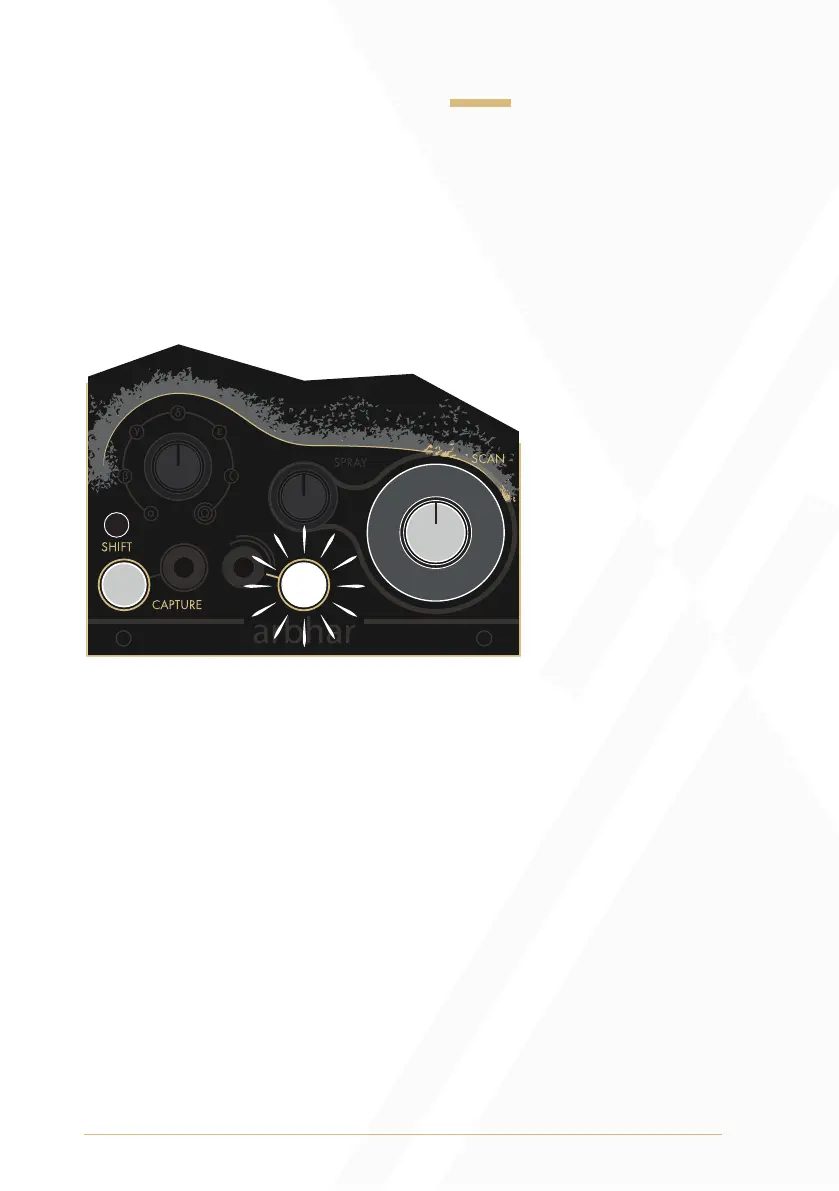
To change between Scan Mode and Follow Mode, press and hold the
Shift Button and the Capture Button, then turn the Scan knob to either of
the two extreme values. Double turning the Scan knob to the minimum or
maximum position will toggle between Scan Mode and Follow Mode.
The Strike Button will be unilluminated when Scan Mode is selected and
will illuminate white when Follow Mode is selected.
Scan Mode: Scan Mode is the factory default mode. In Scan Mode, the
user can manually scan through the recorded buffer, setting the Scan
parameter at any position to freeze audio playback.
Follow Mode: In Follow Mode, audio playback is triggered and
directed internally.
Pressing the Capture Button or sending a gate or trigger signal to the
Capture Gate Input will start recording and simultaneously trigger the
playback from the the start of the layer at the speed set by the
Scan knob.
Pressing the Strike Button or sending a gate or trigger signal to the
Strike Input will start playback from the start of the layer. Playback
speed is set by the Scan knob.
1
2
3
4
1) Shift Button
2) Capture Button
3) Scan Knob
4) Strike Button


 To Next Page