5
Installation
1. Confirm that the Eurorack synthesizer system is powered off.
2. Locate 18 HP of space in your Eurorack synthesizer case for
the module.
3. Locate an additional 2 HP of space in your Eurorack synthesizer
case for the optional CV expansion module.
4. Connect the 10 pin side of the IDC power cable to the 2x5 pin
header on the back of the module, confirming that the red stripe on
the IDC power cable is connected to -12V, indicated with a white
stripe on the module.
5. Connect the 16 pin side of the IDC power cable to the 2x8 pin
header on your Eurorack power supply, confirming that the red
stripe on the power cable is connected to -12V.
6. Optional: To install the CV Expander module, connect the included
12 pin IDC cable to both modules. Ensure that the red strip of the
IDC cable matches the white stripe on each module.
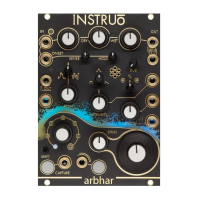
7. Mount the Instruō arbhar in your Eurorack synthesizer case.
8. Power your Eurorack synthesizer system on.
Note:
This module has reverse polarity protection.
Inverted installation of the power cable will not damage the module.
Specifications
• Width: 18 HP Module + 2 HP CV Expansion Module
• Depth: 42mm
• +12V: 210mA
• -12V: 30mA
• Sample Rate: 64kHz
• Bit Depth: 32 Bit


 To Next Page