12
En
Connecting the Speaker Cables
Using Banana Plugs
• If you are using banana plugs, tighten the speaker terminal before inserting the banana plug.
• Do not insert the speaker code directly into the center hole of the speaker terminal.
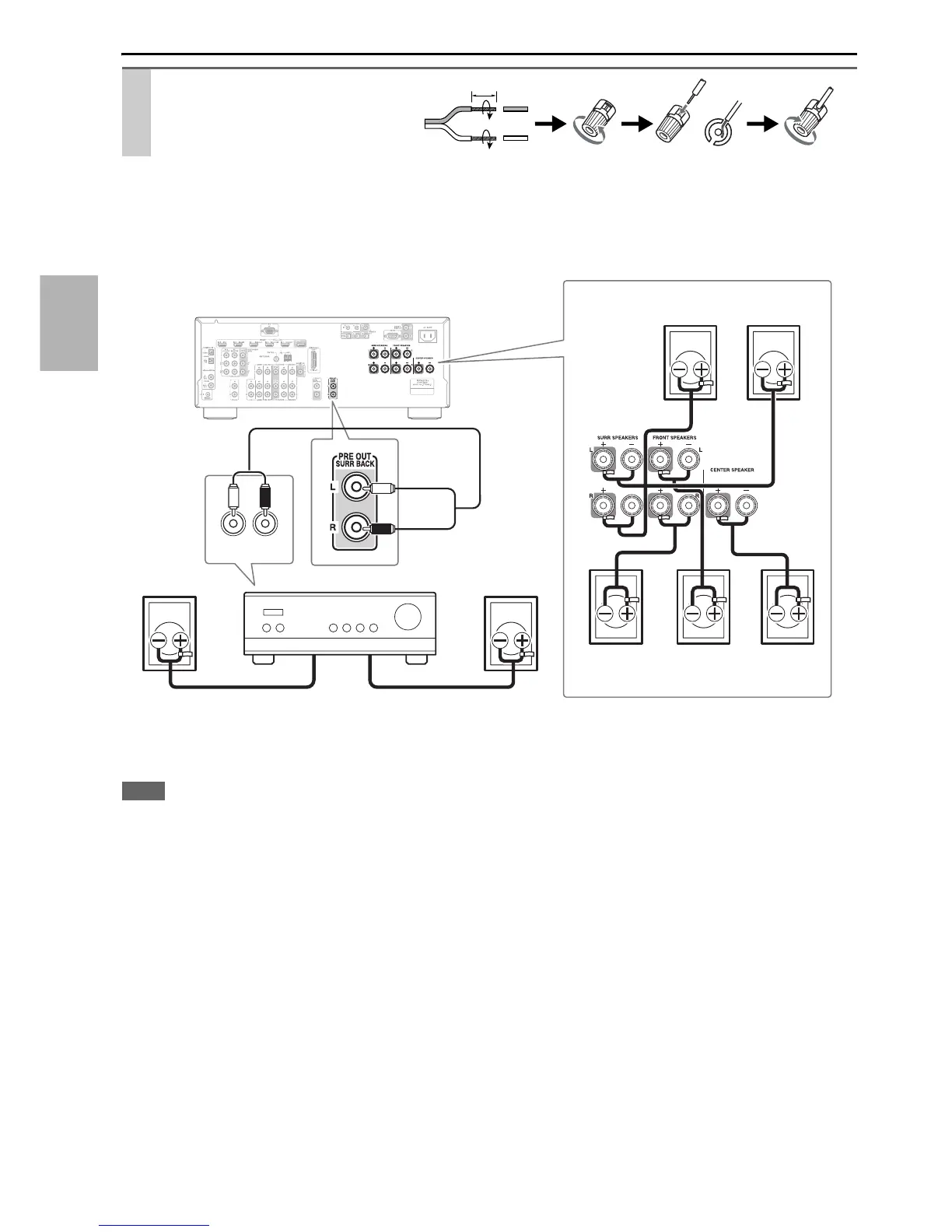
The following illustration shows which speaker should be connected to each pair of terminals. If you’re using only one
surround back speaker, connect it to the PRE OUT: SURR BACK jacks.
Connect your Power amplifier’s analog audio output jacks to the AV receiver’s PRE OUT: SURR BACK jacks with an
audio cable.
Note
• The speakers are configured by using “Speaker Setup” (➔ 37).
Strip 1/2" to 5/8" (12 to 15 mm) of
insulation from the ends of the
speaker cables, and twist the bare
wires tightly, as shown.
1/2" to 5/8"(12 to 15 mm)
AUDIO
INPUT
LR
Surround
back left
speaker
Surround left
speaker
Surround right
speaker
Center
speaker
Front right
speaker
Surround
back right
speaker
Front left
speaker
Power amplifier



 To Next Page