34
Connecting the AV Receiver—Continued
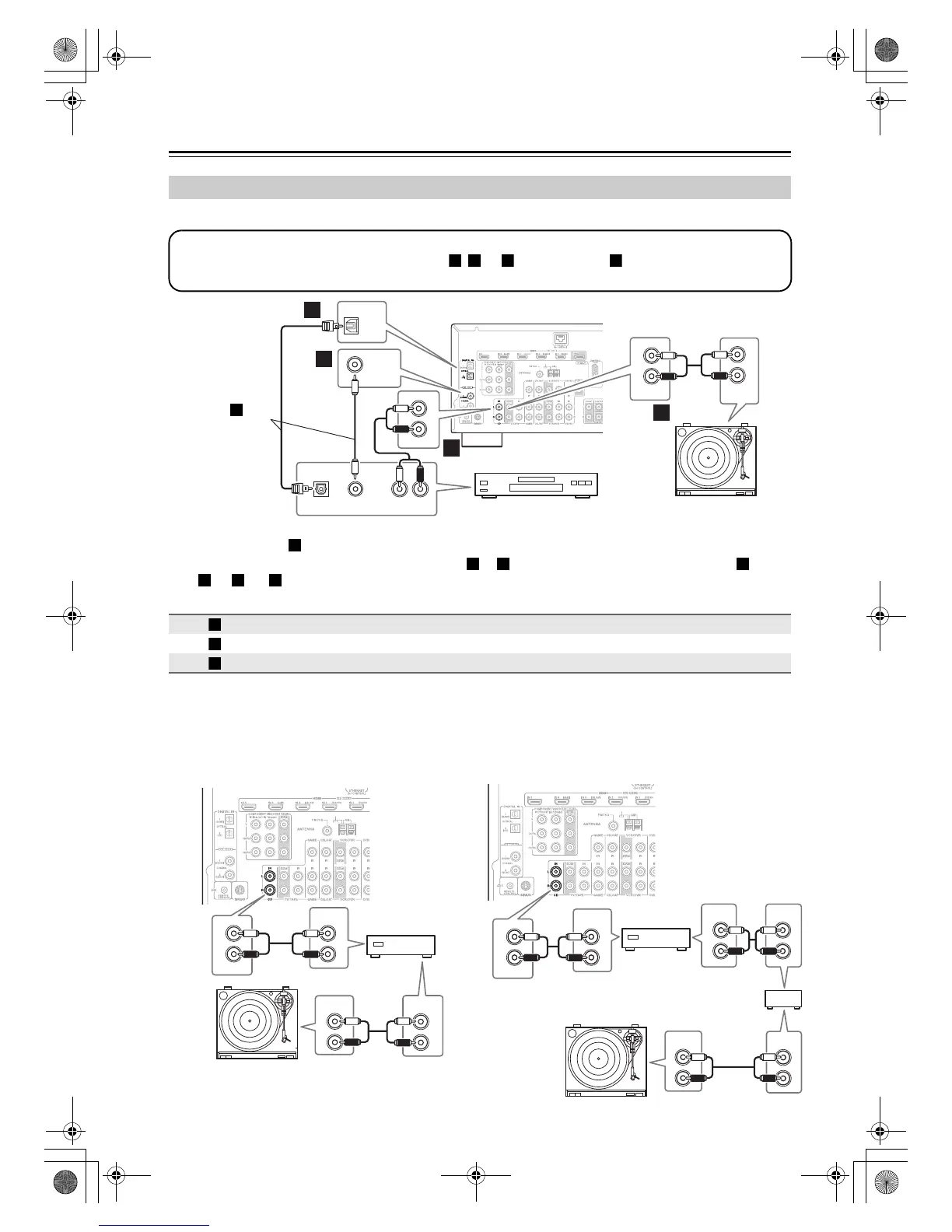
■ CD Player or Turntable (MM) with Built-in Phono Preamp
• With connection , you can listen to and record audio from the CD player and listen in Zone 2.
• To connect the CD player digitally, use connection or . (To record or listen in Zone 2 as well, use and
, or and .)
■ Turntable (MM) with no Phono Preamp
Built-in
A phono preamp is necessary to connect a turntable that
doesn’t have a phono preamp built-in.
■ Turntable with an MC (Moving Coil) Cartridge
An MC head amp and phono preamp are necessary to
connect a turntable with an MC (Moving Coil) cartridge.
Connecting a CD Player or Turntable
Connection AV receiver Signal flow CD or turntable
CD IN L/R ⇐ Analog audio L/R output
DIGITAL IN COAXIAL 1 (DVD/BD) ⇐ Digital coaxial output
DIGITAL IN OPTICAL 2 (CD) ⇐ Digital optical output
IN
L
R
L
R
CD
AUDIO
OUTPUT
OPTICAL
OUT
AUDIO
OUT
LR
COAXIAL
OUT
L
R
IN
(DVD/BD)
IN 1
COAXIAL
IN 2
(CD)
OPTICAL
CD
b
a
a
c
Step 1:
Choose a connection that matches your CD player ( , , or ). Use connection for a turntable with a built-in
phono preamp.
a b c a
Turntable (MM) with
built-in phono preamp
CD player
Connect one or
the other Con-
nection must
be assigned
(see page 43)
b
a
b c a
b a c
a
b
c
IN
L
R
CD
AUDIO
OUTPUT
AUDIO
OUTPUT
AUDIO
INPUT
L
R
L
R
L
R
Phono preamp
IN
CD
L
R
AUDIO
OUTPUT
AUDIO
INPUT
AUDIO
OUTPUT
AUDIO
OUTPUT
AUDIO
INPUT
L
R
L
R
L
R
L
R
L
R
MC head amp or
MC transformer
Phono
preamp
DTR-30.1_En_A.book 34 ページ 2009年4月9日 木曜日 午後1時30分


 To Next Page