66
Enjoying Music in the Remote Zone
With Zone 2 you can enjoy one input source in the main
room and a different source in another room. With Zone
2 you can enjoy one input source in the main room and a
different source in another room.
There are three connection methods: using a receiver/
integrated amp in Zone 2, using a power amp in Zone 2,
or using only a pair of speakers in Zone 2.
Note:
ZONE 2 is analog only. Digital signals are not output.
If no sound is heard from the selected input source,
check if the component is connected to the analog
inputs.
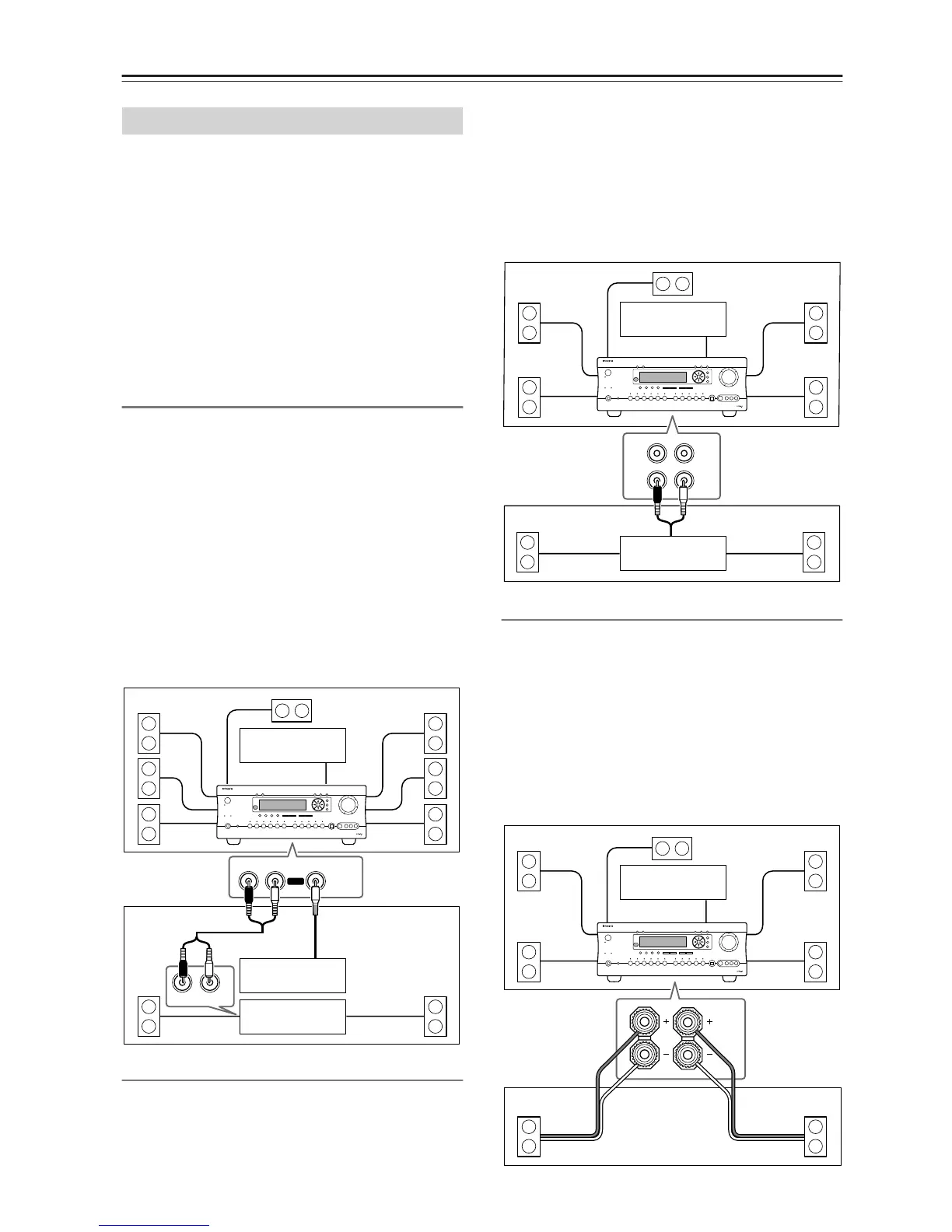
Using a Receiver/Integrated Amp in Zone 2
With this connection method you can use 7.1 surround
sound in the main room and play a different AV source in
Zone 2. Zone 2’s volume is adjusted on the receiver/inte-
grated amp.
• Set the Surr Back/Zone2 setting to Zone 2 (see page
67).
• Use an RCA/phono audio connection cable to connect
the DTR-7.4’s AUDIO ZONE 2 OUT L/R outputs to
analog audio inputs on your receiver/integrated amp.
• Use a composite video connection cable to connect
the DTR-7.4’s VIDEO ZONE 2 OUT to a composite
video input on your Zone 2 TV.
Connect your Zone 2 speakers to the speaker terminals
on your receiver/integrated amp.
Using a Power Amp in Zone 2
With this connection method you can use 5.1 surround
sound in the main room and play a different source in
Zone 2. Zone 2’s volume is adjusted on the DTR-7.4.
• Set the Surr Back/Zone2 setting to Zone 2 (see page
67).
• Use an RCA/phono audio connection cable to connect
the DTR-7.4’s PRE OUT SURR BACK/ZONE 2 L/R
outputs to the analog audio inputs on your power amp.
• Use a composite video connection cable to connect
the DTR-7.4’s VIDEO ZONE 2 OUT to a composite
video input on your Zone 2 TV.
• Connect your Zone 2 speakers to the speaker termi-
nals on your power amp.
Using Only Speakers in Zone 2
With this connection method you can use 5.1 surround
sound in the main room and play a different AV source in
Zone 2. Zone 2’s volume is adjusted on the DTR-7.4.
• Set the Surr Back/Zone2 setting to Zone 2 (see page
67).
• Connect your Zone 2 speakers to the DTR-7.4’s
SURR BACK/ZONE 2 SPEAKERS terminals.
• Use a composite video connection cable to connect
the DTR-7.4’s VIDEO ZONE 2 OUT to a composite
video input on your Zone 2 TV.
Connecting Zone 2
OUT
R
L
ZONE 2
R
L
IN
Main Room
Receiver/
integrated amp
Zone 2
TV
TV
DTR-7.4
SURR
SURR
BACK/
ZONE 2
R
L
Main Room
Power amp
Zone 2
TV
DTR-7.4
SURR
BACK/
ZONE 2
SPEAKERS
R
L
Main Room
Zone 2
TV
DTR-7.4



 To Next Page