88
Operating Onkyo Products Using the Remote Controller—Continued
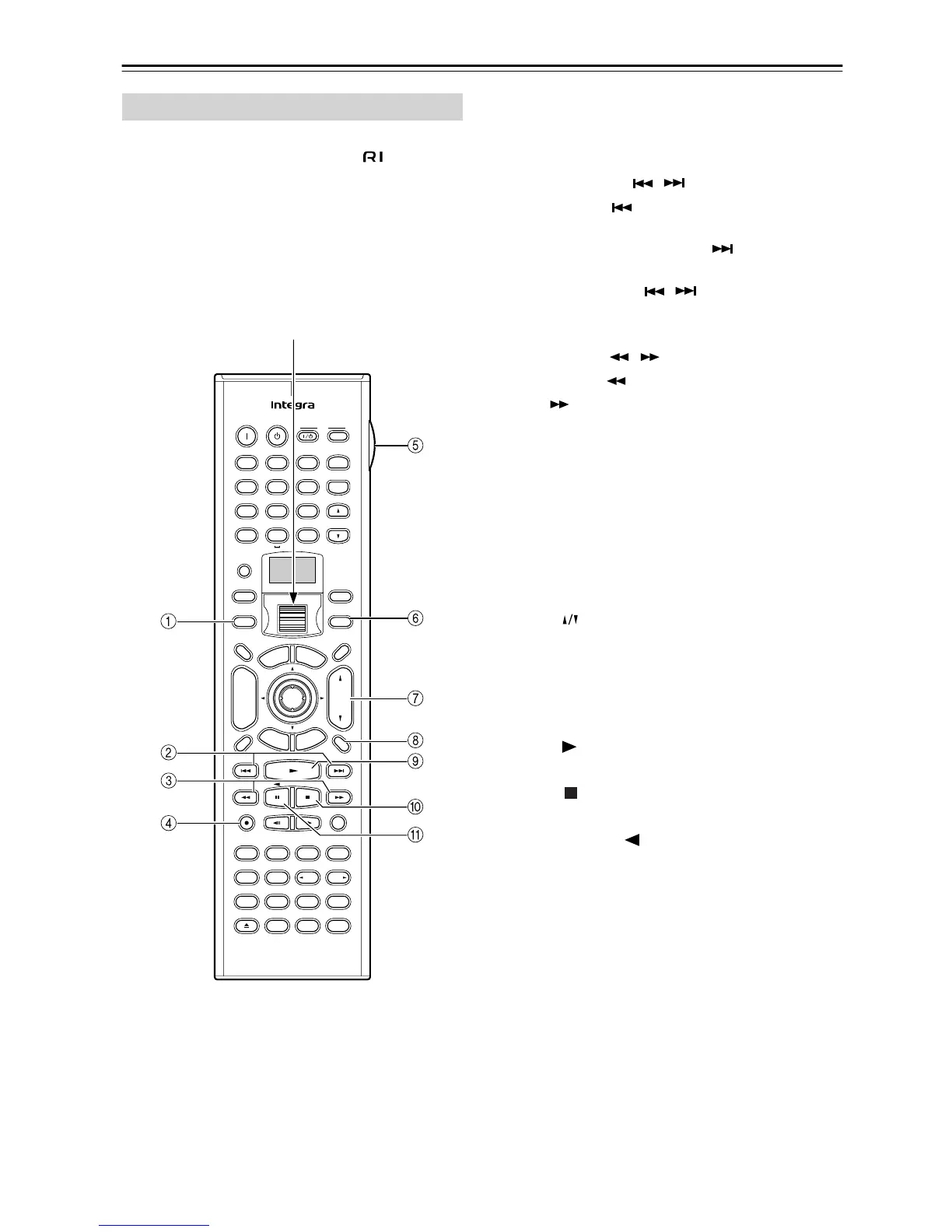
Tape mode is used to control an Onkyo cassette
recorder connected to the DTR-7.4 via . To select
Tape mode, press the scroll wheel until “AMP”
appears on the display.
Note:
While neither the Input button nor Mode button is illu-
minated, the scroll wheel changes the input source and
remote controller mode simultaneously (e.g., set the
input source and mode to “TAPE.”)
1 Mode button
This button is used with the scroll wheel to select
the remote controller modes. Press the scroll wheel
until “AMP” appears on the display.
2 Previous/Next / buttons
The Previous button is used to select the previ-
ous track. During playback it selects the beginning
of the current track. The Next button is used to
select the next track.
The Previous/Next / buttons make not work
properly with some cassette tapes depending on
how they were recorded.
3 Rewind/FF / buttons
The Rewind button is used to start rewind. The
FF button is used to start fast forward.
4 Rec ● button
This button is used to start tape recording.
5 LIGHT button
This button is used to turn on or off the remote con-
troller’s illuminated buttons.
6 Input button
This button is used to select the input source. Press
this button first, and then roll the scroll wheel until
“TAPE” appears on the display.
7 VOL button
This button is used to set the volume of the
DTR-7.4.
8 Muting button
This button is used to mute the DTR-7.4. This func-
tion can be set only with the remote controller.
8 Play button
This button is used to start tape playback.
0 Stop button
This button is used to stop tape playback.
A Reverse Play button
This button is used to start reverse playback.
Tape Mode
--
/
---
@.
-
'
/ ABC DEF
PQRS TUV WXYZ
GHI JKL MNO
TV CH
TV VOL
RC
-
550M
+
10 0
123
456
789
THX
DSP DSP
+
-
+
-
Direct Tuning
Caps Delete
Language Loca
t
ion
Album Ar
tist GenrePlaylist
Custom
Display
Dimmer
T
V
Input
Sleep
Muting
AngleSubtitleAudio
MemorySearchA
-
BRepeat
T
V
On Standby
A
u
d
i
o
A
D
J
E
x
i
t
G
u
i
d
e
Random
Step
/
Slow
Rec
Last Memory
Clear
Input
T
o
p
M
e
n
u
M
e
n
u
S
e
t
u
p
R
e
t
u
r
n
Zone
2
InputMode
Macro
CH
VOL
Disc
Test Tone
CH SEL
Pure A
Surround
Direct
Stereo
Re
-
EQ
All CH ST
Level
+
Level
-
L Night
Audio SEL
Enter
Scroll wheel



 To Next Page