80
Enjoying Net Audio—Continued
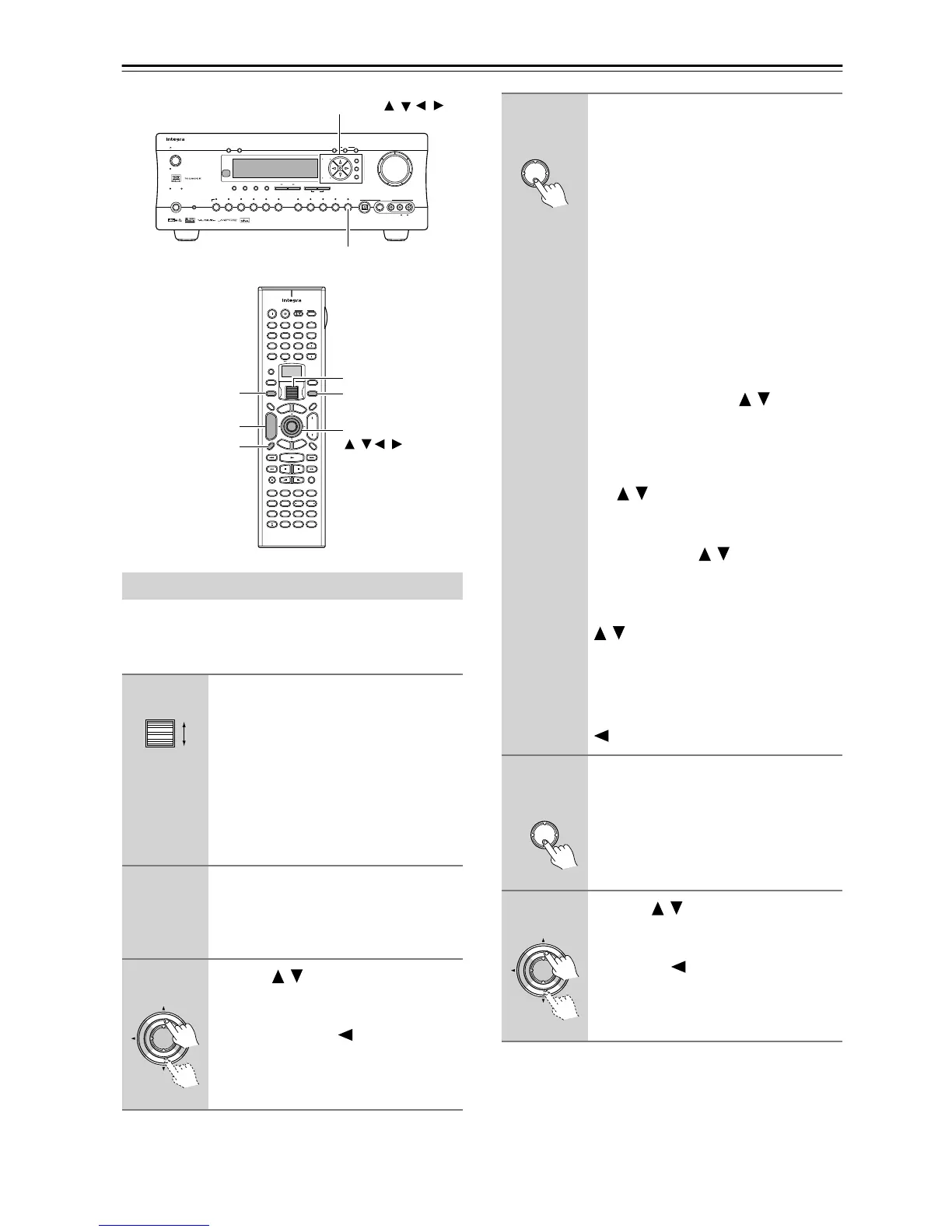
To listen to Internet radio, the connection/configuration
requirements listed on pages 72, 73 and 76-78 must be
satisfied.
Enjoying Internet Radio
1
While either the Input button
nor Mode button is illuminated,
rolling the scroll wheel to select
IRD (Internet Radio).
“NET-T” appears on the bottom line.
On the DTR-7.4, press the Net Audio
button. This button switches between
two alternative settings: Server and
Internet Radio.
2
Press the Display button on the
remote controller.
If the main menu has been already dis-
played, go to the next step.
3
Use the / buttons to select one
of the main menu; Genres, Loca-
tion, or Language.
To cancel, press the button.
Master Volume
Standby/On
UpsamplingPure Audio
Audio
Selector
Tape
Tuner Phono Net AudioCD
Video 1
VCR 1
Video 3
Video 2
VCR 2
Video 4 Video 5
DVD
Zone 2
()
GRN
Rec
()
RED
A
-
FO
RM Listening Mode Memory
Video 5 Input
StereoDirect
/
Pure Audio
DSP
Surround THX
Clear
Rec Out
Zone 2 Of
f
Setup
Tuning
Preset
Enter
Return
DimmerDisplay
S Video
Audio
Video L R
Phones
Standby
Memory FM Mode
DTR
-
7. 4
Digital
--
/
---
@.
-
'
/ ABC DEF
PQRS TUV WXYZ
GHI JKL MNO
TV CH
TV VOL
RC
-
550M
+
10 0
123
456
789
THX
DSP DSP
+
-
+
-
Direct Tuning
Caps Delete
Language Loca
t
ion
Album Ar
tist GenrePlaylist
Custom
Display
Dimmer
T
V
Input
Sleep
Muting
AngleSubtitleAudio
MemorySearchA
-
BRepeat
T
V
On Standby
A
u
d
i
o
A
D
J
E
x
i
t
G
u
i
d
e
Random
Step
/
Slow
Rec
Last Memory
Clear
Input
T
o
p
M
e
n
u
M
e
n
u
S
e
t
u
p
R
e
t
u
r
n
Zone
2
InputMode
Macro
CH
VOL
Disc
Test Tone
CH SEL
Pure A
Surround
Direct
Stereo
Re
-
EQ
All CH ST
Level
+
Level
-
L Night
Audio SEL
Enter
Display
CH/Disc +/–
Enter,
Input
Net Audio
///
Mode
Scroll wheel
Setup/Enter/Return/Cursor
/ //
Enter
4
Press the Enter button.
Wait while your requested data is down-
load from the XiVA Internet Radio Ser-
vice.
* What is the XiVA Internet Radio
Service?
The XiVA Internet Radio Service pro-
vides tuning information, allowing
you to select from a large number of
stations. You can find Internet Radio
Stations based on your interests,
musical taste, language and location.
When Genres is selected:
Allow a few moment until the Genre
menu appears. When the main list of
genres appears, use the / buttons to
select the genre desired. Pressing the
Enter button brings up the sub-list of the
genre you selected, which prompts you
to further select one of the items using
the / buttons.
When Location is selected:
The list containing names of countries
appears. Use the / buttons to select
the desired item.
When Language is selected:
The list of languages appears. Use the
/ buttons to select your desired
item.
If no list is found, “No List” appears.
You can return from this screen to the
previous selection screen by pressing the
button.
5
Press the Enter button.
You are presented with a list of radio sta-
tion names.
6
Use the / buttons to select one
of the radio stations.
You can return to the previous step by
pressing the button.



 To Next Page