124
Controlling Other Components—Continued
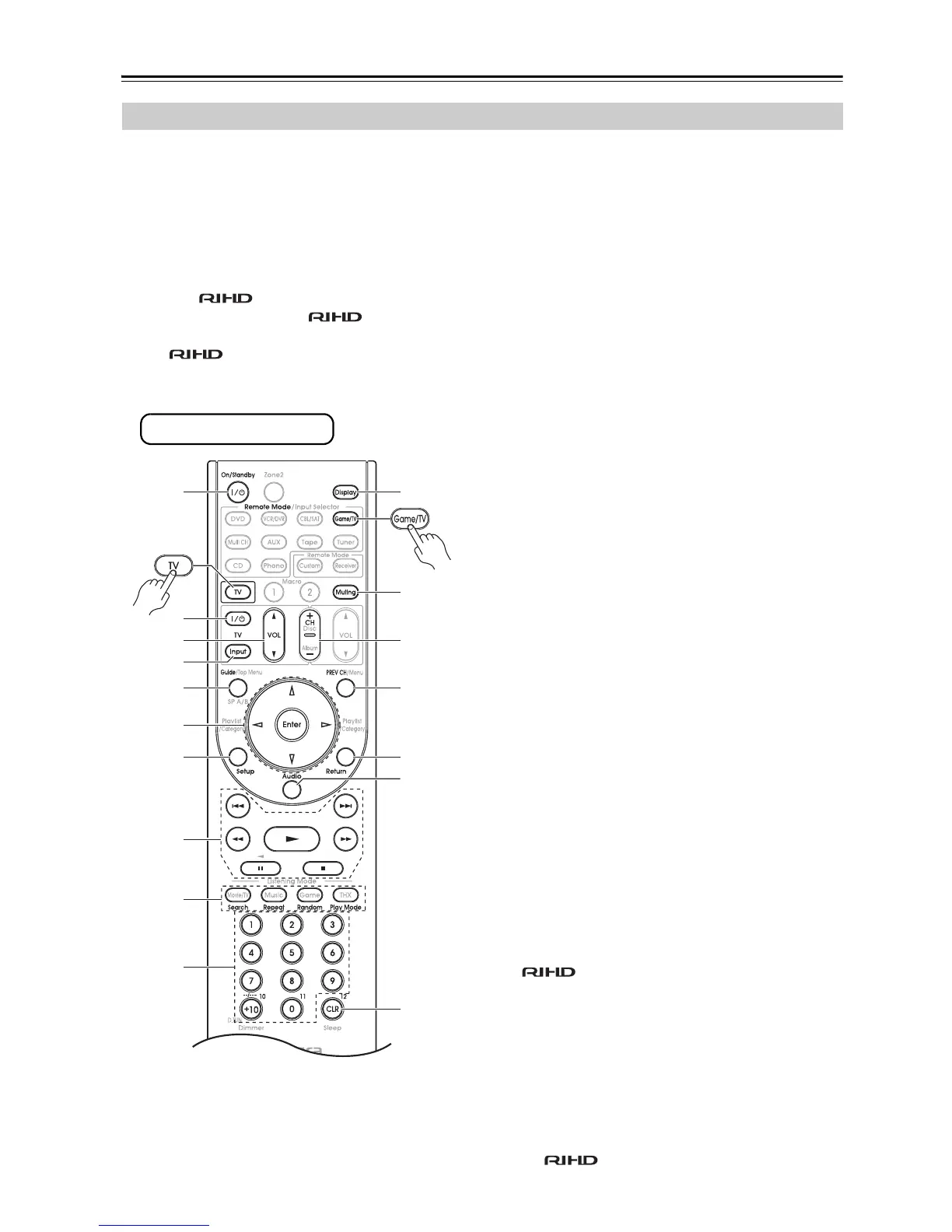
By pressing the [TV] or [Game/TV] buttons that’s been
programmed with the remote control code for your TV
(TV/DVD combination or TV/VCR combination), you
can control your TV with the following buttons.
For details on entering a remote control code for a differ-
ent component, see page 122.
The [TV] and [Game/TV] buttons are preprogrammed
with the remote control code for controlling a TV that
supports the *
1
. The TV must be able to receive
remote control commands via and be con-
nected to the AV receiver via HDMI. If controlling your
TV via doesn’t work very well, program your
TV’s remote control code into the [TV] button and use
the TV remote mode to control your TV.
a On/Standby, TV [9] buttons
Set the TV to On or Standby.
b TV VOL [q]/[w]
Adjust the TV’s volume.
c TV [Input] button
Selects the TV’s external inputs.
d Guide button*
Displays the program guide.
e Arrow [q]/[w]/[e]/[r] and Enter buttons*
Used to navigate menus and select items.
f Setup button*
Displays a menu.
g [1], [3], [2], [5], [4], [7], [6]
buttons*
Play, Pause, Stop, Rewind, Fast forward, Previous,
and Next.
These buttons works for combination devices.
h Search, Repeat, Random, and Play Mode
buttons*
Function as colored buttons or A, B, C, D buttons.
i Number buttons
Enter numbers. 0 button enters 11 on some compo-
nents. +10 button* works as “-.--” button or +10.
j Display button
Displays information.
k Muting button
Mutes the TV.
l CH +/– button
Select channels on the TV.
m PREV CH button
Selects the previous or last channel.
n Return button*
Exits the TV’s setup menu.
o Audio button*
Selects foreign language soundtracks and audio for-
mats (e.g., Dolby Digital or DTS).
p CLR button*
Cancels functions and clears entered numbers, or
enters 12.
* Buttons marked with an asterisk (*) are not supported by the
function.
Controlling a TV
1
bl
bm
bo
bp
bn
1
4
5
6
7
bk
2
3
8
9
bq
* With some components, certain buttons may not work as
expected, and some may not work at all.
Press [TV] button first
*1 The supported by the AV receiver is the CEC sys-
tem control function of the HDMI standard.



 To Next Page