35
Connecting the AV Receiver—Continued
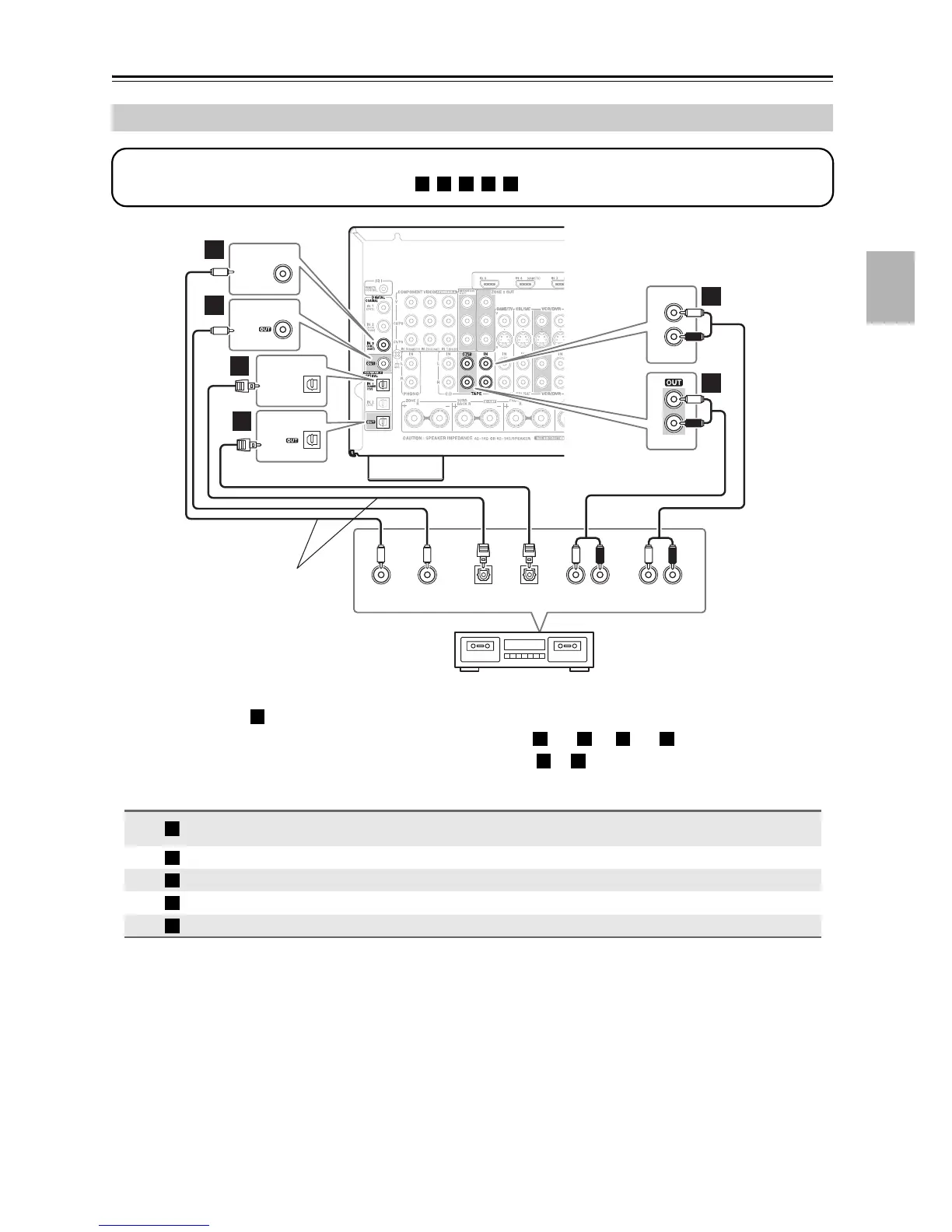
• With connection , you can play and record and listen in Zone 2.
• To connect the recorder digitally for playback, use connections and , or and .
• To connect the recorder digitally for recording, use connections or .
z
Connecting a Cassette, CDR, MiniDisc, or DAT Recorder
Connection AV receiver Signal flow Cassette, CDR, MD, or DAT recorder
TAPE IN L/R
TAPE OUT L/R
⇐
⇒
Analog audio L/R output
Analog audio L/R input
DIGITAL COAXIAL IN 3 (CBL/SAT) ⇐ Digital coaxial output
DIGITAL COAXIAL OUT ⇒ Digital coaxial input
DIGITAL OPTICAL IN 1 (GAME/TV) ⇐ Digital optical output
DIGITAL OPTICAL OUT ⇒ Digital optical input
d
e
COAXIAL
OUT
AUDIO
IN
LR
OPTICAL
OUT
L
R
IN
TAPE
COAXIAL
IN
AUDIO
OUT
LR
L
R
TAPE
COAXIAL
OPTICAL
IN 3
(CBL/SAT)
COAXIAL
IN 1
(GAME/TV)
OPTICAL
OPTICAL
IN
b
c
a
a
Step 1:
Choose a connection that matches the recorder ( , , , , ), and then make the connection.
a b c d e
Cassette, CDR, MD, etc.
Connect one or the other
Connection must be assigned
(see page 44)
a
a b a d
c d
a
b
c
d
e



 To Next Page