95
Advanced Setup—Continued
Equalizer Setting
With the Equalizer settings, you can adjust the tone of
speakers individually with a 7-band equalizer. The vol-
ume of each speaker can be set on page 94.
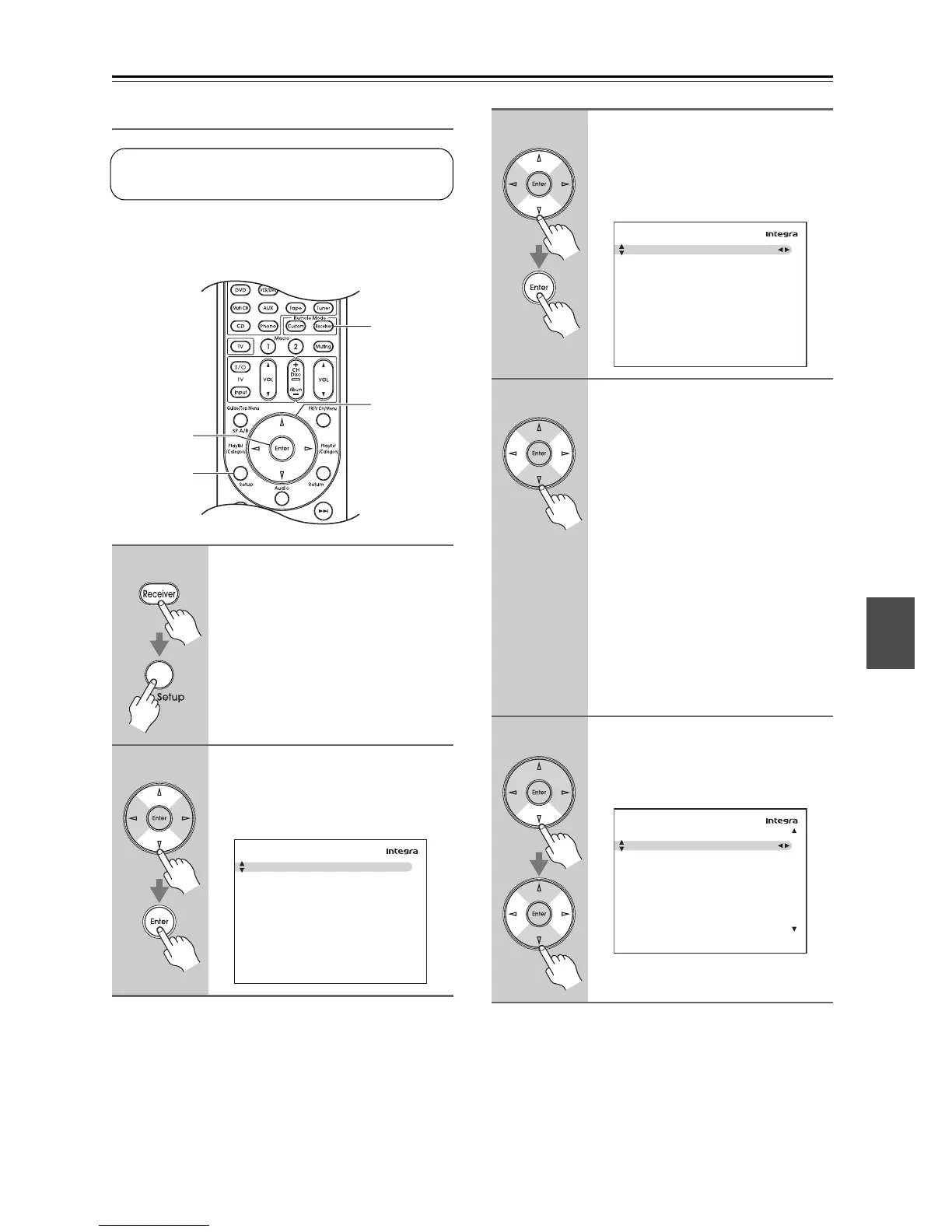
1
Press the [Receiver] button fol-
lowed by the [Setup] button.
The main menu appears onscreen.
If the main menu doesn’t appear, make
sure the appropriate external input is
selected on your TV.
2
Use the Up and Down [q]/[w] but-
tons to select “2. Speaker
Setup”, and then press [Enter].
The “Speaker Setup” menu appears.
This setting is set automatically by the Automatic
Speaker Setup function (see page 49).
1, 8
2-7
1
2, 3
2. Speaker Setup
1. Speaker Settings
2. Speaker Configuration
3. Speaker Distance
4. Level Calibration
5. Equalizer Settings
6. THX Audio Setup
3
Use the Up and Down [q]/[w] but-
tons to select “5. Equalizer Set-
tings”, and then press [Enter].
The
“Equalizer Settings”
menu
appears.
4
Use the Left and Right [e]/[r]
buttons to select:
Off:
Equalizer off, response flat.
Audyssey:
The tone for each speaker is set
automatically by the Automatic
Speaker Setup function.
Be sure to select this setting after
having performed the Automatic
Speaker Setup.
Manual:
You can adjust the equalizer for
each speaker manually.
If you select “Manual”, continue with
this procedure. If you select “Off” or
“Audyssey”, go to step 8.
5
Use the Down [w] button to select
“Channel”, and then use the Left
and Right [e]/[r] buttons to
select a speaker.
2–5. Equalizer Settings
Equalizer
Off
2–5. Equalizer Settings
Equalizer
Channel
25Hz
40Hz
63Hz
100Hz
160Hz
250Hz
400Hz
630Hz
Manual
Front
0dB
0dB
0dB
0dB
0dB
0dB
0dB
0dB
Equalizer



 To Next Page