56
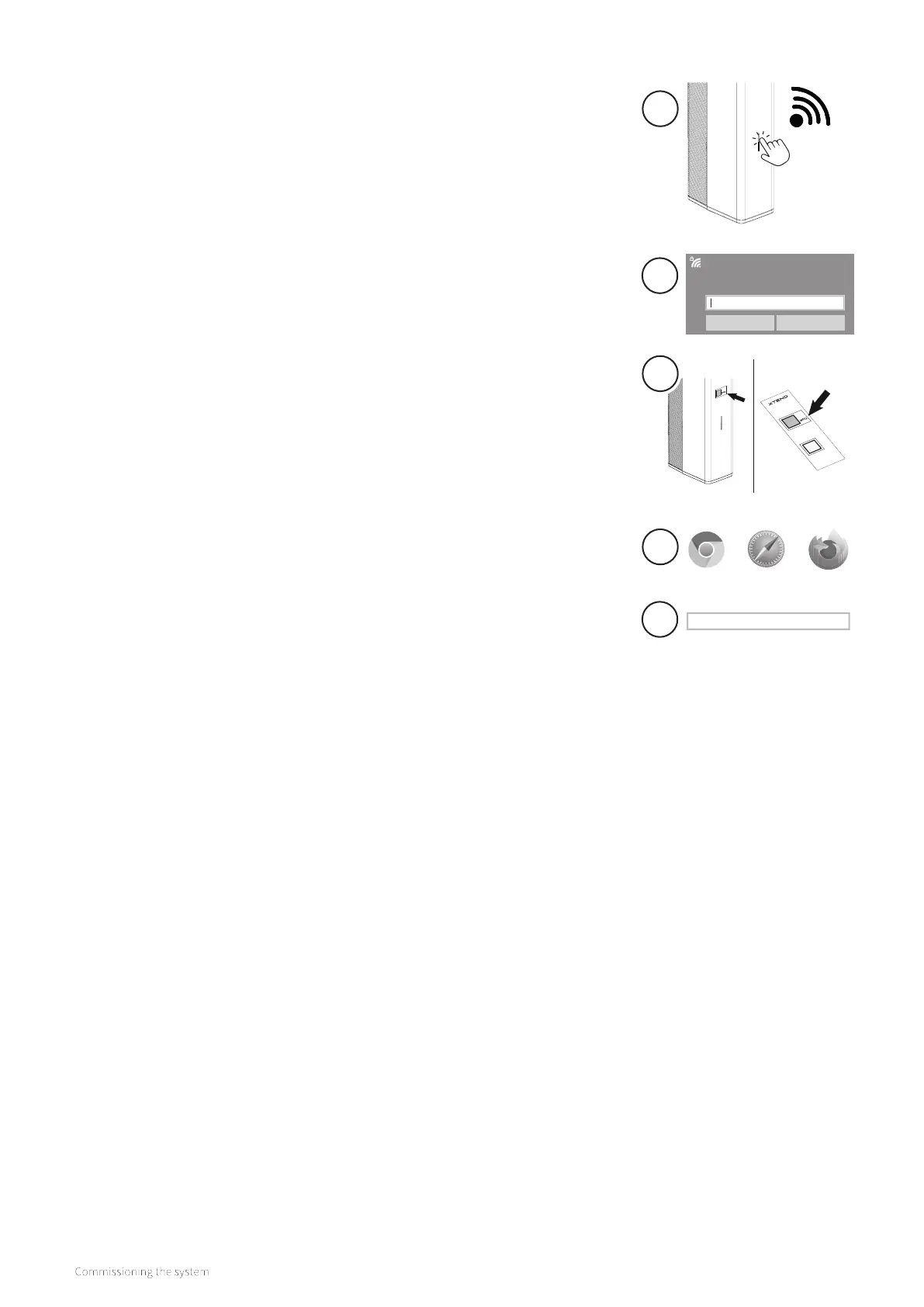
10.2.2 Mannual connection
1. Activate the WiFi access point on the Xtend by briefly pressing the
LED button on the front of the device. The LED will flash purple.
2. Go to the WiFi settings on the smartphone, tablet or laptop
and search for the network "Xtend_<serial number>", for example
Xtend_2209z01234.
3. Select network Xtend and enter the password which can be read
on the QR code sticker under WPA2 (on the front of the device or in
point (2) of the WiFi activation card)
4. Open a web browser on the smartphone, tablet or laptop.
5. Enter "mydevice.intergasheating.co.uk" as URL in the search
bar of the web browser and press "go/enter". If the page of "mydevice.
intergasheating.co.uk" is not available, type "10.20.30.1" and press "go/
enter".
You can now access the WiFi control screen.
The LED will flash for 15 minutes. As soon as the LED stops flashing, the WiFi
connection will no longer be active.
Xtend_2209z01234
Verbinding maken
Beveiligingssleutel voor het netwerk invoeren
Volgende Annuleren
2
3
mydevice.intergasheating.co.uk
4
5
1


 To Next Page