Setup
1.LoosenleverA.
2.Shiftmidlineholdertodesiredposition.
3.Tightenlever .
5.5.2AdjustingHeightofNucleusMidlineHolder
Youcanadjusttheheightofthenucleusmidlineholderin
twoways:
•Adjustittogetherwiththearmrestheight.Referto
correspondingarmrestchapters.
•Adjusttheheightofthenucleusmidlineholderonly.
Refertosectionbelow.
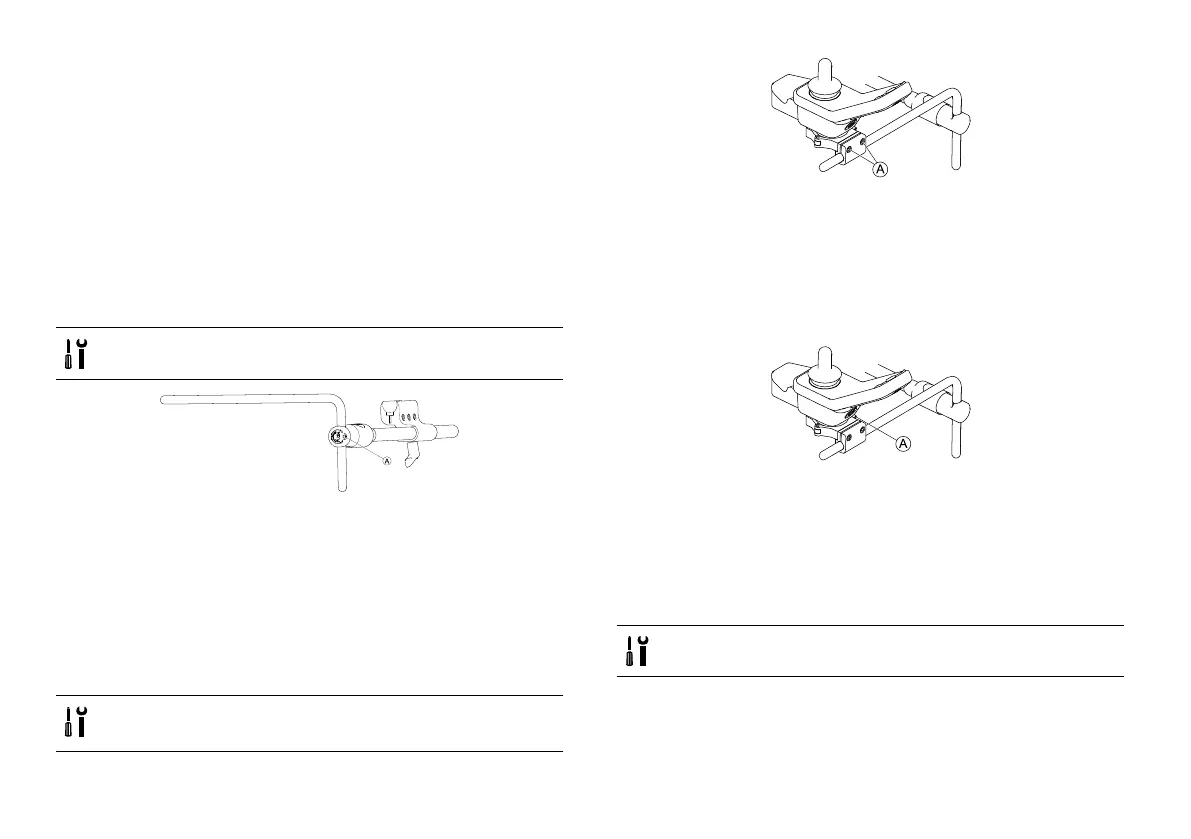
•3/16inchAllenkey
Fig.5-12
1.LoosenscrewA.
2.Adjustnucleustodesiredheight.
3.Tightenscrew.
5.5.3AdjustingJoystick/DisplayPositiononNucleus
MidlineHolder
DLX-REM110,DLX-REM2XX,DLX-REM400
•4mmAllenkey
•8mmwrench
TiltingRemote
Fig.5-13ExampleofDLX-REM400adjustment.DLX-REM110,
DLX-REM211andDLX-REM216areadjustedthesameway.
1.LoosenscrewsA.
2.Positionremoteonnucleus.
3.Tightenscrews.
RotatingRemote
Fig.5-14ExampleofDLX-REM400adjustment.DLX-REM110,
DLX-REM211andDLX-REM216areadjustedthesameway.
1.LoosenscrewA.
2.Rotateremoteinclamptodesiredposition.
3.Tightenscrew.
DLX-REM500
•3/16inchAllenkey
1528224-Y
41













 To Next Page