10
5.0 Error messages at remote
5.1 Error codes of remote
The following error codes refer to the G40 standard model with remote, main module and servo-/light module.
Do the follwing check before analyzing the error codes:
• Switch on and off the remote several times.
Wait five sec. before switching on again.
This check determines whether the error can automatically be corrected by the electronic system in which case
the flashing of status display is automatically deactivated.
If this is not the case, localize the error with the flash code.
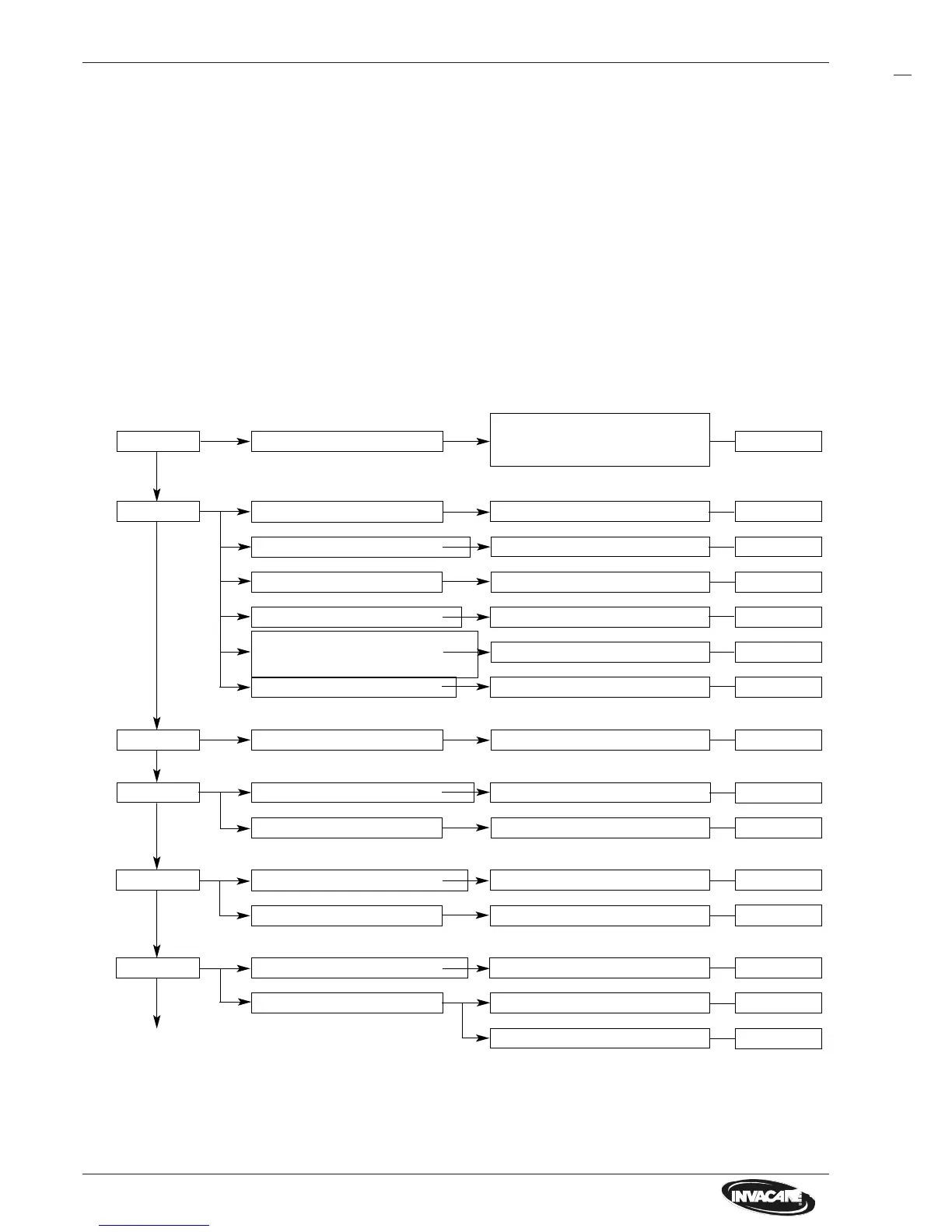
2 x flashes
Flash codes on remote status display:
1 x flash Elektronic module defective
Steering servo disengaged
5 x flashes
Motor connection loose/defective
Drive motor defective Check/replace motor
Check/replace cable/connector
6 x flashes
Brake error at motor Check motor brake
Motor connection loose/defective Check/replace cable/connector
4 x flashes
Motor connection loose/defective Check/replace cable/connector
Drive motor defective Check/replace motor
3 x flashes
Drive motor disengaged*
Engage motor (Driving mode)
* Flash code can only be activated when you move the joystick in freewheel operation.
Check / replace status display of
modules
Cable/connector loose, defective
Servo-/light module defective
Back turn signal bulb defective **
Short circuit in Lighting system
Engage servo (Driving mode)
Check/replace connector/cable
Replace servo-/light module
Replace turn signal bulb
Check lighting system
Steering servo motor defective Check/replace servo motor
Check/replace motor
Chapter 12.0
Chapter 9.2
Chapter 13.0
Chapter 12.3
Chapter 9.2
Chapter 11.2
Chapter 11.0
Chapter 9.1
Chapter 19.0
Chapter 9.1
Chapter 13.0
Chapter 9.1
Chapter 9.1
Chapter 9.1
Chapter 9.1
** Flash code can only be activated when the turn signal is also switched on.
The flash codes can be generally deactivated by switching off and on at remote.






 To Next Page