SECTION 6—FRONT RIGGINGS
Part No 1114809 85 TDX™ Wheelchairs
Installing/Removing Mechanical Elevating/Genius
Legrests
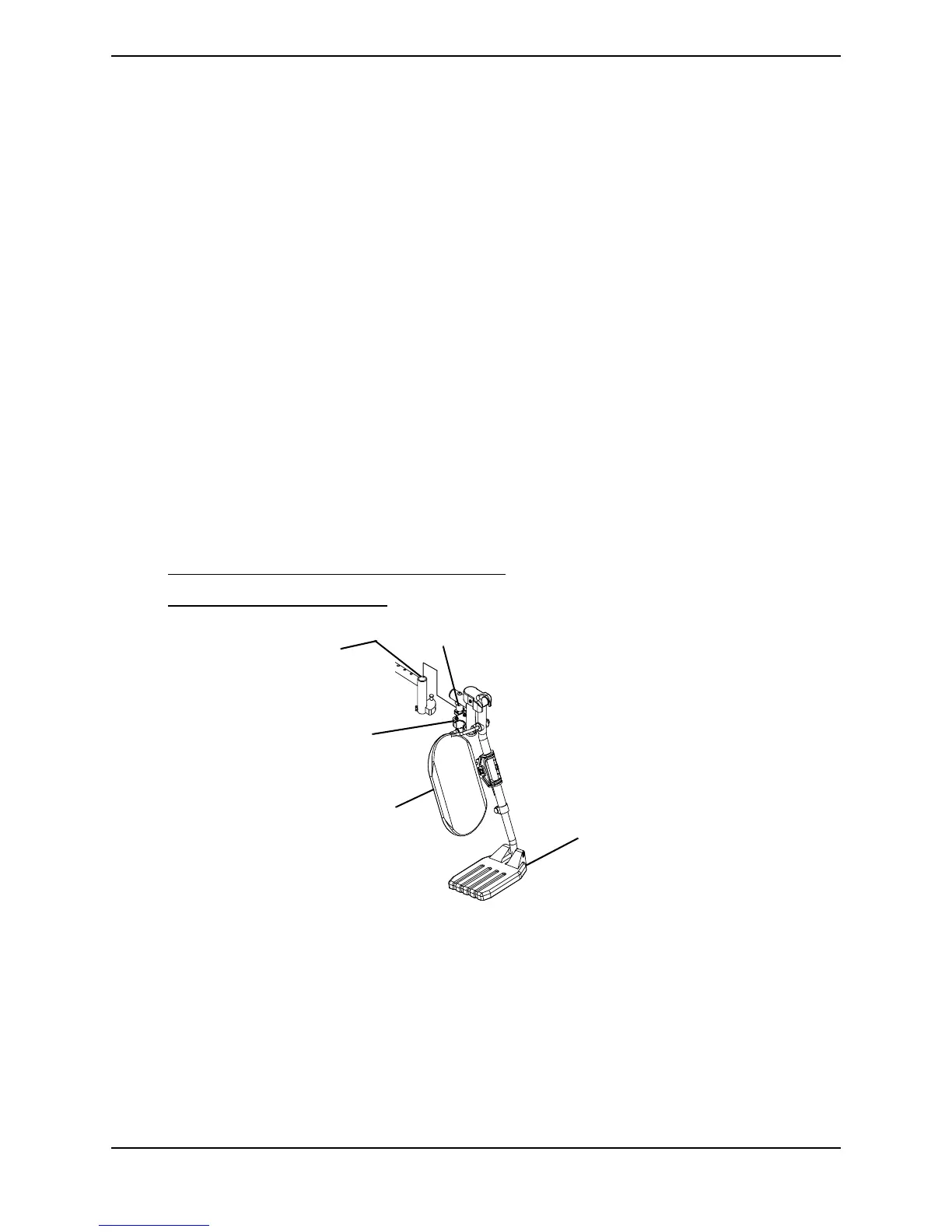
NOTE: For this procedure, refer to FIGURE 6.25.
Installing
1. Turn elevating legrest to side (open footplate is perpendicular to wheelchair) and
position the mounting pin on the legrest mounting holes on the seat frame.
2. Insert the mounting pin into the mounting hole.
NOTE: Make sure the legrest sits flush on the seat frame.
3. Rotate the elevating legrest toward the inside of the wheelchair until it locks in place.
NOTE: The footplate will be on the inside of the wheelchair when locked in place.
4. Lift the elevating legrest up and position the mechanical elevating legrest push rod
around the pin on the legrest as shown in FIGURE 6.25.
5. Press down on mechanical elevating legrest push rod until there is an audible "click".
6. Repeat STEPS 1-5 for the opposite elevating legrest.
7. If necessary, adjust elevating legrests. Refer to one of the following:
• Adjusting Mechanical Elevating Legrests on page 86.
• Adjusting Genius Legrests on page 87.
FIGURE 6.25 Installing/Removing Mechanical Elevating/Genius Legrests
Removing
1. Lift up on the mechanical elevating legrest push rod and remove from the pin on the
legrest as shown in FIGURE 6.25.
2. Push elevating legrest release handle toward the opposite side of the wheelchair and
swing legrest to the outside of the wheelchair.
3. Lift up on elevating legrest and remove from wheelchair.
4. Repeat STEPS 1-3 for opposite side of wheelchair.
Mounting
Hole
Mounting Pin
Legrest Release
Handle
Calfpad
Footplate
NOTE: AT5544 shown.
Genius legrest installs
the same way.




 To Next Page