SECTION 6—FRONT RIGGINGS
Part No 1114809 87 TDX™ Wheelchairs
Speed/Height
NOTE: Mechanical Elevating Legrest speed and height cannot be adjusted independently of the
recline function of the wheelchair. If the mechanical elevating legrests are not operating as desired,
have the wheelchair serviced by an Invacare dealer or technician.
Adjusting Genius Legrests
Footplate Height
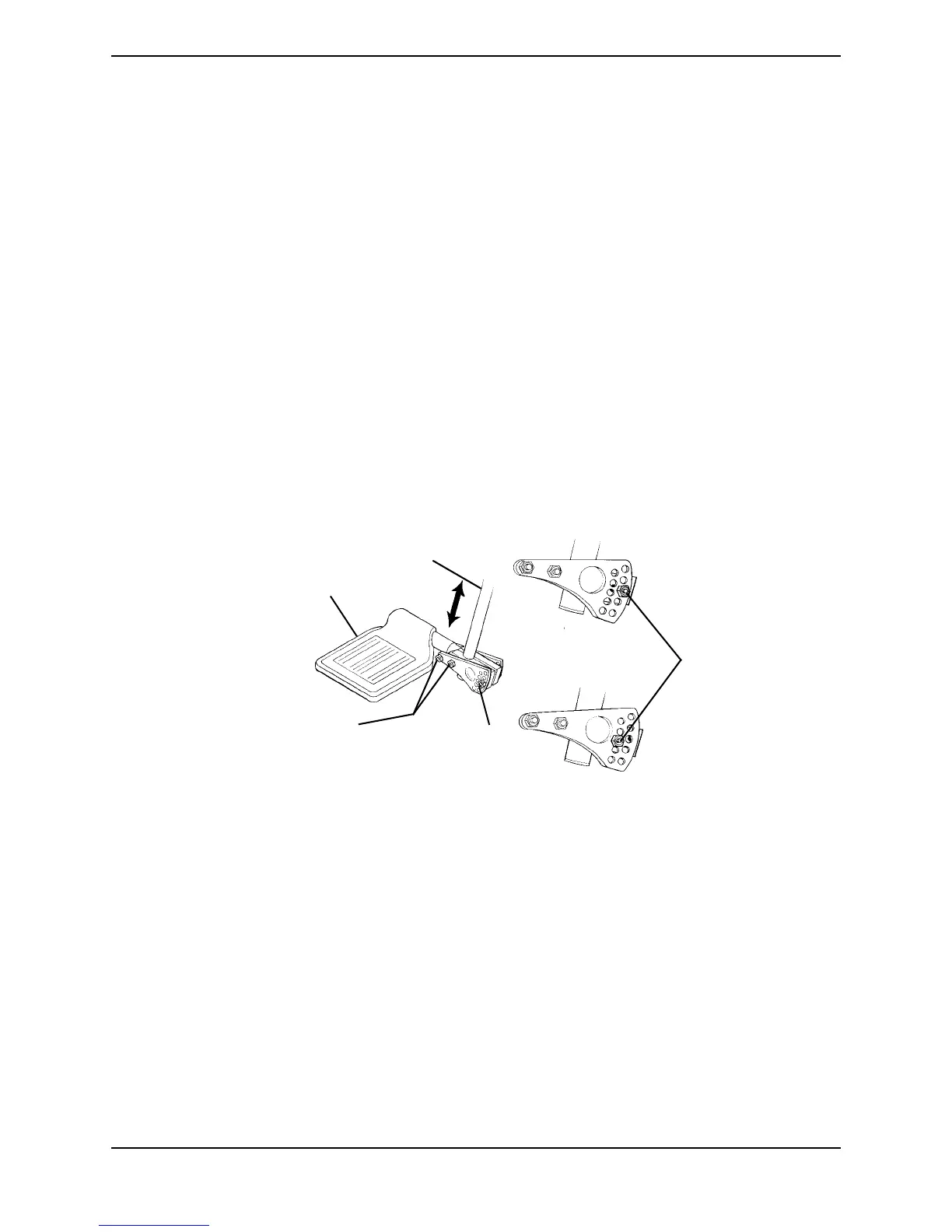
NOTE: For this procedure, refer to FIGURE 6.28.
1. Note the angle of the footplate in relation to the legrest as shown in FIGURE 6.28.
2. Loosen, but DO NOT remove, the three hex bolts and locknuts that secure the
footplate to the legrest.
3. Adjust the footplate to the desired height.
4. Line up the footplate to the angle noted in STEP 1.
5. While holding the footplate, tighten the three hex bolts and locknuts securely.
FIGURE 6.28 Adjusting Genius Legrests - Footplate Height/Footplate Angle
Footplate Angle
NOTE: For this procedure, refer to FIGURE 6.28.
1. Note the angle of the footplate in relation to the legrest as shown in FIGURE 6.28.
2. Remove the rear hex bolt and locknut that secure the footplate to the legrest.
3. Move the footplate to the desired angle.
4. Install the hex bolt through the mounting holes that correspond to the desired
footplate angle.
5. Install the locknut onto the hex bolt.
6. Line up the footplate to the angle noted in STEP 1.
7. While holding the footplate, tighten the hex bolt and locknut securely.
Footplate
Legrest
Rear Hex Bolt
and Locknut
Rear Hex Bolt
and Locknut
Hex Bolts and
Locknuts




 To Next Page