12 GDC-800H IP DECT Handset User Guide - Issue 2.0
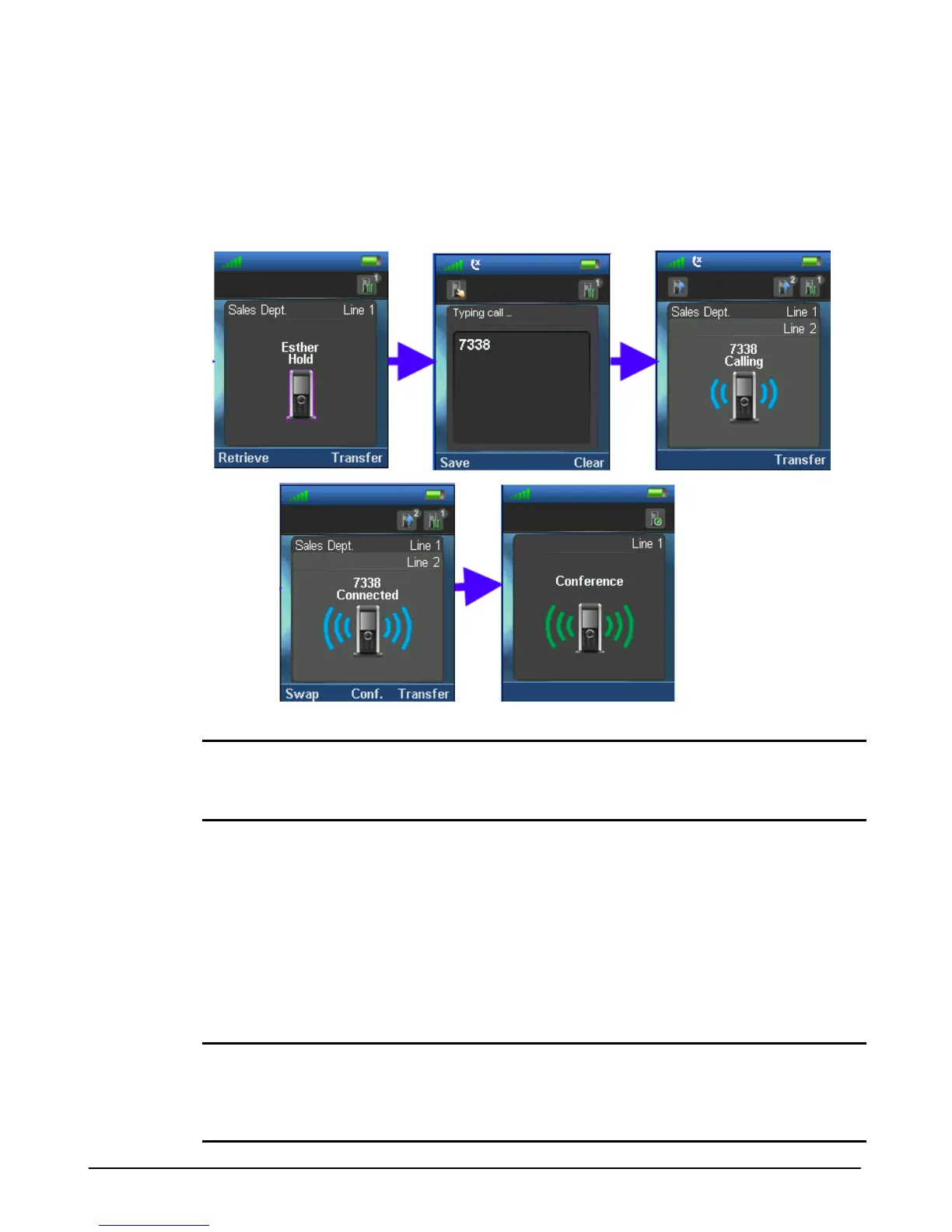
1. While on an active call, press the “Hold” soft key.
2. Dial the party to join in the conference.
3. Press the Off-hook key (green handset).
4. After the party answers, press the “Conf.” soft key to establish the three-way conference.
NOTE
When you have an active and a held call, you may toggle between the calls using the “Swap”
soft key; pressing the “Swap” key places the active call on hold and retrieves the held call.
Accessing Your Voice Mail
The notification LED at the top of the handset lights if you receive a new message. To call your
voice mail to listen to your messages or to manage your mailbox,
1. Press and hold the ‘1’ digit on the dial pad.
2. After connecting to the Voice mail system, follow the voice instructions to retrieve your
messages and manage your mailbox settings.
NOTE
The notification LED lights in a red, green or orange color to indicate a new message. The LED
may be disabled and provide no indication of a new message. The LED is configured under the
Handset “Setting” menu.



 To Next Page