GDC-800H IP DECT Handset User Guide - Issue 2.0 13
The base station must be configured by your system administrator to access your iPECS host
voice mail service.
Redial
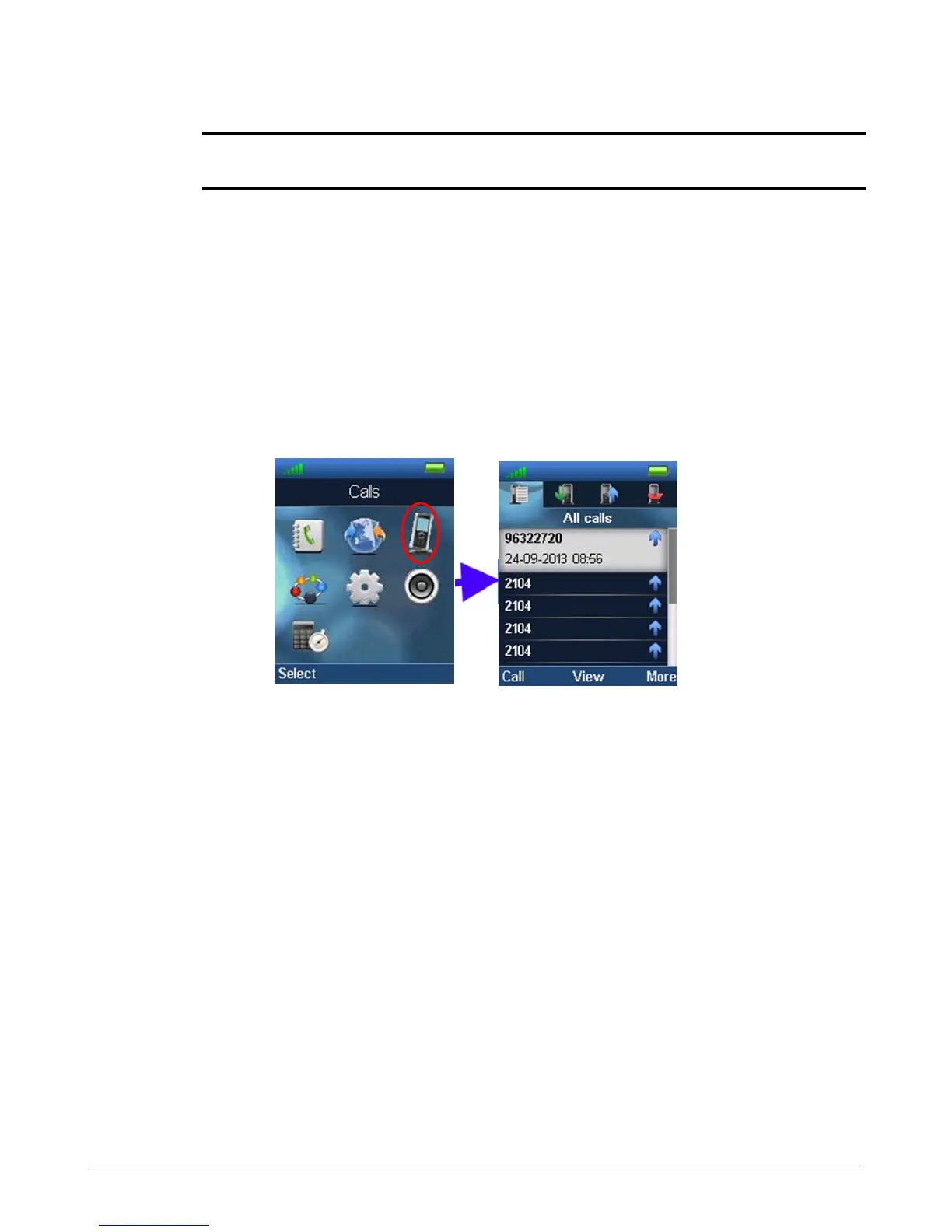
The GDC-800H has four call log lists (All, received, outgoing and missed). You can select a
number from a list to return a call to the number.
1. While idle, press the Menu key then select the Call Logs menu
2. Select “View” then select the type of log (All, received, outgoing, or missed)
3. Use the Up/Down navigation buttons to highlight the desired number.
4. Press the “Call” soft key to call the number.
Mute
You can activate mute so that your voice is not transmitted to the connected call. The Mute icon
will display to indicate the active mute status. To activate or deactivate mute, press the Mute
button.
Hands free
The GDC-800H includes a loudspeaker on the rear of the unit that can be activated for
handsfree use of the phone. To activate the Handsfree mode press the Speaker key. To
deactivate the speaker, press the Off-hook key (green handset) to continue the call using the
handset earpiece, or press the On-hook key to terminate the call.
Headset



 To Next Page