iPECS-MG Quick Start Guide
5
2.2 Power Supply Unit Installation
The Power Supply Unit (PSU) can be installed in the BKSU and the EKSU by the installer.
Make sure that the KSU is not plugged into an outlet. The PSU is located at the rear side of the KSU and is capable of
providing three kinds of power sources to the MB and MBE through the 20-pin connector, CN6/CN7 (refer to the
following Table).
AC Input Voltage and Fuse Rating
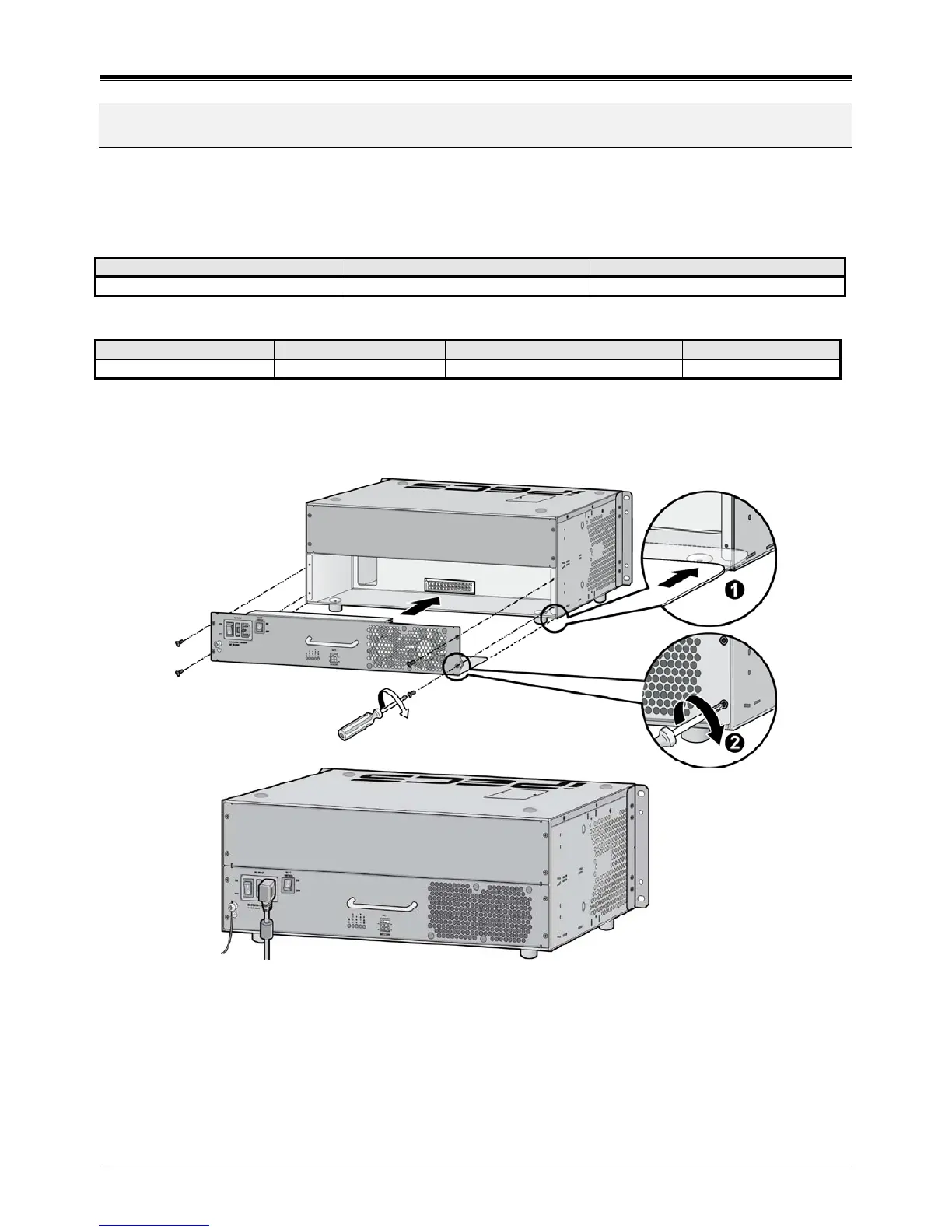
1. Insert PSU along the guide rails on the rear side of iPECS-MG.
2. Slide and Press PSU to the CN6 on MB and the CN7 on MBE.
3. To fix it securely, turn 4 screws clockwise.
Figure 2.2 PSU Installation
NOTE
• When turning-Off the PSU of 1
st
KSU, the 2
nd
and 3
rd
PSUs first should be turned-Off, or the
iPECS-MG will automatically shut them off.
• The 1
st
and 2
nd
KSUs will work independent of the 3
rd
KSU (power shut-Off).
• The 1
st
KSU will work independent of the 2
nd
KSU (powered-Off), however, the 3
rd
KSU
cannot work without the 2
nd
KSU powered-On.
• The MPB100/MPB300 should be reset if the 2
nd
and 3
rd
KSUs are turned-On/Off.



 To Next Page