| Messages and troubleshooting
138
YLS-K
10.4.5 Updating the firmware and product configuration
Some faults may require a firmware update. This can be done with the
help of an HPLP file. The file will be sent to you by email from the IPG
service department.
Contact the competent service department of IPG Laser GmbH and de-
scribe the problem. In order for the problem to be solved more quickly,
we recommend creating a log file with LaserNet first and sending this
by email to the IPG service department (Behavior in the event of mal-
functions [}129]).
Laser configuration update
In addition to firmware updates, the HPLP file can
also be used for updating the laser configuration.
You will receive an HPLP file from our service employees with the
firmware update, which can be installed using LaserNet. To do this, pro-
ceed as follows:
1. Start the LaserNet software.
2. Make certain that there is a network connection to the laser.
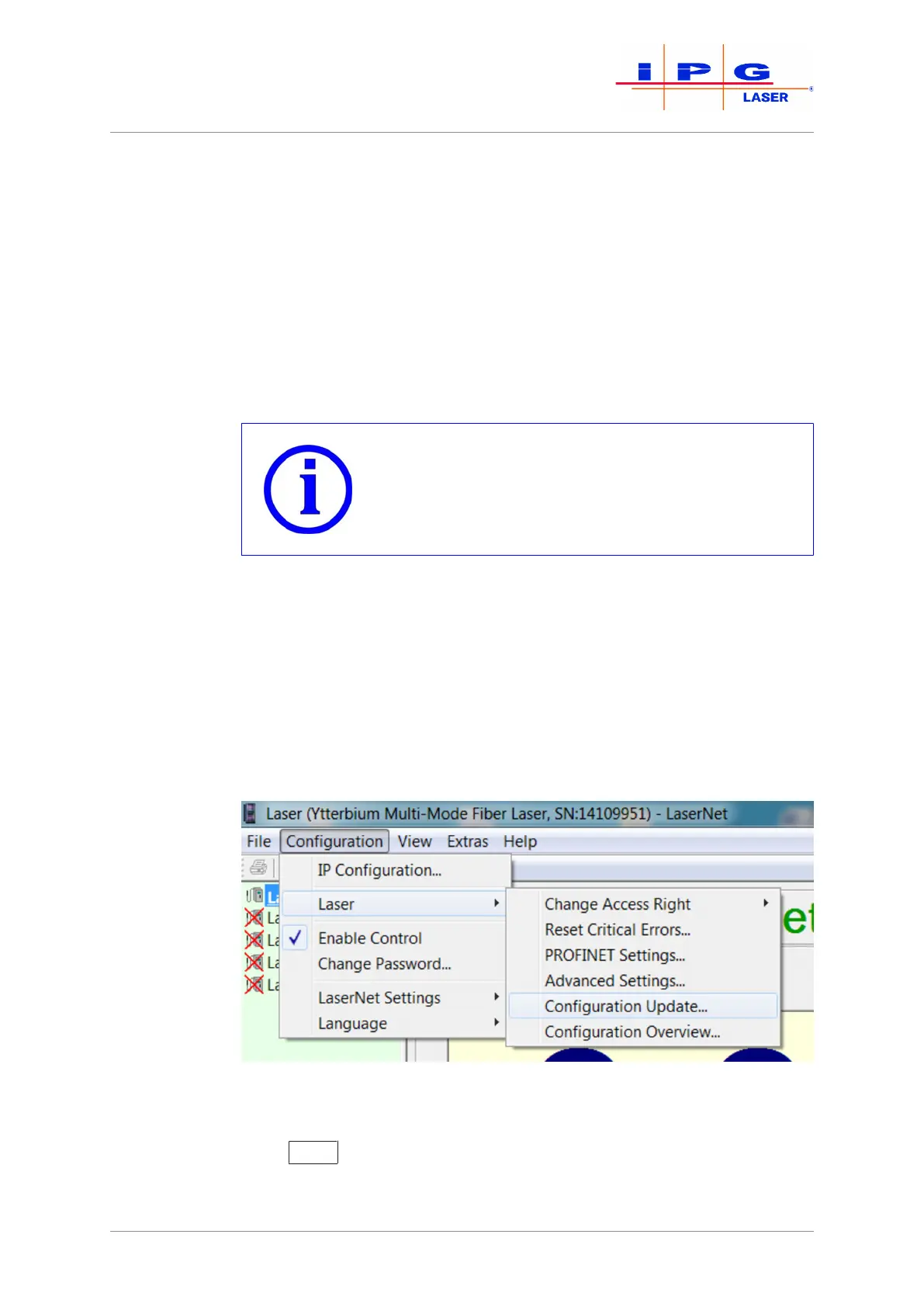
3. Select Configuration\Laser\Configuration up-
date… .
Figure87: Updating the configuration
4. In the opened window, select the current HPLP file and click on
Open
.



 To Next Page