| LaserNet software
74
YLS-K
8.3 Establishing a connection to the laser
In order that you can establish a connection between your computer
and the laser, you must connect the computer and the laser to the same
local network.
Proceed as follows:
1. Connect a network cable to the corresponding interface of the
laser and to the network card of your computer.
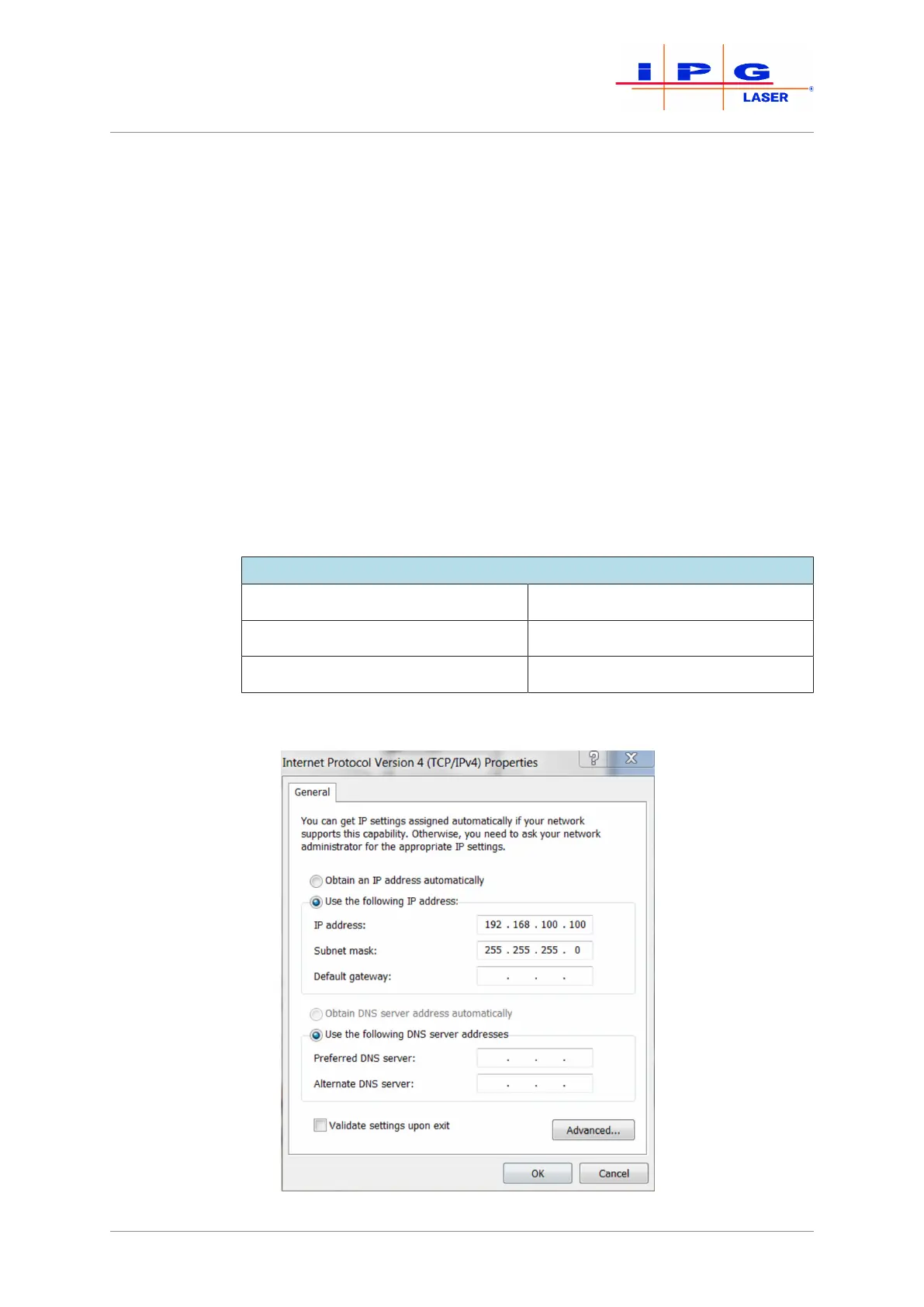
2. In the Windows operating system, open the dialog window In-
ternet Protocol Properties (TCP/IPv4) and enter there
the standard IP address of the computer (see table and Fig. Inter-
net Protocol Properties)
3. Change the last 3 digits of the IP address. Note that the IP address
of the laser and the computer must differ in the last three digits.
4. After entering the IP address, click on OK.
Standard IP address of the computer and laser
IP address computer 192.168.100.100
IP address laser 192.168.100.1
Subnet mask 255.255.255.0
Table7: Standard IP address
Figure32: Internet Protocol Properties



 To Next Page