81YLS-K
8.6.2 Configuration menu
Optional functions
Depending on the laser configuration and the se-
lected operating mode (TEST/ROBOT), some func-
tions may not be available in LaserNet. The unavail-
able options are shown in gray in LaserNet.
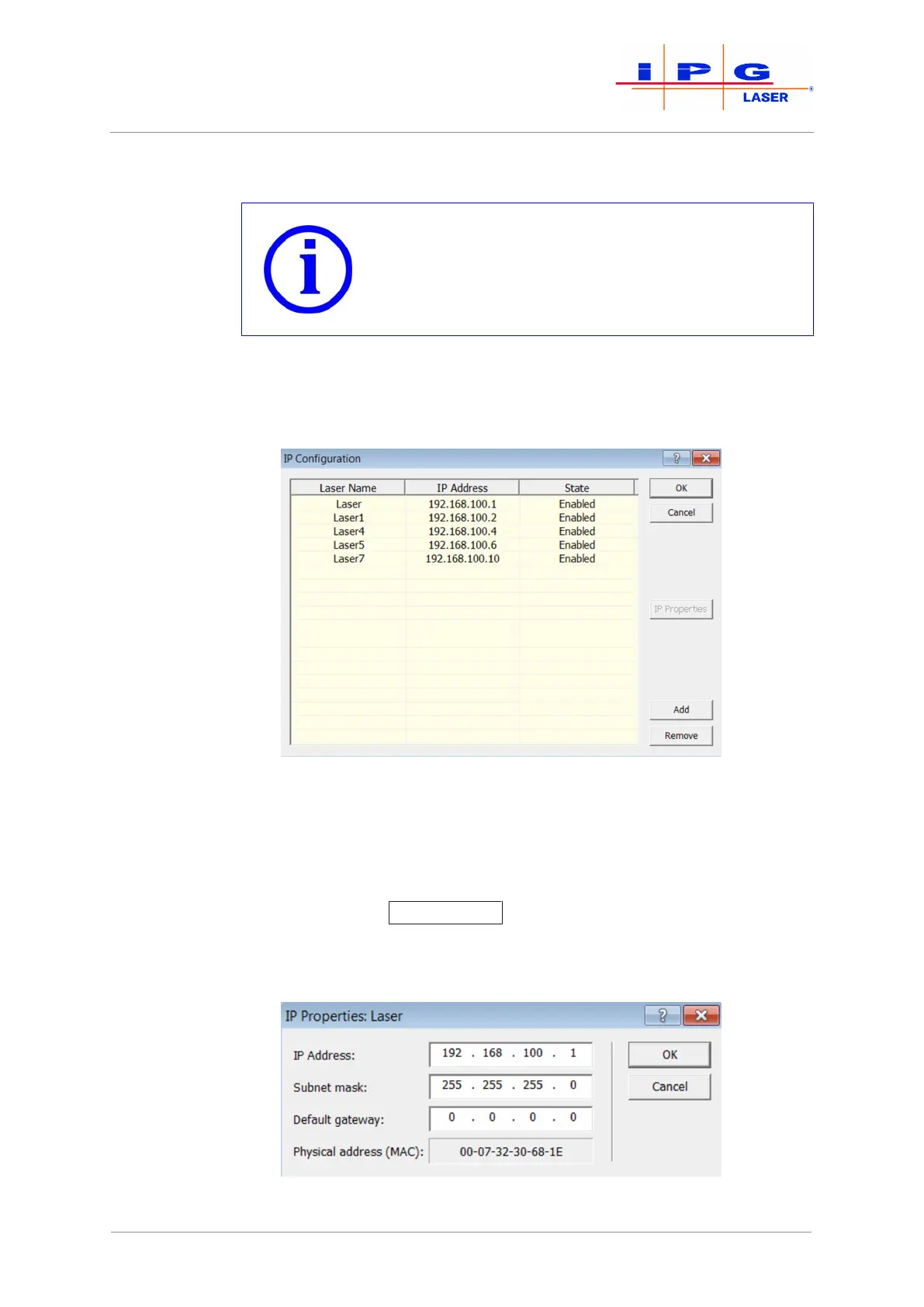
IP Configuration
In the submenu IP Configuration, you can change the laser name and the
IP address of a laser as well as activate or deactivate a laser.
Figure38: IP Configuration activated
The laser name is used for identification if you control and monitor
multiple lasers with one computer. Ensure that you assign each laser a
unique name. In the IP address column, the IP address for the laser with
the corresponding name is assigned. If an active connection to a laser
exists, the button IP Properties
becomes available (only in Supervisor
Mode). Clicking on this button opens an input window in which you can
change the IP address of the laser.
Figure39: IP Properties
| LaserNet software



 To Next Page