Home
iRobot
Vacuum Cleaner
Roomba Red
Page 81
iRobot Roomba Red - Page 81
87 pages
Manual
Save Page as PDF
To Next Page
To Next Page
To Previous Page
To Previous Page
Loading...
81
3
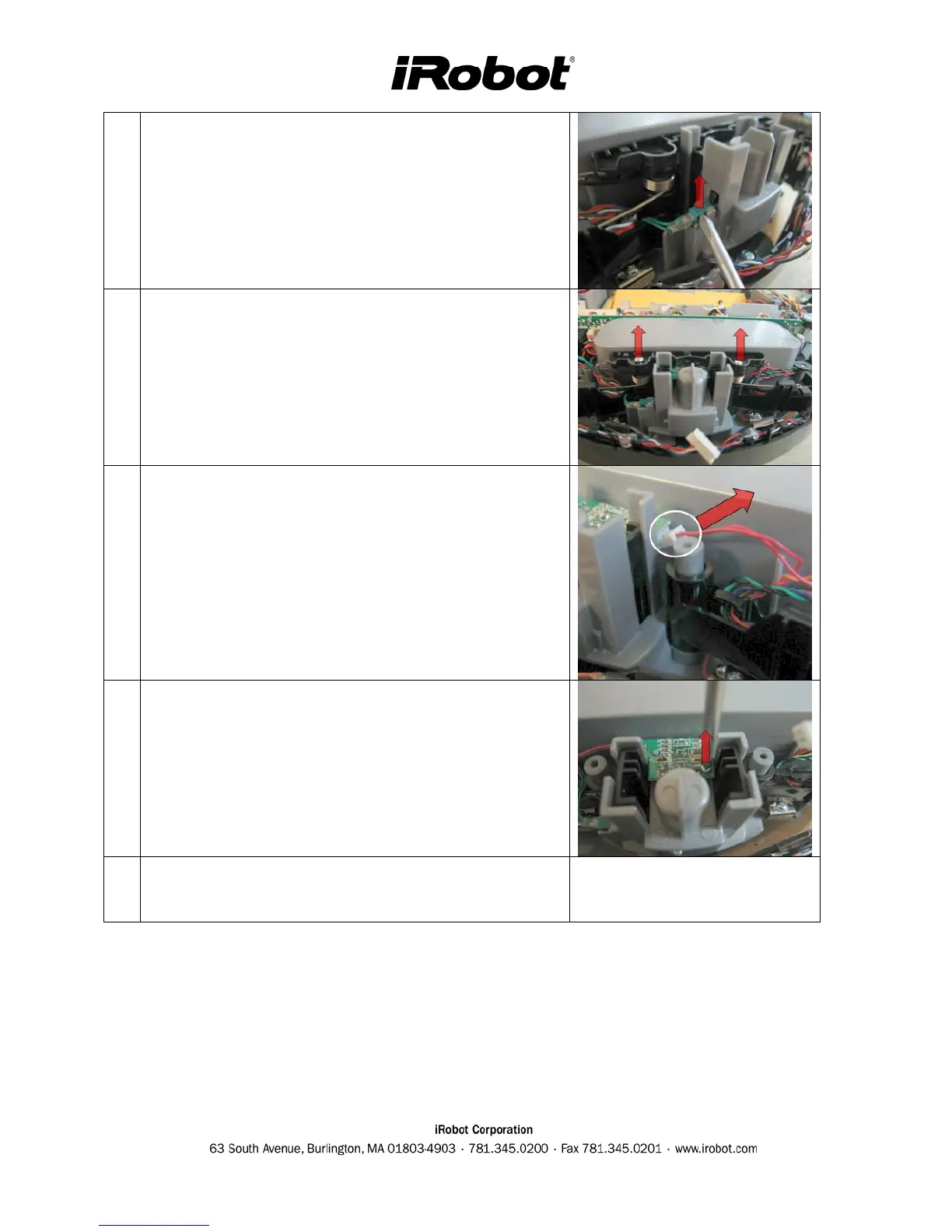
Remove caster drop switch from the chassis.
4
Unscrew the spring cover and remove it. Release and
remove the springs underneath.
5
Disconnect the optical connector.
6
Remove screw that holds down optical pcb
7
Lift board off the chassis.
80
82
Table of Contents
Main Page
Table of Contents
2
Roomba Service Process
5
01: Customer Call
6
02: Roomba Return Procedure
7
03: Incoming Roomba Inspection
7
04: Roomba Cleaning
8
05: Roomba Software & Charging Reset
8
06: Roomba Diagnostics: Built-In-Test (Bit)
9
07: Capture Built-In-Test Data
9
08: Roomba Diagnostics: Mobility Test
9
09: Fix or Replace Roomba
9
10: Test Battery
10
11: Test Power Supply
10
12: Test Home Base (if Applicable)
10
13: Test Virtual Wall (if Applicable)
11
14: Test Remote (if Applicable)
11
15: Replace Faulty Accessories
11
16: Pack & Record the Serial Numbers
11
17: Monthly Data Report to Irobot
12
Roomba Vacuuming Robot
13
Roomba Terminology
13
Roomba Chassis Disassembly Procedure
14
Roomba Electrical Inter-Relationships
15
Service Procedure (Based on Built-In-Test Failures)
16
Failed Bit 0 - Panel LEDS
17
Failed Bit 1 - Bumpers
18
Failed Bit 2 or 3 - Outer & Inner Cliff Sensors
19
Failed Bit 4 - Wheel Drop
20
Failed Bit 4 - Wall Sensor
21
Failed Bit 5 - RCON / IR Receiver
22
Failed Bit 6 - Battery Sensor
22
Failed Bit 7, 8 or 9 - Drive Wheels & Encoders
23
Failed Bit 10 - Stasis (Front Wheel)
25
Failed Bit 11 - Main Brush
26
Failed Bit 12 - Debris Sensor
27
Failed Bit 13 - Vacuum
28
Failed Bit 14 - Side Brush
29
Failed Bit 15-20 - Charging
30
Precautionary Replacements
31
Charging Accessories
32
Roomba Battery
33
Battery Types
34
Battery Insertion Technique
34
General Battery Maintenance Tips
35
Battery Troubleshooting
35
Roomba Power Supply
36
Power Supply Generations
36
Power Supply Troubleshooting
36
Roomba Home Base
37
Manual Docking
38
Home Base Generations
39
Home Base Troubleshooting
39
Rapid Charger
40
Roomba Accessories
41
Roomba Virtual Wall
42
Virtual Wall Generations
43
Virtual Wall Troubleshooting
43
Roomba Remote
44
Remote Troubleshooting
44
Roomba Filter
45
Filter Troubleshooting
45
Bristle, Flexible and Side Brush
46
Brush Troubleshooting
46
Appendix A: Charging Troubleshooting Flowchart
48
Appendix B: Serial Number Format
49
Appendix C: Roomba Code List
51
Appendix D: Roomba Error Codes
53
Appendix E: Roomba Software & OSMO
54
Appendix F: Roomba Built-In-Test Procedure
56
Auto-Advance Mode
57
Manual-Advance Mode
58
Alternative Data Capture
61
Irobot Data Capture
61
Built-In-Test Output File (Using Irobot Roomba Factory-Test-Client Version 1.1)
62
Appendix G: Roomba Built-In-Test Limits
63
Appendix H: Roomba Mobility Test Procedure
64
Appendix I: PCB Connector Designation
68
Appendix J: Battery Test Procedure
69
Appendix K: Power Supply Test Procedure
70
Appendix L: Built-In-Test Toolbox Kits
71
Appendix M: Disassembly Procedure
72
Roomba Chassis Disassembly Procedure
72
Roomba Cleaning Frame Disassembly Procedure
73
Roomba Main PCB & Inner Bumper Removal Procedure
75
Roomba Wheel Disassembly Procedure
77
Roomba Fixed Caster Removal Procedure
79
Roomba Swivel Caster Removal Procedure
80
Roomba Swivel Optical Stasis & Switch Removal Procedure
80
Appendix N: User Interface
82
User Interface : POWER Light
82
User Interface : STATUS Light
83
User Interface : DIRT Detect
83
Appendix O: Roomba Engineering Changes
84
Appendix P: GLOSSARY
87
Related product manuals
iRobot Roomba
40 pages
iRobot Roomba e6
13 pages
iRobot Roomba i4
43 pages
iRobot Roomba j7
40 pages
iRobot Roomba i6
16 pages
iRobot Roomba e5
12 pages
iRobot Roomba j9
12 pages
iRobot Roomba i3
43 pages
iRobot Roomba j7+
32 pages
iRobot Roomba 890
13 pages
iRobot Roomba i5+
49 pages
iRobot Roomba 900
36 pages



 To Next Page