Manual No. 0183B 9/29 IPC Series Service Manual
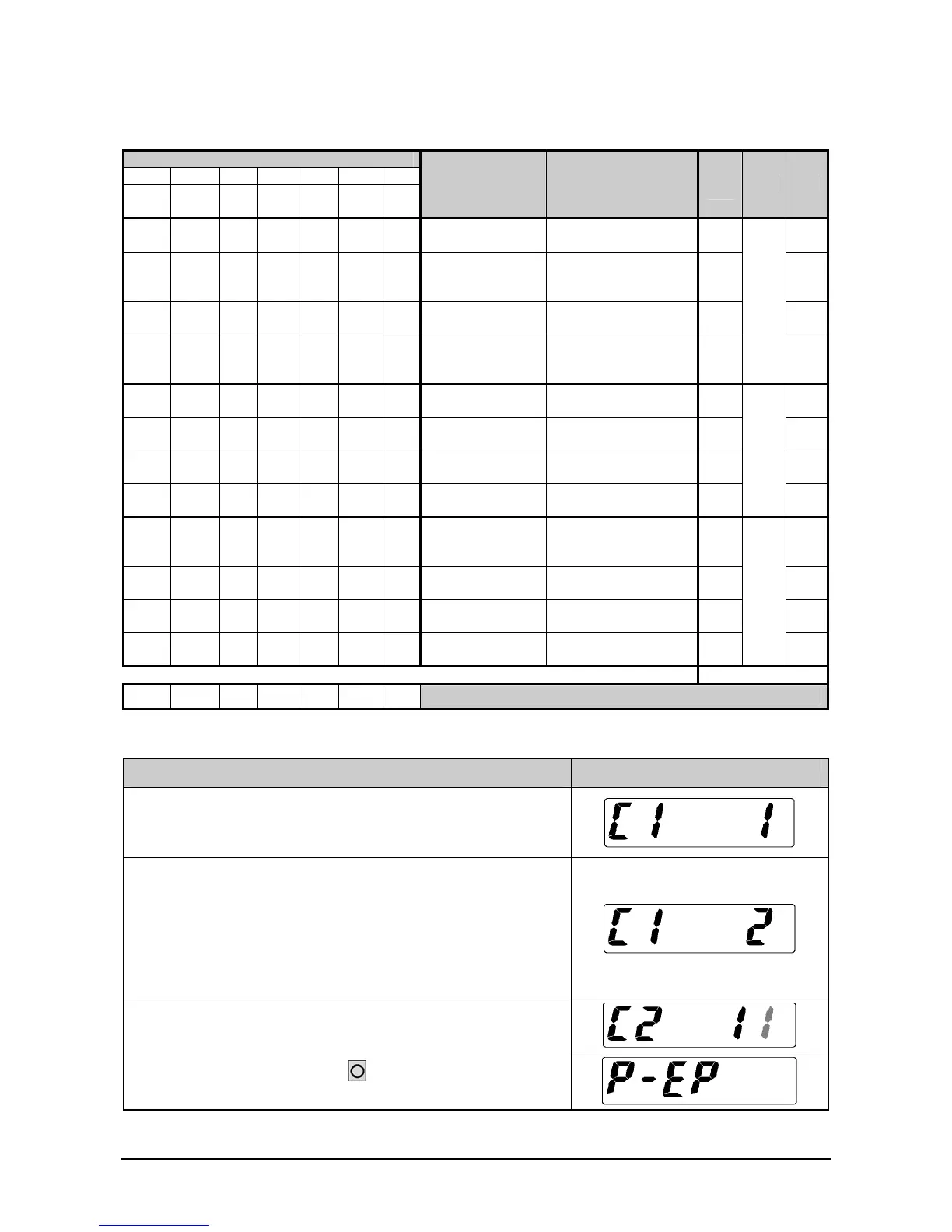
2.1.6 C1 Mode – Country No. Setting
1) Country No. Table
Country No.
1 2 3 4 5 6 7
JPN
ASIA
USA
AUS
CAM
EU
Item Data
Wei-
ght
Digit Bit
0 0 0 0 0 0 0 Start range
0: ±10%
1: ±2%
1 D0
0 0 0 0 1 0 0 Zero point mark
0: Lights on at true zero
1: Lights on at
Provisional zero
2 D1
1 0 0 0 1 0 0
Below true zero
indication
0: "___"
1: Negative value
4 D2
0 0 0 0 1 0 0
Cleaning tare
weight by pressing
ZERO key
0: No
1: Yes
8
10
0
D3
0 0 1 0 0 0 1
Decimal point
Indicator
0: "."
1: ","
1 D4
0 0 0 1 0 0 0
Over-scale
indication
0: BLANK
1: "OL"
2 D5
0 0 0 0 1 0 0 Tare subtraction
0: Not possible
1: Possible
4 D6
0 0 0 0 0 1 1
ZERO key during
tare subtraction
0: Possible
1: Not possible
8
10
1
D7
0 0 0 0 0 0 0
Stabilized,
re-stabilized
frequency
0: 5 times.
1: 8 times.
1 D8
0 0 0 0 0 0 0
Re-stabilization
Starting range
0: 2 times over
1: 4 times over
2 D9
0 0 0 0 0 0 0
Stabilized/re-
stabilized range
0: 3 times
1: 5 times
4 D10
1 0 0 0 0 0 0
Section
adjustment
0: No
1: Yes (JAPAN)
8
10
2
D11
804 000 010 020 04E 080 090 ←Display of F mode Measurement Condition
2) Operation
Operation Display
1. Stating Test
2. Setup of Country No.
- To select the No., use the [ * ] key
- Example: ASIA=2
3. When the C2 mode is then required, press the TARE key.
- When finishing, press the Memory Switch to record the
data to the memory, and enter the Ending Test Mode.



 To Next Page