Manual No. 0183B 26/29 IPC Series Service Manual
4.2.3 Load Cell Replacement
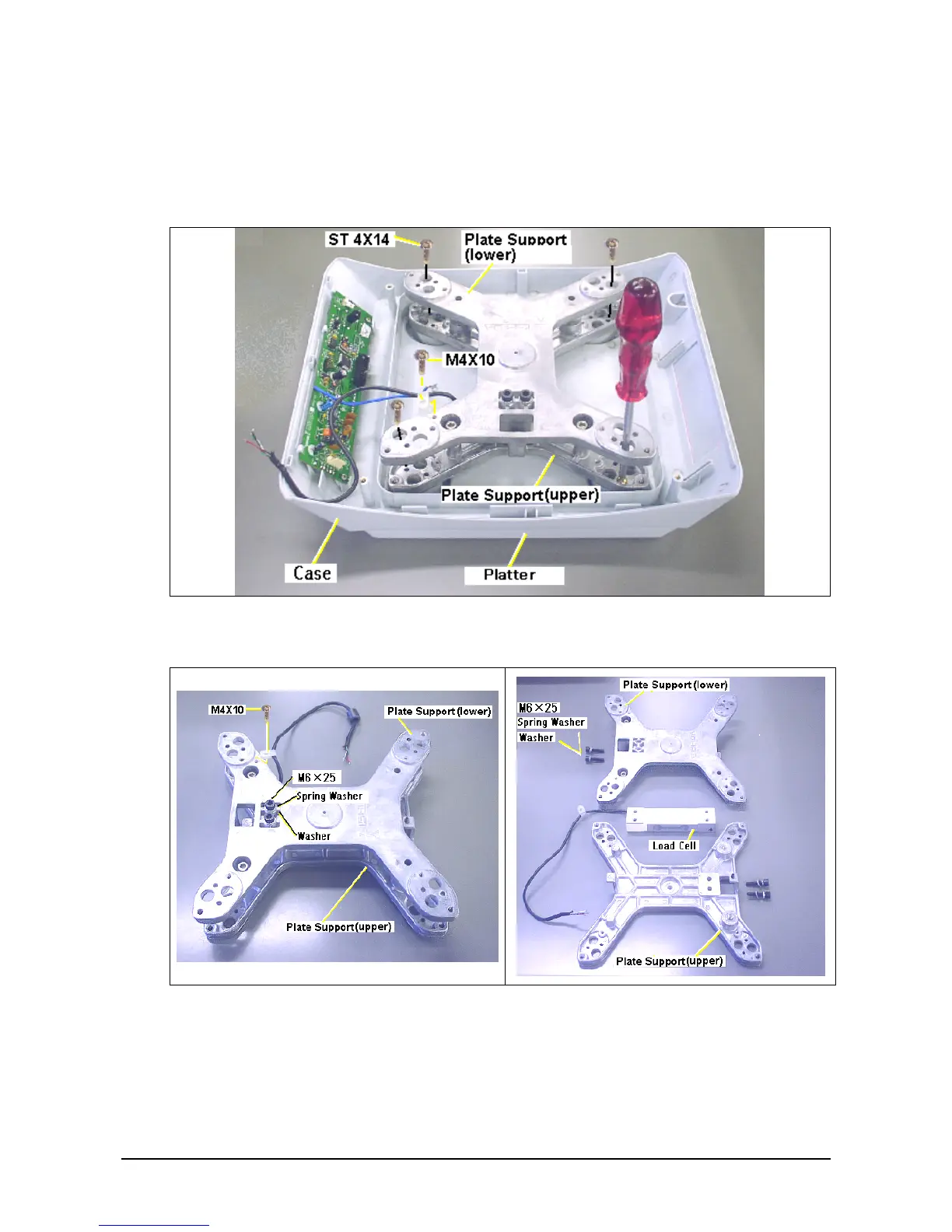
1. Remove the load cell cable using the soldering iron.
2. Remove the M4×10 screw which fixes the cable clamp, then remove the ground cable and
load cell cable.
3. Remove the four ST4×16 screws where the platter and plate support are fixed.
4. Remove the M6×25 hexagonal bolts, spring washers and flat washers, which fix the plate
support and load cell in two locations both above and under.
5. Fix a new load cell and fix in four locations on the upper and lower plate support with flat
washers, spring washers, and M6×25 hexagonal bolts order.
The direction of load cell installation should be carried out on the lower plate support on the
cell cable side.
6. Confirm whether each cell limit space in the 8-location set screws is within a specified value.
Adjust by turning the set screws to the regulations value, and apply the screw lock agent if
differing from a specified value.



 To Next Page