Device Messages and Troubleshooting
116
8 Device Messages and Troubleshooting
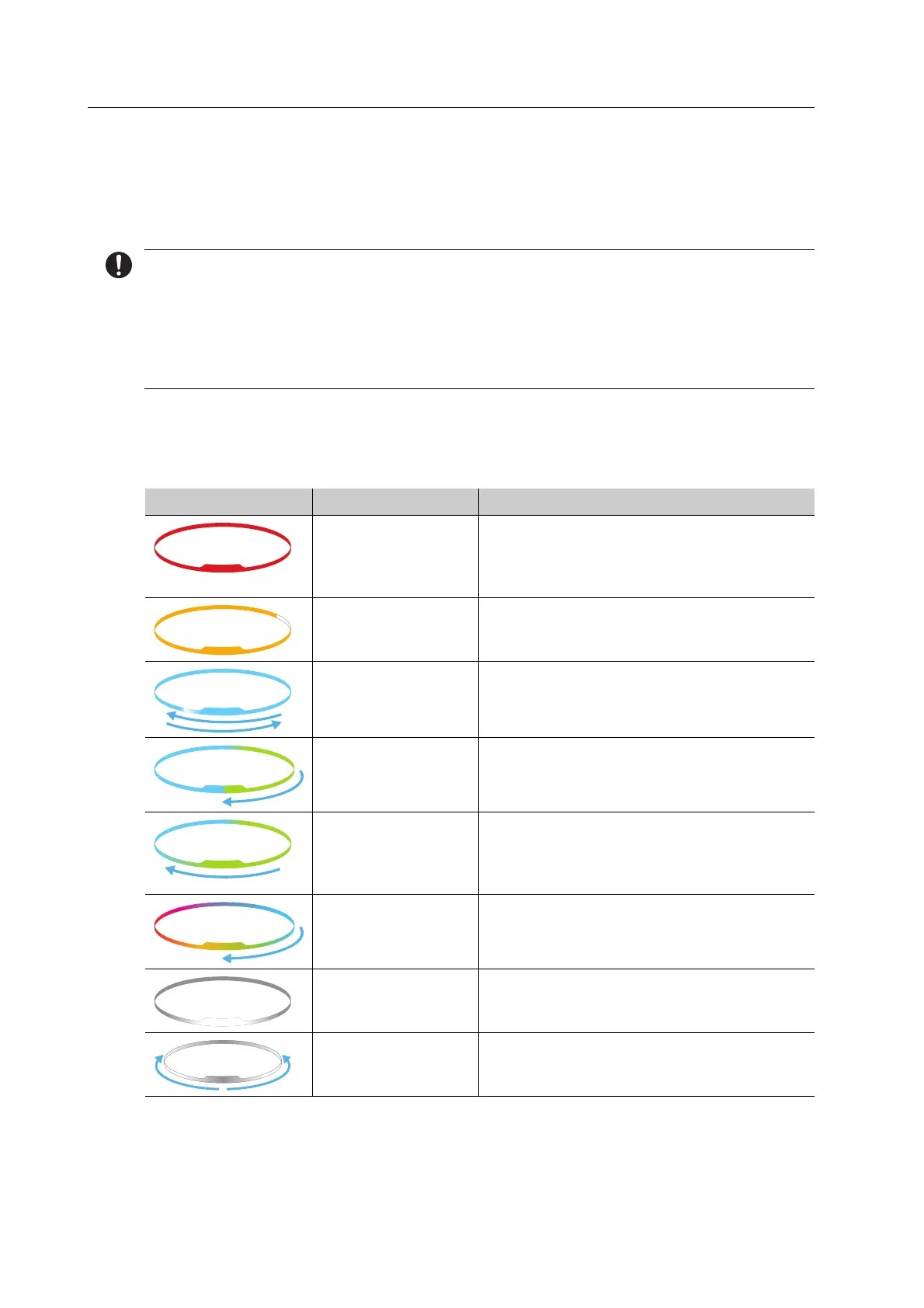
The device informs you via the OSD ring and the displays in the [PrograMill One] app about
the state of your device, pending tasks and potential problems.
In the event of an error, first check the displays in the app.
If you cannot solve problems with the help of the information in the app and the following
sections, please contact an authorized service partner.
8.1 OSD ring status
OSD ring Colour Meaning
Red blinking light Warning for the user, possibly user
intervention required, possibly output error
code.
Contact your authorized service partner.
Orange blinking
light, white
Display of maintenance tasks in the area of
the loading aid.
Pending tasks for the operator.
Blue, white
sequential light
Automatic cleaning is being conducted
Blue, green
sequential light
with coloured edge
Device is active (e.g. milling job is processed)
Blue, green
sequential light
without coloured
edge
Device is ready for operation
Rainbow colours • Newly inserted blocks / tools are being
identified
• Device calibration is running
White blinking light
in the direction of
the status indicator
Device is starting up
White blinking light
in the direction of
the network switch
Device is shutting down



 To Next Page