20
CORRECT CONDITION
STEP AND
ITEMS TO
CHECK
05)
PRESSER
FOOT
LIFTER
SWITCH
PROCEDURE DEFECTIVE CONDITION
Turnthehandwheeltowardyou.
Lowertheneedlebarfromits
highesttolowestposition.
Raisetheneedlebarfromits
lowestpositiontohighest
position.
Iftheresultiscorrectcondition,
pressthestart/stopbuttonto
proceedthenextstep.
Iftheresultisdefectivecondition,
pressthereversestitchbuttonto
proceedthenextstep.
Buzzerdoesnotsound.
Stitchwidthorlength
symboldoesnotappear.
–REMEDY–
ReplacethecircuitboardP.
ReplacethecircuitboardA.
Zigzagmotordoesnotget
defaultposition.
buzzerdoesnotsound.
–REMEDY–
Replacethezigzagmotor.
ReplacethecircuitboardA.
Feedmotordoesnotget
defaultposition.
buzzerdoesnotsound.
–REMEDY–
Replacethefeedmotor.
ReplacethecircuitboardA.
06)
UPPER SHAFT
POSITIONING
SENSOR
07)
ZIGZAG MOTOR
(STEP MOTOR)
AND
FEED MOTOR
Turnthehandwheeltowardyou.
Lowertheneedlebaritshighest
toposition(zigzagphase).
Presstheneedleup/downbutton.
Raisetheneedlebarfromits
lowestpositiontoitshighest
position(feedphase).
Presstheneedleup/downbutton.
Iftheresultiscorrectcondition,
pressthestart/stopbuttonto
proceedthenextstep.
Iftheresultisdefectivecondition,
pressthereversestitchbuttonto
proceedthenextstep.
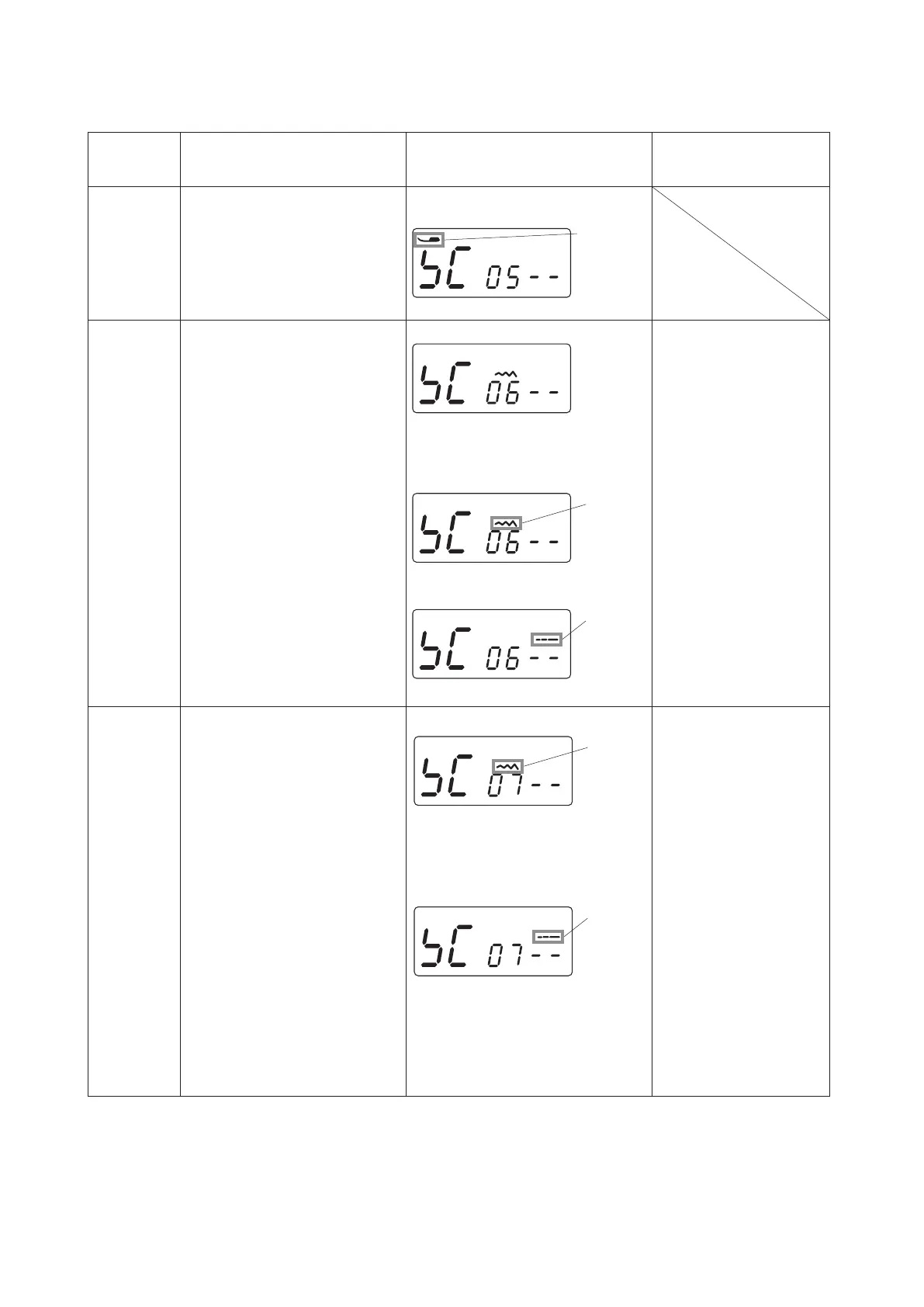
LCDdisplays“SC06--”.
Turnthehandwheel.
LCDdisplaysstitchwidthsymbol
whentheneedlebarisatzigzag
phase.
LCDdisplays“SC07--”.
Presstheneedleup/downbutton
whenLCDdisplaysstitchwidth
symbol.
TheZigzagmotorwillbeinitialized
andgetitsdefaultposition.
SELF-DIAGNOSTIC TEST
Notapplicableforthismachine.
Pressthestart/stopbuttonto
proceedthenextstep.
LCDdisplays“SC05--”andpresser
footsymbol.
Presser
foot
symbol
Presstheneedleup/downbutton
whenLCDdisplaysstitchlength
symbol.
Thefeedmotorwillbeinitializedand
getitsdefaultposition.
Stitch
width
symbol
Stitch
length
symbol
LCDdisplaysstitchlengthsymbol
whentheneedlebarisatfeedphase.
Stitch
width
symbol
Stitch
length
symbol



 To Next Page