84
A Bluetooth control module is typically installed in the basement
area of the RV. The Bluetooth control module works in conjunc-
tion with the One Control Touchscreen System. Connecting to
the system is accomplished through a 6 digit password. This
password is necessary when connecting the One Control® Sys-
tem to an Android or Apple smartphone or tablet. The password
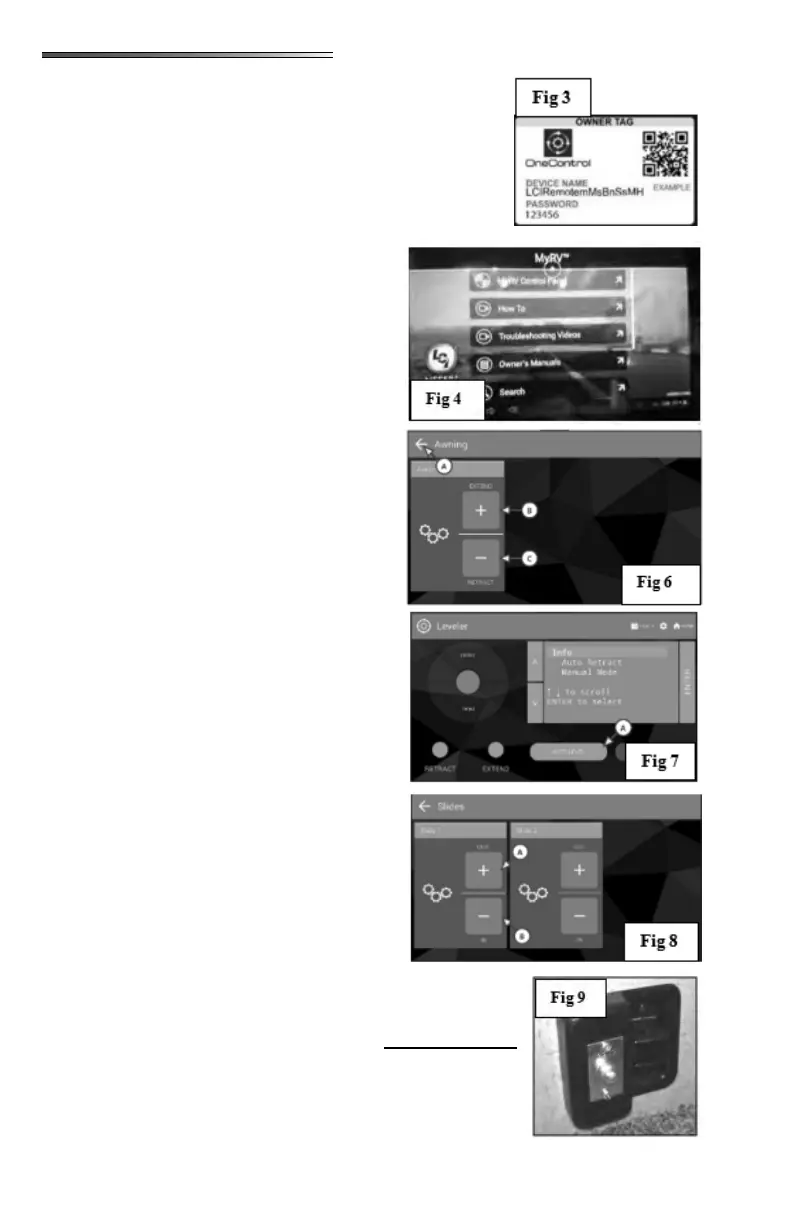
and Device Name are located on a tag that is typically found
inside a cabinet in the vicinity of the touchscreen.
On the
smartphone app, select
screen The De-
vice selection screen will open ().
Select the AWNING icon;
the screen opens showing the awnings ).
If there are multiple awnings, there will be a se-
lection for each awning at the left of the screen.
Select the awning you want to control, then press
and hold the EXTEND (B) or RETRACT (C)
buttons. Select the back arrow (A) to return to
the previous screen.
Select the LEVELER icon,
the screen opens showing the leveler control
panel (). This screen will allow you to
extend and retract the jacks and to auto level the
RV. Press the AUTO LEVEL button (A) to begin
leveling the RV.
Refer to the Lippert User Guide for the One Con-
trol system for more detailed information. Select
the HOME icon to return to the previous screen.
Select the SLIDES icon
which will open the slideout screen ( ).
Slideouts will be numbered 1-4 on the touch-
screen. The screen can display up to 4 slideouts.
Press Slide 01, and then press (and hold) the OUT
(A) button to extend the slide, or the IN (B) button
to retract it. Repeat this action on the remaining
slideouts. Select the back arrow to return to the
device selection screen.
This indicates
there is a problem with the bedroom slide-out. In order for the
slideout to function properly, the bedroom door .
An electronic door catch has been installed to the wall in the bed-
room behind the door (). A second piece is mounted to the
door (). If the door is closed, the Slide 01 notication on
the touchscreen display will disappear and the slide-out will NOT











 To Next Page