MNP11M01GB06 May 2007- Rev.4 Page: 10 de 40
FUpdating the program:
IN COMPACT WITHOUT FLASH MEMORY:
If it is necessary to update the program to a new version you have to replace the
EPROM chip present in the control card. To do this you must move away the steel U,
as is indicate in the previous figure. Then carry out the next steps:
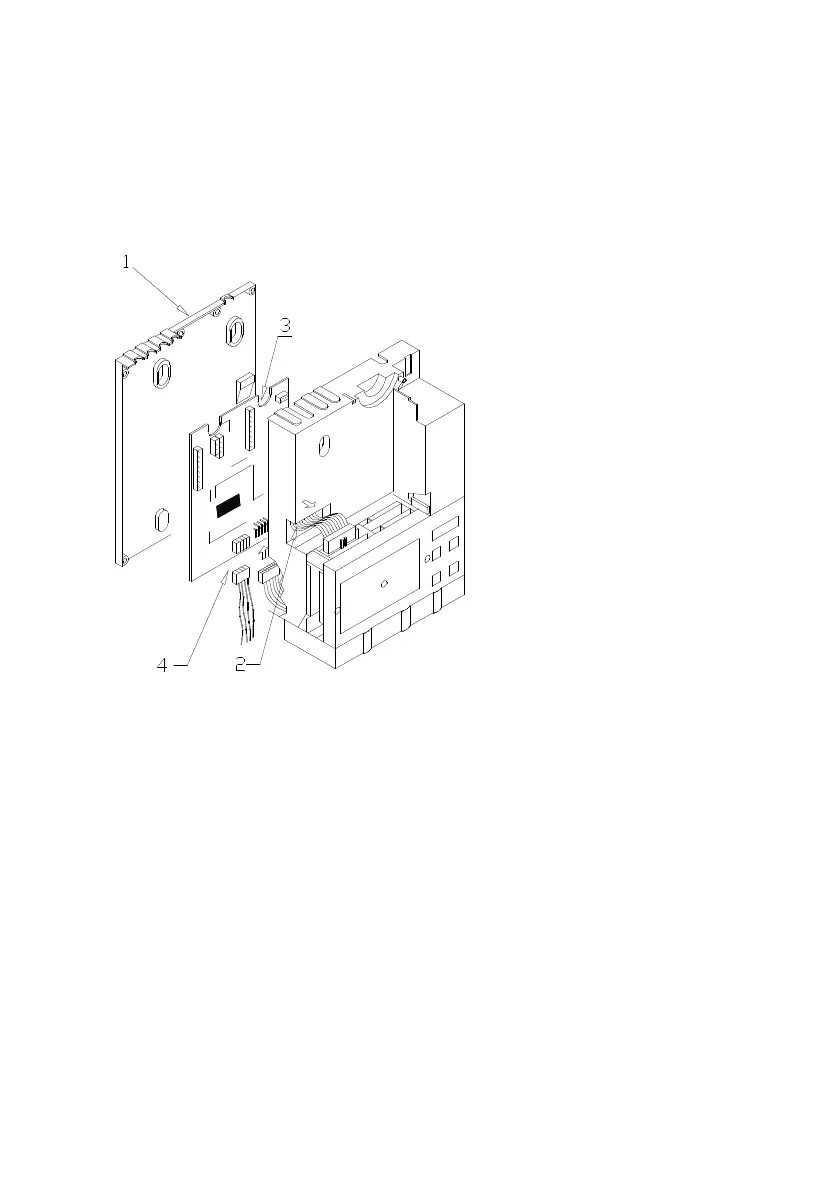
- Remove the screws that attach the water protection cover. (1)
- Disconnect the flat cable that joins the control board to the display board.
- Uncouple the flat cable of T10 validator (2).
- Then you can see the components side of the control card, where you can replace
the EPROM chip with the help of a flat screwdriver .
Before replacing the water protection cover check connecting the flat cable of the
display and extracting the validator flat cable (2).
- IN COMPACT WITH FLASH TECNOLOGY:
• RECORDING FROM PC:
To recording the programme from PC it is neccessary to have the next components:
n Comunication cable RS-232, cod: 8800756.
n Recording programme memory flash: REPROYYXX.EXE.


 To Next Page