64
Layout
Operator’s Manual QUADRIGA 1000/BB
4.3-10
4.1-2
9
Full Tire RemoveFull Tire Remove
Full Tire RemoveFull Tire Remove
Full Tire Remove
Only Bead Break
Only Remove Upper
Only Remove Lower
Full Tire MountFull Tire Mount
Full Tire MountFull Tire Mount
Full Tire Mount
Mount Lower Bead
Mount Upper Bead
0
1
2
3
0
1
2
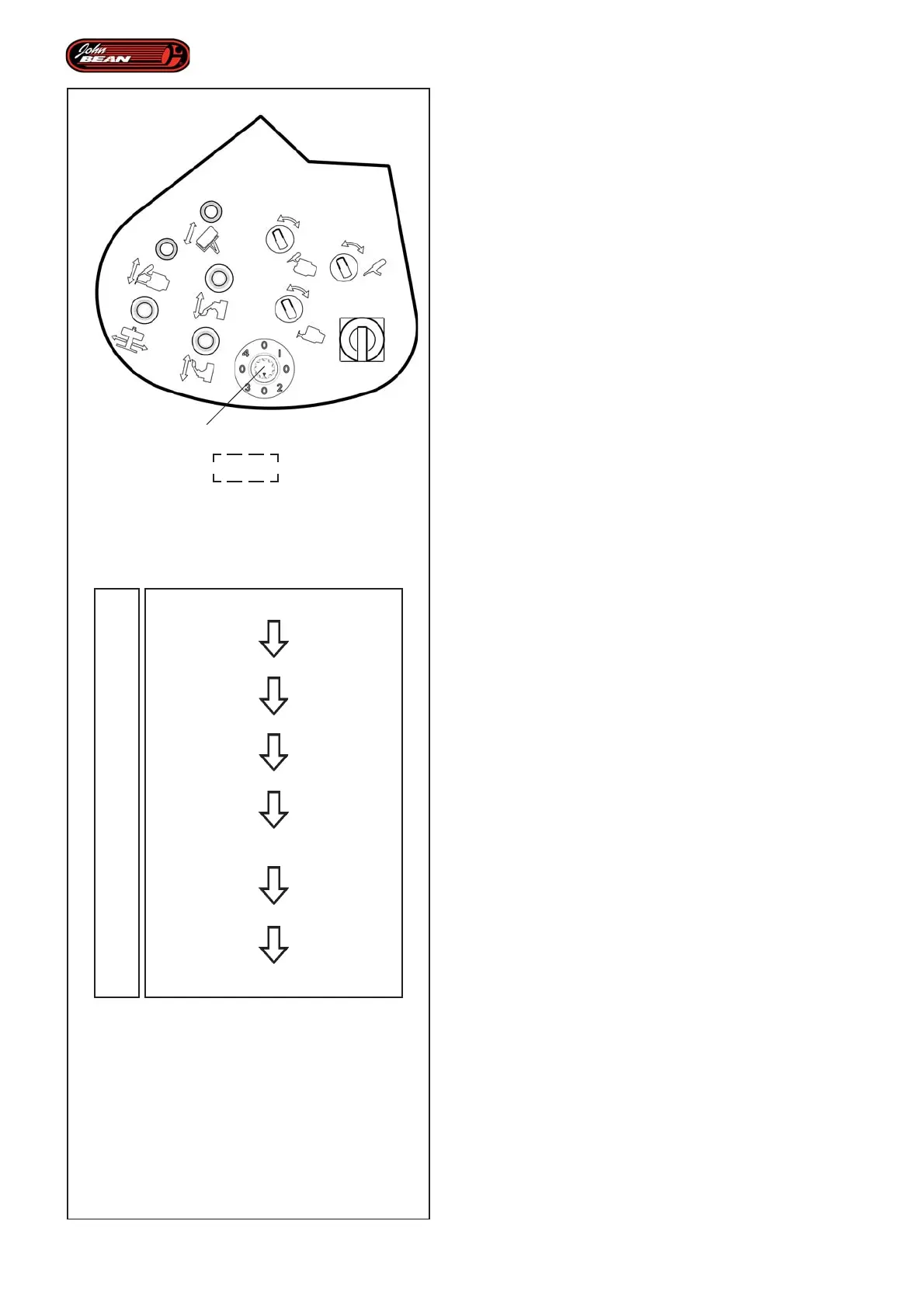
4.3.5 Individual Automated Parts Selector
Use the selector (9, Fig.4.1-2) on the Control Unit to
select the individual operations (Subprograms) normally
performed in a set order in Automatic Mode running.
Thanks to numerous sensors distributed in specific
points on the machine, the software registers the
workflow continually and is constantly informed as to
the conditions of the various parts involved in the work
cycle. It follows that all this allows a list of possible
operations to be compiled electronically on the basis
of the tasks that have already been completed.
Lastly, the operator can press a certain selector (9,
Fig.4.1-2) to select only the Subprograms that allow
operations to be performed in perfect safety for the
operator, the elements being worked on, (rim and tire)
and the machine itself.
The diagram (Fig.4.3-10) shows the normal workflow
controlled in Automatic Mode running.
The different selector positions (9, Fig.4.1-2)
correspond to the following functions.
In the Automatic Demounting program:
“Full Tire Remove”:
“0” enables the entire Automatic Demounting cycle.
“Full Tire Remove“.
“1” enables the Automatic BEAD BREAKING
Subprogram,
“Only Bead Break“.
“2” enables the Automatic UPPER BEAD REMOVAL
Subprogram.
“Only Remove Upper“.
“3” enables the Automatic LOWER BEAD REMOVAL
Subprogram.
“Only Remove Lower“.
In the Automatic Mounting program:
“Full Tire Mount Program”:
“0” enables the entire Automatic Mounting cycle.
“Full Tire Mount”.
“1” enables the Automatic LOWER BEAD MOUNT
Subprogram.
“Mount Lower Bead“.
“2” enables the Automatic UPPER BEAD MOUNT
Subprogram.
“Mount Upper Bead“.


 To Next Page