26
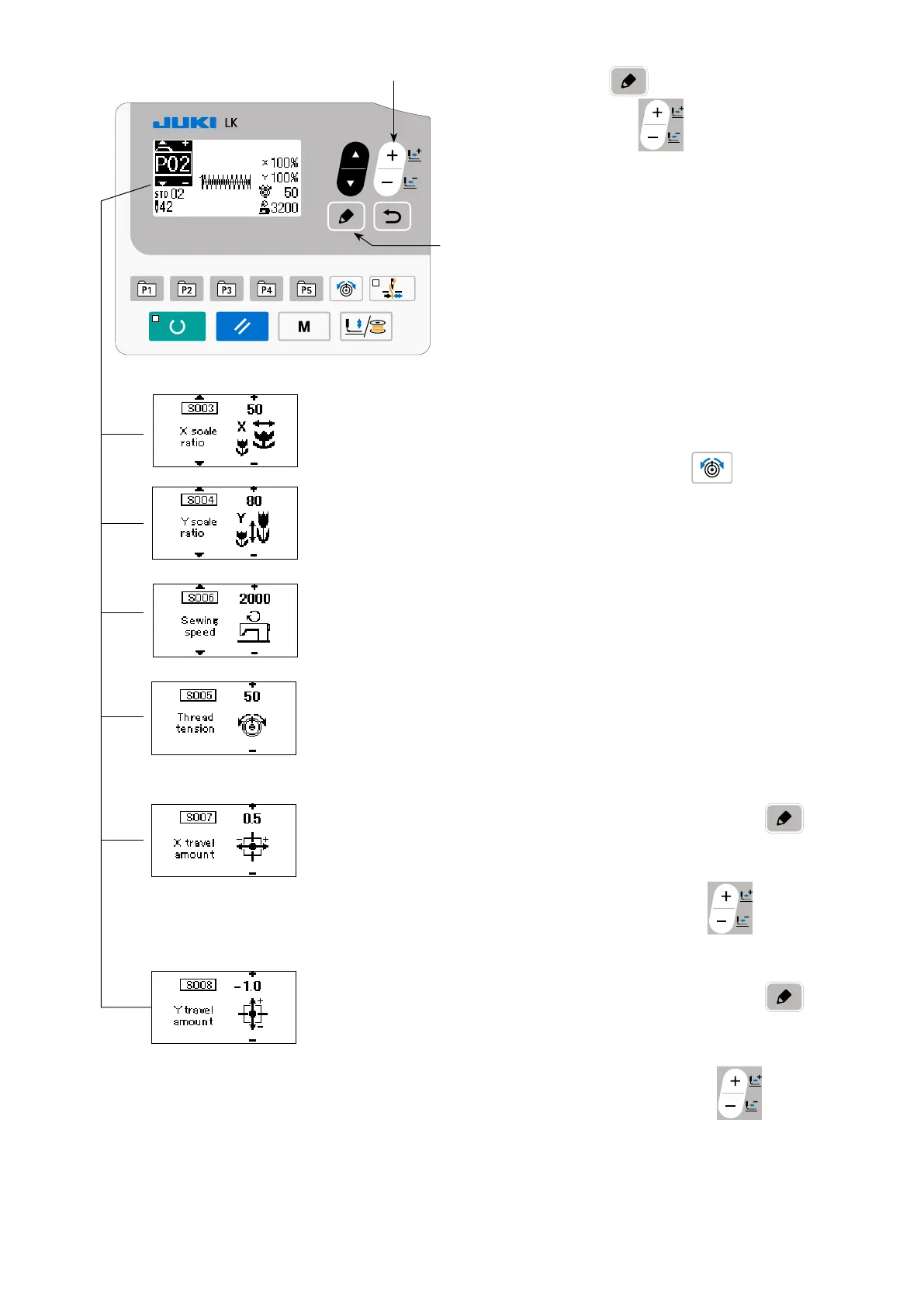
3) Press EDIT key
. Edit the item data with
DATA CHANGE key
.
The item data that can be edited are as de-
scribed in
"(2) Listing of item data" p.28
".
4) Respectively set the X reduction ratio to "50" (%),
Y reduction ratio to "80" (%), sewing speed to
"2000" (sti/min) and thread tension to "50".
* Press thread tension key
to display
"S005" and set the thread tension.
5) The "X enlargement/reduction ratio" display 0.0
is displayed by pressing EDIT key
.
The amount of travel in X direction can be set in
increments of 0.1 mm. Change the set value to
"0.5" with DATA CHANGE key
.
6) The "Y enlargement/reduction ratio" display 0.0
is displayed by pressing EDIT key
.
The amount of travel in Y direction can be set in
increments of 0.1 mm. Change the set value to
"−1.0" with DATA CHANGE key
.



 To Next Page
 Loading...






