– 166 –
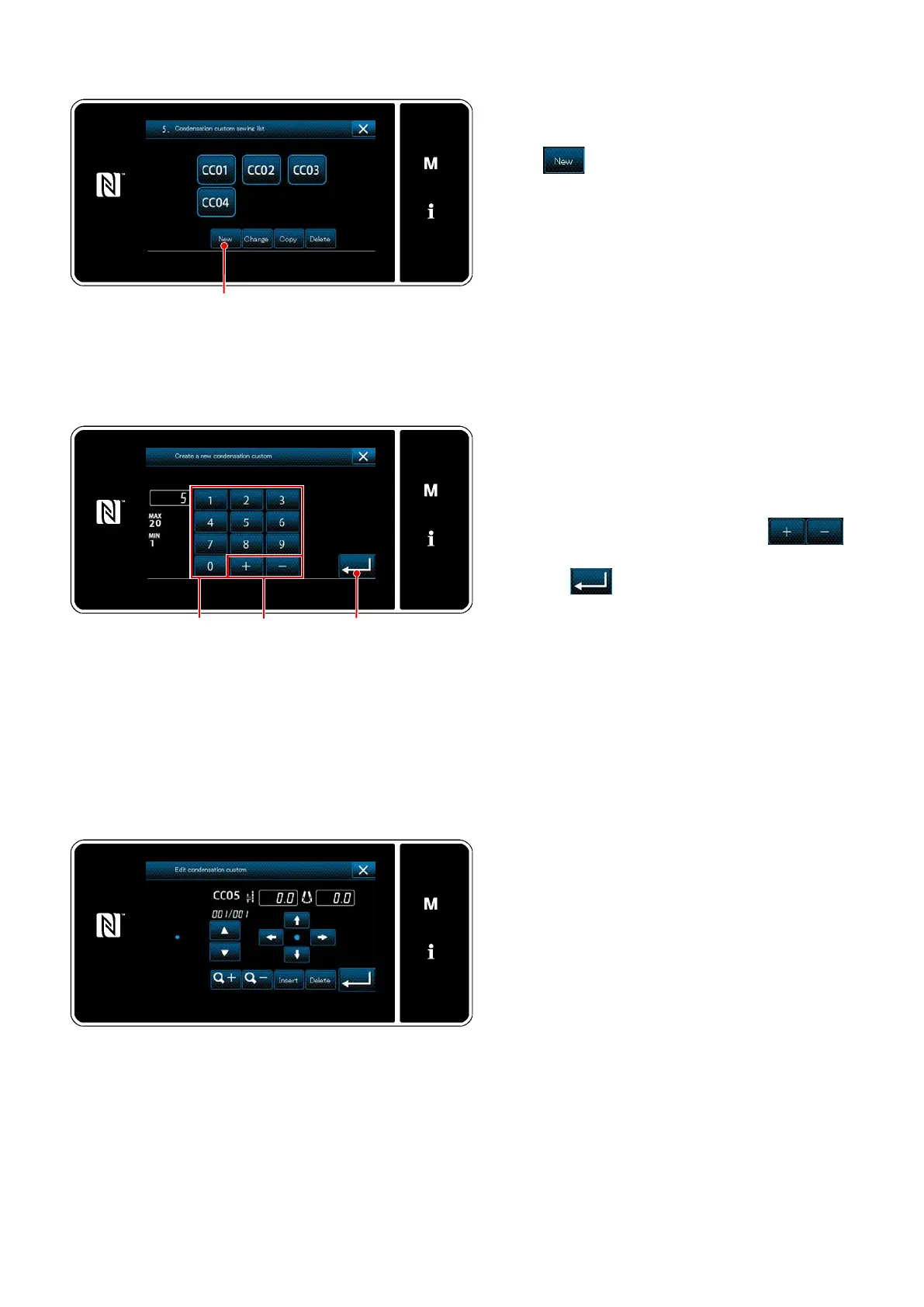
<New condensation custom pattern creation pattern
number input screen>
Inputting the condensation custom number
1) Enter the pattern number with numeric key-
pad
.
An unassigned registration number that is
closest to the entered value in the plus/minus
direction is displayed by pressing
.
2) Press
.
The "condensation custom edit screen" is dis-
played.
In the case the entered number has already
been registered, the prompt message for
overwrite conrmation is displayed.
Selecting the new condensation custom creating function
Registered condensation custom patterns are
displayed on the screen.
Press
.
The "new condensation custom pattern creation
pattern number input screen" is displayed.
<Condensation custom pattern list screen>
<Condensation custom edit screen>
Creating a condensation custom
The method to create a condensation custom
pattern is same as in the case of a custom
pattern. Refer to
"8-5-2.
Creating a custom
pattern" p. 161
.


 To Next Page
 Loading...