MC
39
7.3. Change-over of the key mode
Factory setting: no
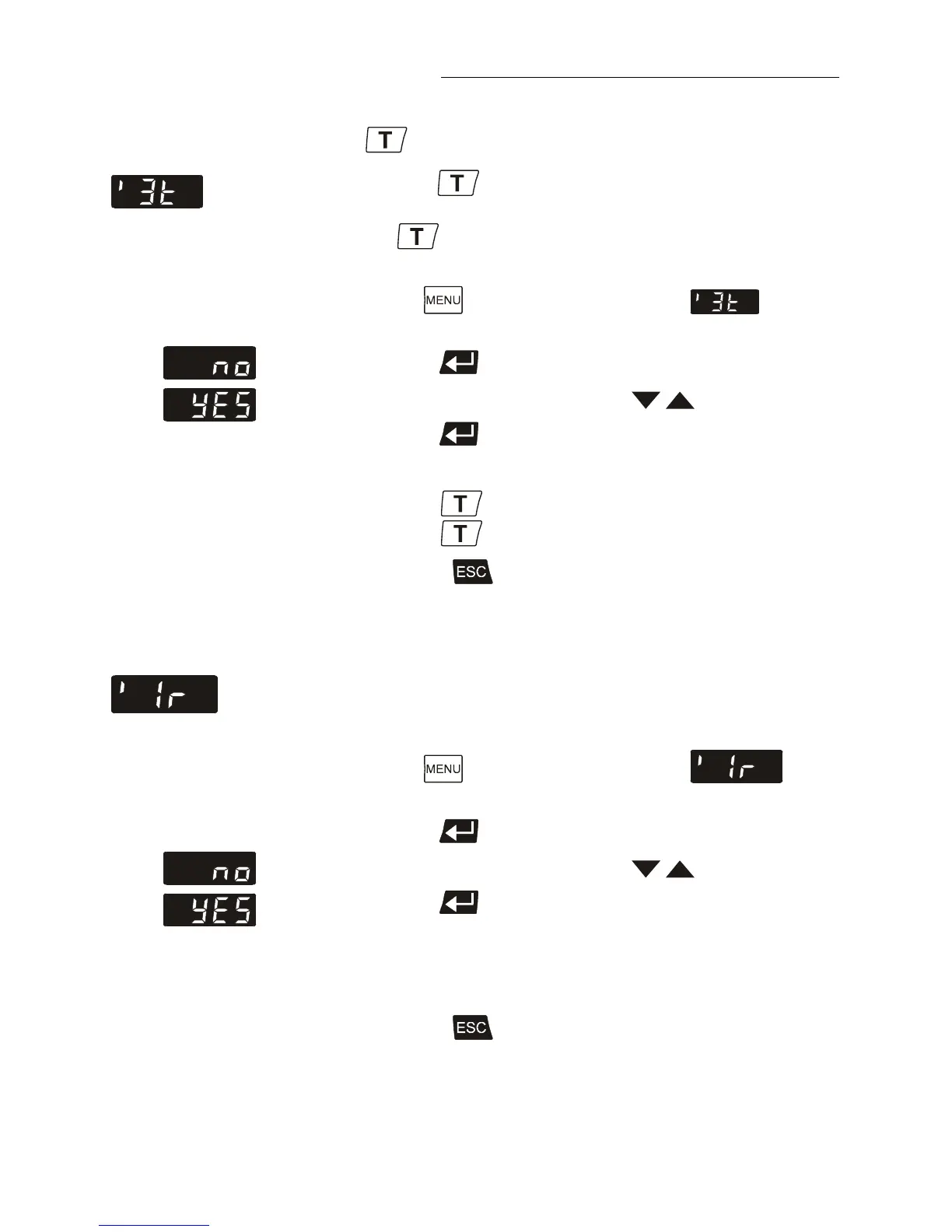
Normally, the key is used to indicate only one adjustable
working temperature.
Press the key, to call up a menu with 3 pre-adjustable
setpoints.
1. Press the button until the menu item is
displayed.
2. Press enter to indicate the parameter.
3. Select the parameter with the keys (YES/no).
4. Press enter to store the selected parameter.
>no< Key in 1-setpoint mode
>YES< Key in 3-setpoint mode
Continue: Press to quit the menu.
7.4. Remote control: activate – deactivate
Factory setting: no
The circulator is to be prepared for remote control by a
personal computer via the serial interface RS232: Set the
menu item >remote< from >no< to >YES<.
1. Press the button until the menu item is
displayed.
2. Press enter to indicate the parameter.
3. Select the parameter with the keys (YES/no).
4. Press enter to store the selected parameter.
>no< No remote control via RS232
>YES<
Continue: Press to quit the menu.
Artisan Technology Group - Quality Instrumentation ... Guaranteed | (888) 88-SOURCE | www.artisantg.com


 To Next Page