76
REMOTE Menu screens (continued)
REMOTE (1/2) Menu screen (continued)
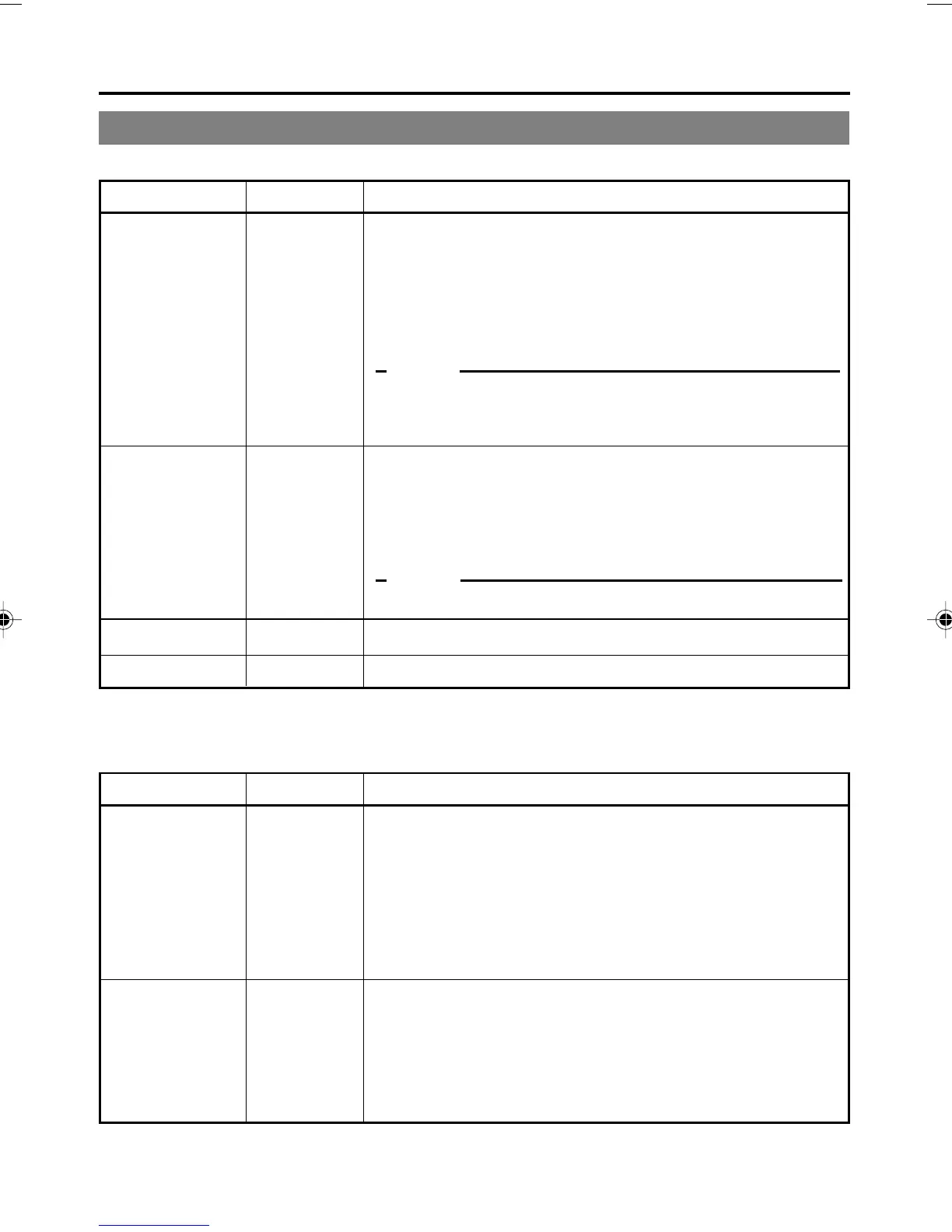
Item Setting Description
LOCAL
FUNCTION
PREROLL
NEXT PAGE
PAGE BACK
NO KEY
EJECT
STP + EJT
ALL KEYS
3SEC
5SEC
7SEC
10SEC
For selecting the buttons of BR-DV6000 to be enabled in remote-
controlling it with the REMOTE (1/2) terminals or the SERIAL
REMOTE terminal:
NO KEY : No button enabled.
EJECT : Only the EJECT button enabled.
STP + EJT : Only the STOP button and the EJECT button are
enabled.
ALL KEYS : All operation buttons are enabled.
Memo
If OPERATION LOCK in the SYSTEM (2/2) Menu screen is set
to ON, the buttons on BR-DV6000 will be disabled regardless of
the setting here.
For setting the preroll time of BR-DV6000 in remote-controlling it
with the REMOTE 1 terminal. Setting done with the editing re-
mote controller prevails over other settings:
3SEC : 3 seconds
5SEC : 5 seconds
7SEC : 7 seconds
10SEC : 10 seconds
Memo
To enhance editing precision, please set it to at least 7 seconds.
For displaying the REMOTE (2/2) Menu screen.
For returning to the TOP MENU screen.
Item Setting Description
REM FF/REW
MODE
REM STOP SEL
FF/REW
SEARCH
EE
PB
For setting the action to be performed when the 9-PIN REMOTE
terminal, 12-PIN REMOTE terminal, RS-232C terminal or DV
terminal received an FF/REW command:
FF/REW : Sets BR-DV6000 to perform FF/REW when an
FF/REW command is received. Normal setting.
SEARCH : Sets BR-DV6000 to perform searching when an
FF/REW command is received. Use this setting
if the search (cue up) function does not work prop-
erly.
For setting the action to be performed when the 9 PIN REMOTE
terminal, 12-PIN REMOTE terminal, RS-232C terminal or DV
terminal received a STANDBY ON command:
EE : Sets BR-DV6000 to the EE mode.
(It goes into the STOP mode.)
PB : Sets BR-DV6000 to the PLAY mode.
(It goes into the STILL mode.)
REMOTE (2/2) Menu screen
MENU SCREENS
– Description of the Menu screens – (continued)
DV6000U_72-104_Eng.p65e 06/03/03, 11:41 PM76



 To Next Page