DN112-06v02
JYE Tech - 15 - www.jyetech.com
Restore Factory
Default
To restore factory default settings enter Menu and touch the
button “Default”. Alternatively, you can do forced factory
default restore at power-up by entering Setup state. Please see
the subsection “Booting Sequence” in Basic Operations.
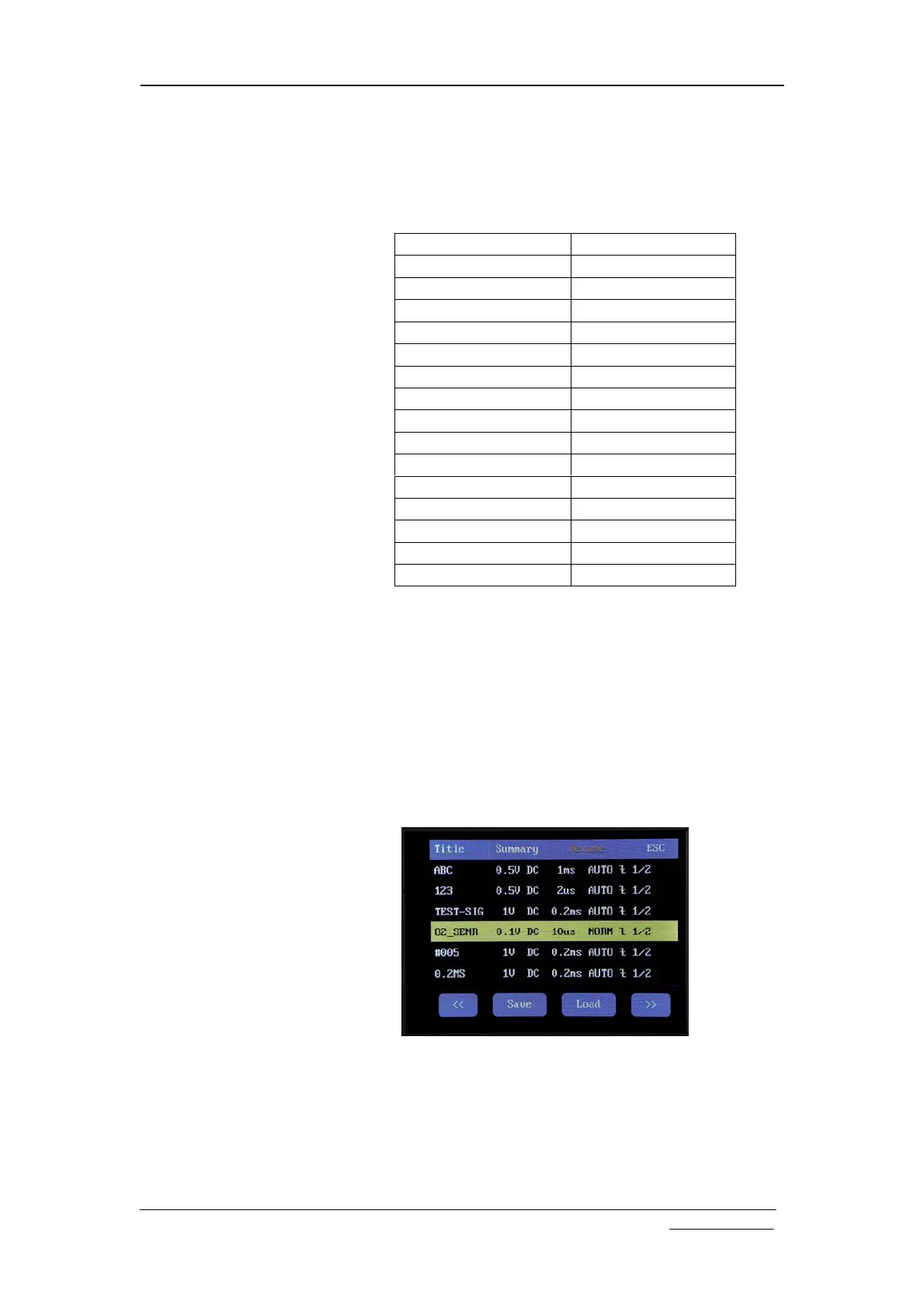
Factory default setting values
Parameter Factory Default Value
Sensitivity 0.5V/Div
Couple DC
Vertical Position 0
Horizontal Position 80
Timebase 1ms/Div
Trigger Mode Auto
Trigger Slope Falling
Trigger Position 1/2
Trigger Level 0V
Trigger Source Internal
Record Length 512 points
VPos Correction 0
Measurements All off
Test Signal Frequency 1KHz
Auto Power-off Time 2 minutes
Save/Recall Presets
Presets are groups of oscilloscope settings that are pre-saved in
EEPROM. These settings can be recalled to replace existing
settings to save setup time. Up to 24 presets can be saved. This
is very useful for frequently performed measurements.
To save or recall a preset enter Menu and touch the “Preset”
button. The preset screen shows (see figure below). Each row
represents a memory location. There are 24 locations available
in four pages. Use “<<” and “>>” buttons to navigate through
the pages. When a location contains preset the summary of the
preset is displayed. An empty location is indicated with “---“.
Touch a row to select the location where you want presets be
saved to or recalled from. The selected row will be highlighted.
Touch “Save” button to save current oscilloscope settings to the
location. Please note that the previously saved settings in the
selected location will be overwritten without warning. Touch
“Load” button to recall the settings that have been previously
saved in the selected location. The recalled settings will take


 To Next Page