DN112-06v02
JYE Tech - 32 - www.jyetech.com
Firmware Upgrade
Sometimes you might need to upgrade firmware to acquire new
features or higher performance. There are two ways to change
the firmware for DSO112A. One is by the pre-installed
bootloader. The other is by a programmer.
Upgrade Firmware by Bootloader
1) Connect DSO112A oscilloscope to an USB port on PC.
2) DSO112A contains a Uart-USB bridge CP2102. If the PC
does not have driver for CP2102 installed install the driver
first. Please go to the website of
www.silabs.com to download the appropriate driver for
your system and install it correctly. You only need to do
this once on one computer.
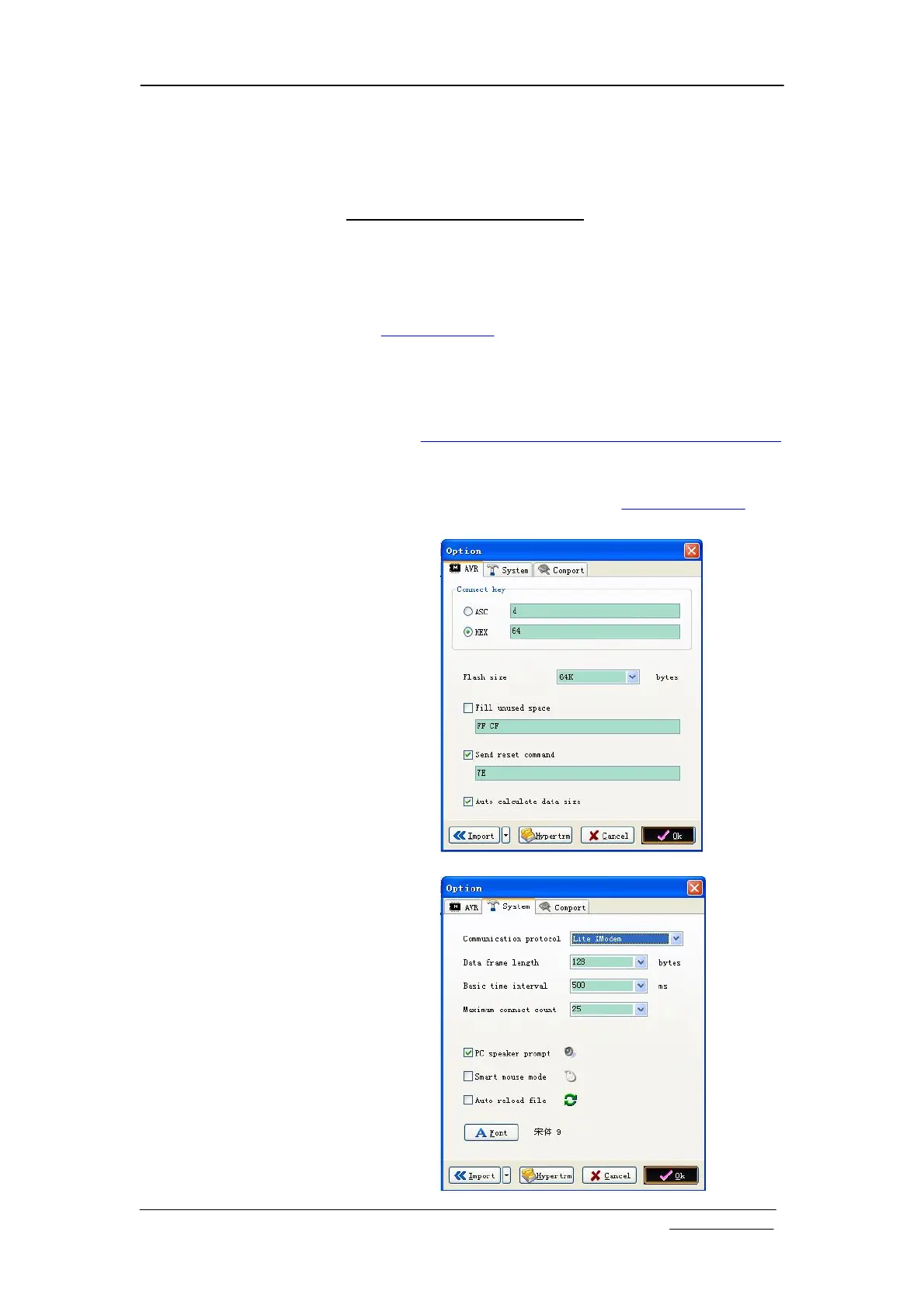
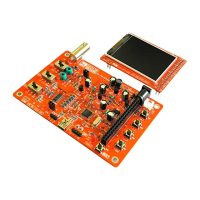
3) Get AVRUBD. AVRUBD is a PC application that talks to
bootloader to write firmware to MCU. It can be downloaded
at http://www.jyetech.com/Products/LcdScope/avrubd.rar.
You only need to do this once on one computer.
4) Download the firmware (hex file) you want to write to the
scope from JYE Tech website (www.jyetech.com) and
save it to your computer.


 To Next Page