DN112-06v02
JYE Tech - 7 - www.jyetech.com
State Navigation
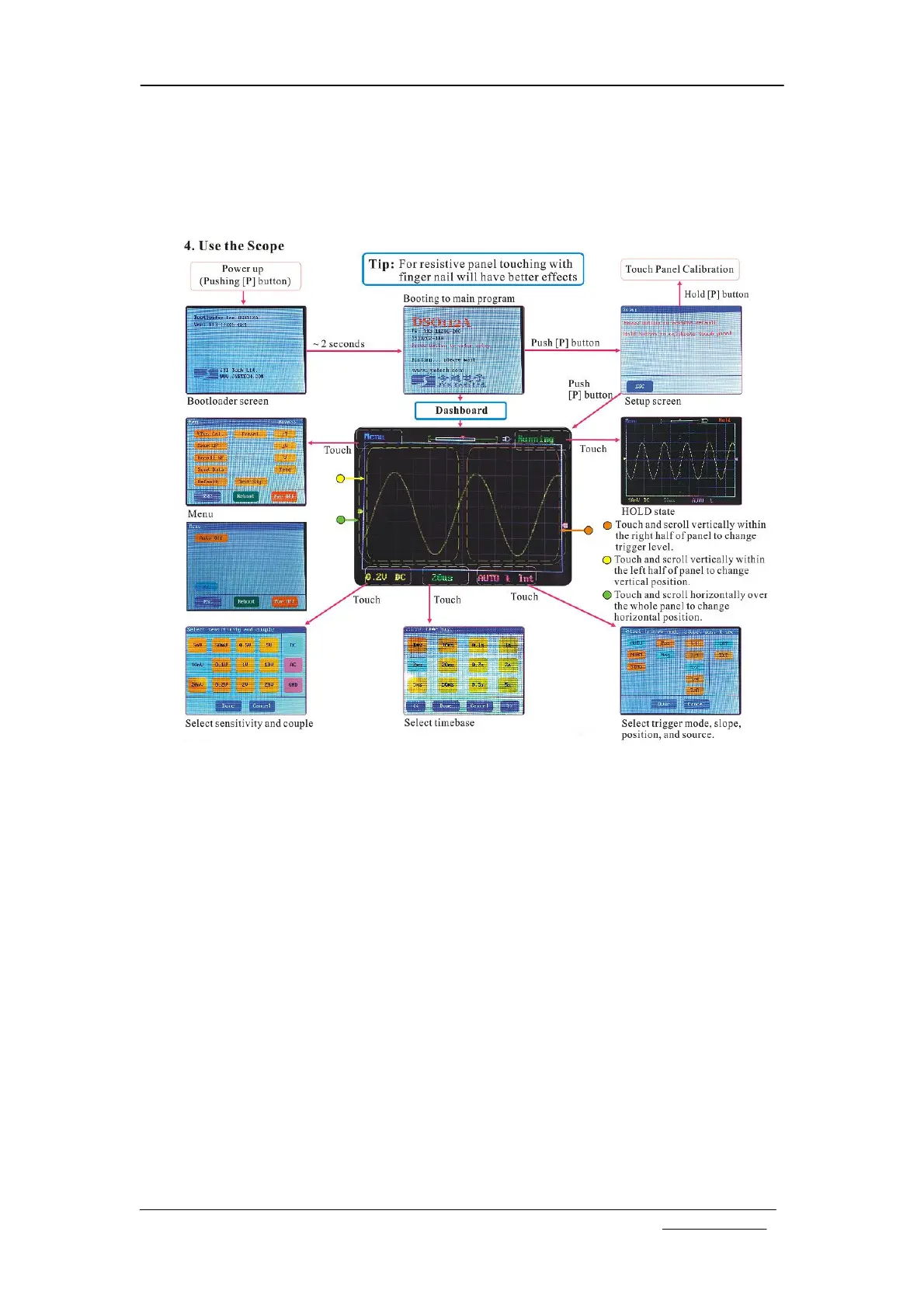
The following diagram shows the relationship of major working
states.
Tip: DSO112A uses resistive LCD panel. It will have better
effects to operate with fingernail instead of finger belly
as in operating a cellular phone.
Booting Sequence
When power button is pressed the oscilloscope is powered up.
The main controller (MCU) will first enter the Bootloader,
where it waits about 2 seconds for possible firmware upgrade
request from serial (USB) port. If such request is received
MCU will stay in Bootloader to perform firmware upgrade. If
no request is received the MCU will boot into the main
firmware of the oscilloscope.
The main firmware will first display the start-up screen at
which information about firmware and manufacturer is shown.
This screen will stay for about 2 seconds. During this time if
the power button is pressed the unit will enter Setup State,
where you can choose to do factory default restore or touch
panel calibration. If power button has not been pressed during
that time MCU will then display the dashboard, at which user
can quickly put the oscilloscope into pre-saved setup. The
dashboard will stay for about 8 seconds. After that the
oscilloscope will enter normal state with the main working
screen displayed. You can start normal use of the oscilloscope
now.


 To Next Page