DN112-06v02
JYE Tech - 4 - www.jyetech.com
Charge Battery
The battery in new oscilloscope is usually depleted or has only
weak power. It is necessary to have it charged before first time
use. To charge the battery you need to connect the device to a
USB power with the provided USB cable. Before connecting
USB cable remember to close the battery switch as state above.
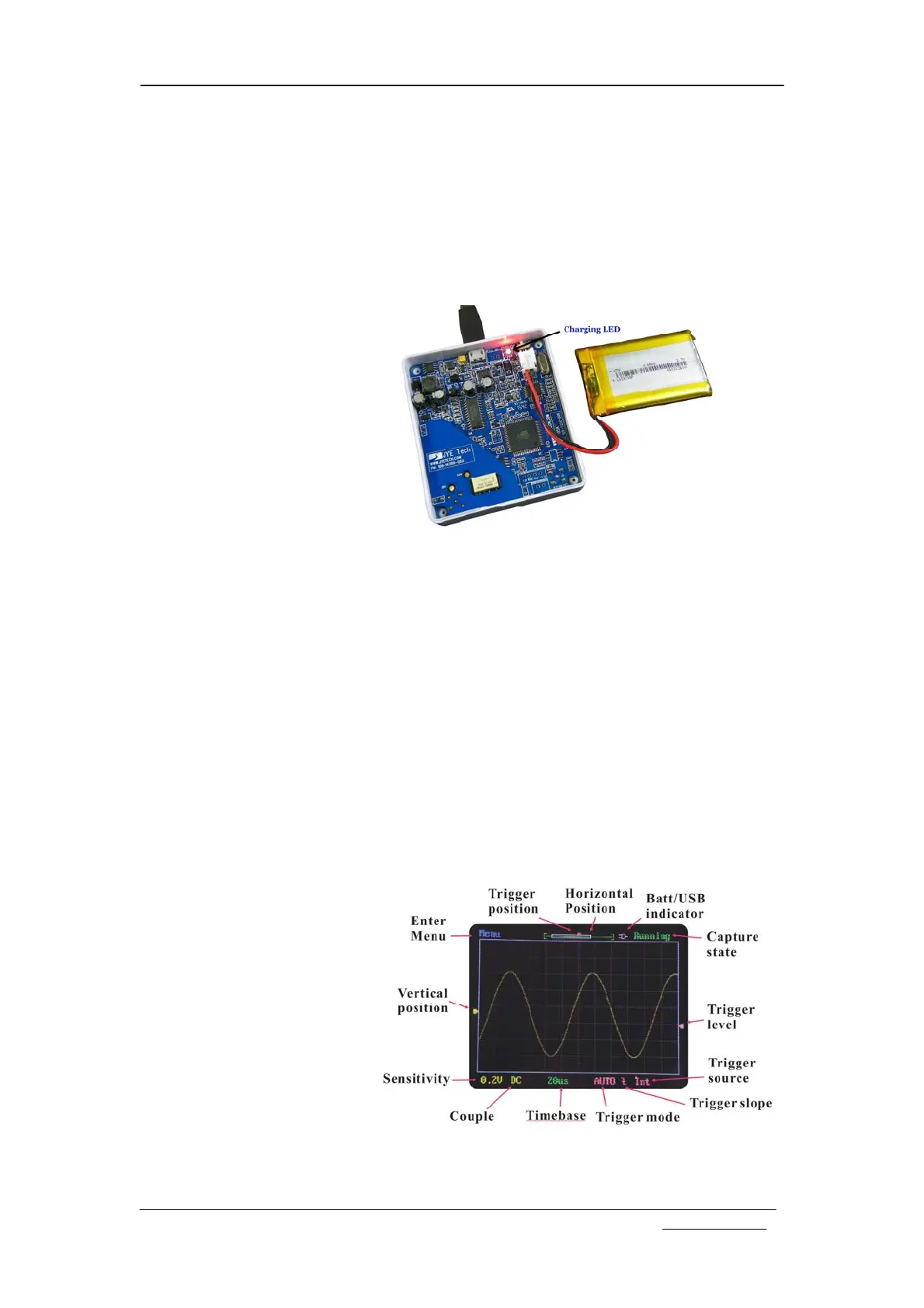
A LED on PCB board will light up when charge is undergoing
(photo below). The LED can be seen from outside of enclosure.
After charge is completed the LED will turn off.
Auto Power-off
To avoid waste of battery power DSO112A is with automatic
shut-down feature. When the unit is running on battery and
there is no touch activity detected for a certain period of time
the oscilloscope will shuts down itself. This auto-power-off
time is set to 2 minutes by default. You may like to change it to
longer to avoid un-wanted quick shut down. Please see
description of “Change Auto-off Time” section.
Panel and Connectors
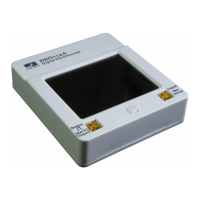
Main Working Screen
The drawing below explains the major display elements of the
main working screen.


 To Next Page