EN
24 762.885 Z05 2012 coolcept_fleX, coolcept³_fleX
NOTE
Soiled, displaced, or damaged seals impair the strain relief and the imperme-
ability.
►
Do not soil, shift, nor damage the seals during DC plug assembly.
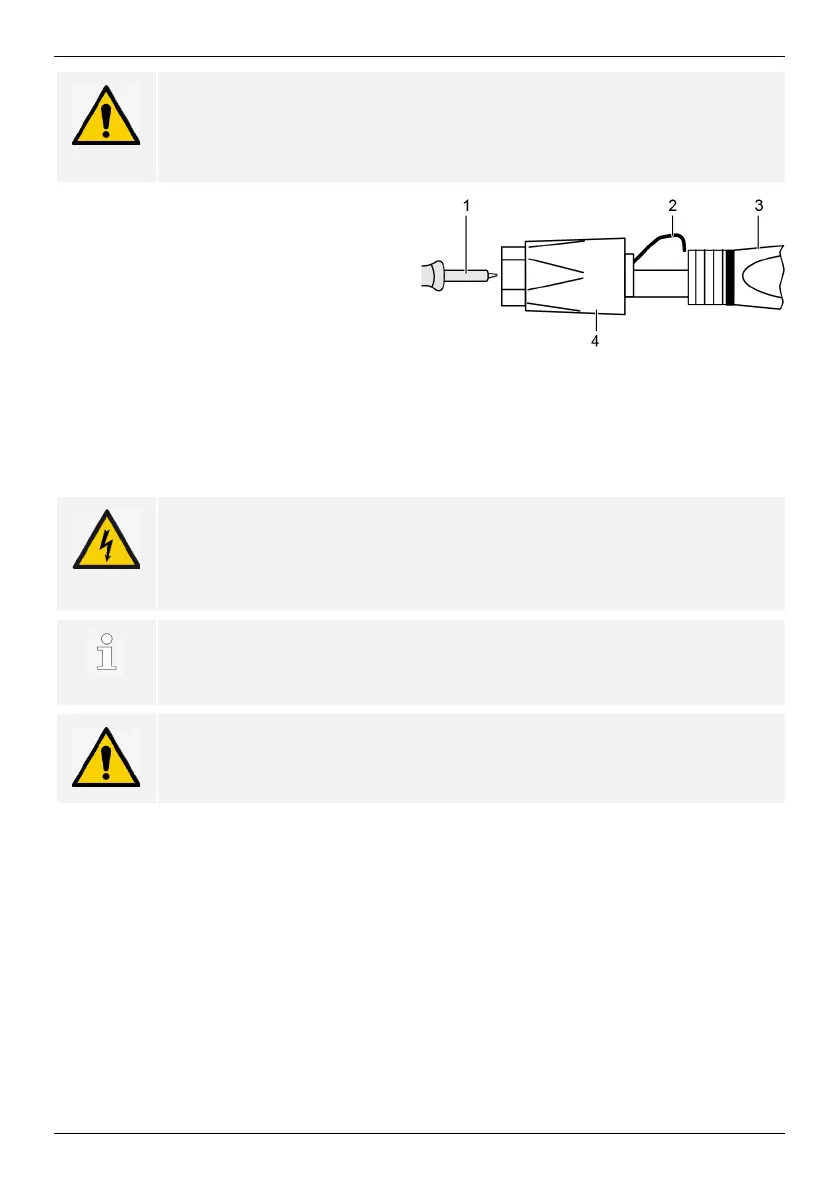
Fitting cable to DC plug
1. Strip 15 mm of cable end of cable (1).
2. Release spring (2) upwards.
3. Introduce stripped cable end into the
DC plug until the cable end becomes
visible underneath the spring (2).
4. Press spring (2) against the stripped
cable end until it engages audibly. Ensure that the cable end is securely fastened.
5. Slide union nut (4) onto inset (3) of the DC plug.
6. Hold inset with a size 16 wrench and tighten the union nut (4) with a wrench, applying
a tightening torque of 2 Nm.
5.5 Connecting inverter and switching AC on
DANGER
Voltage
There is a risk of death by electrocution.
►
Follow the safety instructions and warning notices in chapter 5.1.
DC and AC cables may interfere with data transmission.
►
Keep a distance of 200 mm between the data connecting cables
(RS485/Ethernet) and the DC/AC cables.
NOTE
If sealing caps are missing, moisture may get into the inverter.
►
Seal vacant RJ45 sockets with sealing caps.
1. If required, establish the data connection:
- Connect inverters (mater device and further connected inverters) with data connect-
ing cable(s).
2. Seal vacant RJ45 sockets with sealing caps.
3. Press DC plug firmly into the DC connection in the inverter until it engages audibly.
4. Insert AC plug into the AC connection in the inverter until it engages audibly.
5. Switch on the AC circuit breaker.
6. The display shows the start page of initial commissioning.


 To Next Page