EasyManua.ls Logo

KaVo ELECTROmatic M - User Manual

KaVo ELECTROmatic M
78 pages
Print Icon
To Next Page IconTo Next Page
Loading...
Instructions for use
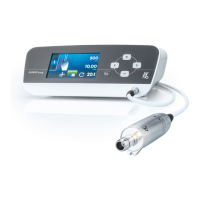
ELECTROmatic M/C and PM/PC

Table of Contents

Questions and Answers

  • P
    Patrick GarciaSep 3, 2025
    Why is the LUX light not on in my KaVo Dental equipment?
    • M
      Matthew GonzalezSep 3, 2025
      The LUX light might not be on because the LED is defective. Replace the LED. Also, the motor hose could be defective, so replace the motor hose. Finally, the device itself could be defective, so replace the control unit. If error persists, notify the service engineer.
  • D
    Dr. Teresa Rush DVMSep 2, 2025
    What to do if my KaVo ELECTROmatic M Dental equipment malfunctions (no display, the LED on the rear of the device flashes)?
    • N
      Nicole BassSep 2, 2025
      If your device malfunctions with no display but the LED on the rear flashes, it could be due to no voltage supply on the control panel or no connection to the control panel. Check and restore the correct connection. Try replacing the connection cord to the control panel or replacing the control panel itself. If error persists, notify the service engineer.
  • A
    Amy HolmesSep 1, 2025
    What to do if my KaVo Dental equipment malfunctions (no display, the LED on the rear of the device does not flash)?
    • H
      Hannah HughesSep 2, 2025
      If your device malfunctions with no display and the LED on the rear doesn't flash, the cause might be no voltage supply. Check and restore the correct voltage supply and connection. Check that the standby LED on the power supply is on. If the standby LED on the power supply is not on, replace the power supply. If error persists, notify the service engineer.
  • L
    Lisa PettyAug 31, 2025
    Why is there no or insufficient spray water in my KaVo Dental equipment?
    • M
      Michael HoldenSep 1, 2025
      There could be several reasons for insufficient spray water. The spray water regulation might be closed, so open it as much as possible. The water line could be soiled; in this case, pull off the handpiece and actuate the spray water in bursts to rinse it. Another cause may be that the filter insert is soiled, so replace the filter on the water inlet. Finally, the spray water on the treatment center or foot control could be closed, so open the spray on the treatment center. If the error persists, unscrew the turbine hose and check if any water flows. If no water flows, notify a service engineer.
  • S
    Sandra ChangAug 30, 2025
    What to do if SAFEdrive icon flashes yellow on my KaVo ELECTROmatic M Dental equipment?
    • N
      Nicole ChristianAug 31, 2025
      If the SAFEdrive icon is flashing yellow, it means the motor is overloaded. If you are using a handpiece from a third-party manufacturer, deactivate SAFEdrive or use a high-speed handpiece from KaVo. If you are using a KaVo high-speed handpiece, relieve the handpiece of its load for at least 2 seconds by lifting it off the tooth. Once the motor reaches maximum speed again and the SAFEdrive icon turns yellow, continue working as usual, making sure to use intermittent mode as the operating mode.
  • M
    Miranda JohnsonAug 29, 2025
    What to do if SAFEdrive icon flashes red on my KaVo ELECTROmatic M Dental equipment?
    • L
      Laura ManningAug 30, 2025
      If the SAFEdrive icon flashes red and the motor stops automatically, it indicates the motor is overloaded. If you're using a third-party handpiece, try deactivating SAFEdrive or switch to a KaVo high-speed handpiece. If you're already using a KaVo high-speed handpiece, take it out of the patient's mouth and inspect the handpiece head for temperature, damage, and ease of operation. If there's no damage or overheating, restart the motor by pressing the foot control again. Service the handpiece. However, if you notice damage or overheating, replace the handpiece or have it repaired.
  • R
    rhodescarlaAug 29, 2025
    What does Event E2 mean on KaVo Medical Equipment?
    • J
      Jason RiveraAug 29, 2025
      Event E2 on your KaVo Medical Equipment indicates that the foot control is being pressed during start-up. Avoid pressing the foot control when switching the unit on.
  • F
    freywhitneyAug 28, 2025
    What does Event E3 mean on KaVo Medical Equipment?
    • N
      Nancy BaileyAug 28, 2025
      Event E3 on your KaVo Medical Equipment means that no motor is connected. Connect the motor.
  • S
    Shelby SullivanAug 27, 2025
    What does Event E4 mean on KaVo Medical Equipment?
    • E
      Emily WilsonAug 27, 2025
      Event E4 on your KaVo Medical Equipment indicates that the motor is blocked. To resolve this, relieve the motor of its load, then stop and start it using the foot control.
  • D
    Daniel CurryAug 26, 2025
    What does Event E5 mean on KaVo Medical Equipment?
    • D
      dianahurstAug 27, 2025
      Event E5 on your KaVo Medical Equipment indicates automatic light and motor shut-off during continuous operation of the motor. Comply with the defined operating mode.

Summary

User Instructions and Safety Guidelines

User Guide and Requirements

Read instructions before first startup to avoid misuse and prevent damage.

Safety Precautions for Operation

Infection Hazard Prevention

Measures to prevent infection risks from contaminated medical devices.

Explosion Hazard Area Warnings

Precautions regarding the use of the product in areas with explosion risks.

Technical Condition Requirements

Ensuring product's technical condition and performing user checks before operation.

Protection Against Liquid Ingress

Preventing liquid ingress to avoid electric shock and injury.

Accessory and Equipment Compatibility

Guidelines for using approved accessories and combining with other equipment safely.

Personnel Qualification Requirements

User training and qualification requirements for operating the device.

Product Description and Specifications

Intended Use of ELECTROmatic

Defines the purpose and application of the ELECTROmatic in dental treatments.

Installation Procedures

Startup and Initial Configuration

Foot Control Calibration

Procedure for calibrating the foot control for optimal operation.

Device Settings Adjustment

Instructions on how to adjust various device settings like speed, LUX, and key tones.

Device Operation and Functions

Starting the Motor

Steps to start the motor and reach the set maximum speed.

Regulating Spray Water

Instructions on how to adjust the amount of spray water for cooling.

Changing Speed Settings

How to change and save speed settings using the control panel or foot control.

SAFEdrive Protection Function

Explanation of SAFEdrive for preventing overheating and burn injuries.

Enabling;Disabling SAFEdrive

Instructions on how to enable or disable the SAFEdrive function.

Using SAFEdrive Function Safely

Guidance on using SAFEdrive and handling alerts or errors.

Reprocessing Steps (DIN EN ISO 17664)

Cleaning Procedures

Procedures for cleaning the unit, including preparation and manual methods.

Disinfection Guidelines

Guidelines and recommended products for disinfecting the unit and spray water.

Servicing and Maintenance

Troubleshooting Common Issues

No or Insufficient Spray Water

Troubleshooting steps for issues with spray water delivery or regulation.

Device Malfunctions: No Display;LED Off

Diagnosing issues when the device display is off or LED is not flashing.

Device Malfunctions: Display;LED Flashes

Troubleshooting device issues when the control panel LED flashes.

Maximum Speed Not Reached

Resolving problems where the maximum motor speed is not achieved.

Sluggish Motor or Handpiece

Troubleshooting steps for a sluggish motor or handpiece performance.

LUX Light Status Issues

Resolving problems with the LUX light being red or not turning on.

SAFEdrive Icon Yellow Alert

Actions to take when the SAFEdrive icon flashes yellow, indicating motor overload.

SAFEdrive Icon Red Error

Troubleshooting SAFEdrive error status where the motor stops automatically.

Interpreting Event Codes (E2-E14)

Interpreting and resolving specific event error codes displayed by the unit.

Internal System Error Resolution

Steps to resolve general internal system errors.

KaVo ELECTROmatic M Specifications

General IconGeneral
Motor TypeBrushless
Torque3.5 Ncm
AutoclavableYes
TypeElectric motor
SpeedUp to 40, 000 rpm
ControlControl unit with display
ConnectionISO 3964
MaterialStainless steel
CompatibilityCompatible with most dental units with electric motor connection

Related product manuals